Powerful Features for SEO Success

Everything you need to understand, optimize, and grow your organic search traffic - from tracking average position and CTR optimization to finding striking distance keywords and fixing indexing issues.

Extended Search Analytics

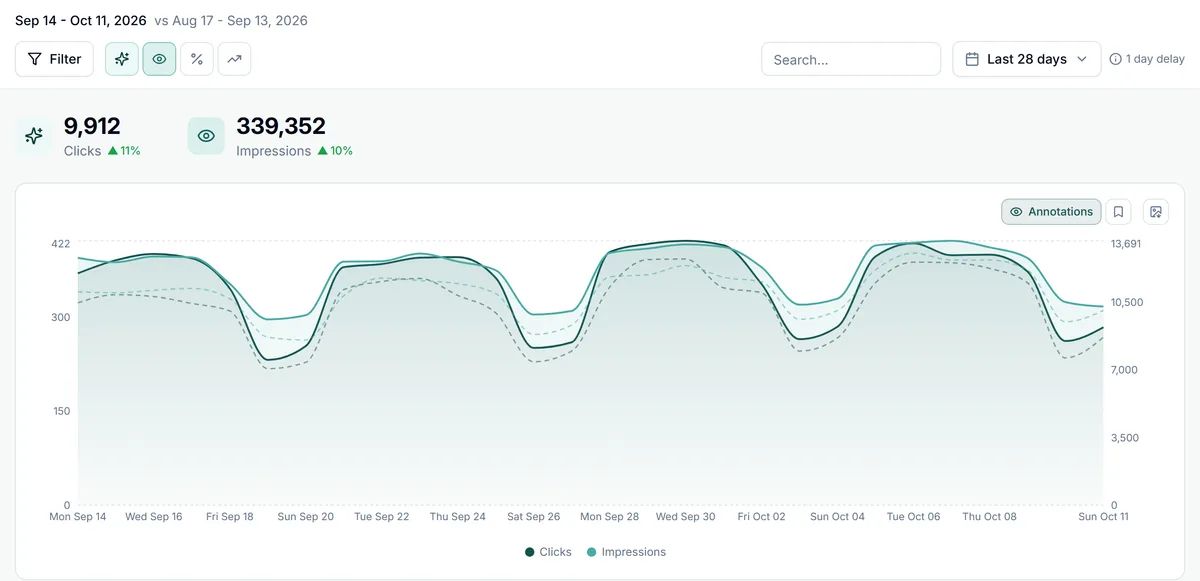
Go beyond basic GSC data with powerful filtering, comparisons, and trend analysis across queries, pages, countries, and devices. Understand exactly how clicks vs impressions move over time and track average position changes for any segment.

  • Compare any time periods with percentage changes - clicks, impressions, CTR, and average position
  • Filter by queries, pages, countries, and devices
  • Visualize trends with interactive charts
  • Multi-site dashboard for agencies
The GSC Wizard dashboard for example.com over the last 28 days: 9,912 clicks and 339,352 impressions, each up on the previous period, above a daily chart of both lines with the previous period dashed
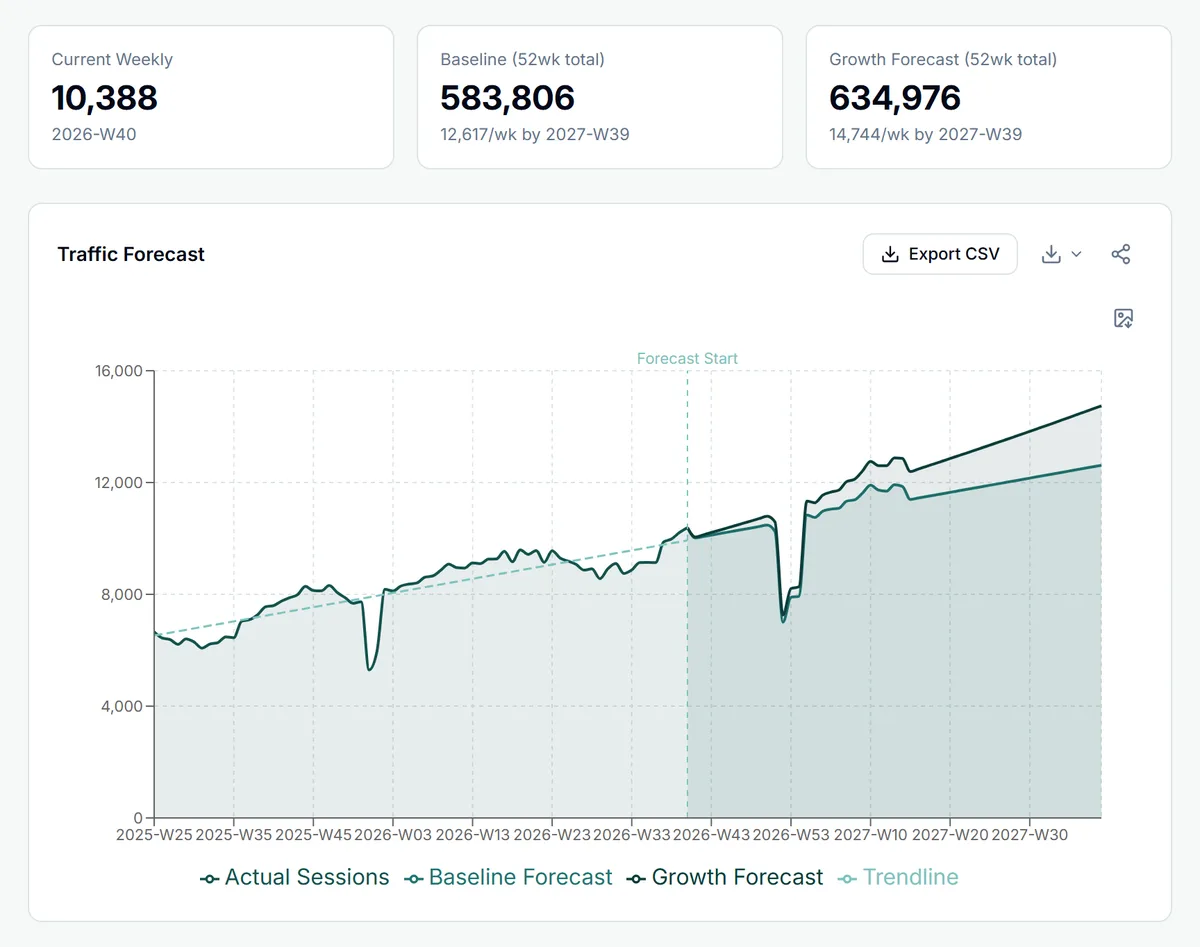
The SEO Traffic Forecast in GSC Wizard: 16 months of weekly clicks with a trendline, a Forecast Start marker, and a 52-week baseline and growth forecast that repeats the holiday dip

Traffic Forecasting

Predict future traffic with machine learning. Plan your content strategy with confidence using seasonal trends and growth modeling.

  • ML-powered traffic predictions
  • Seasonal trend detection
  • Revenue impact simulation
Try interactive demo

Topic Clusters

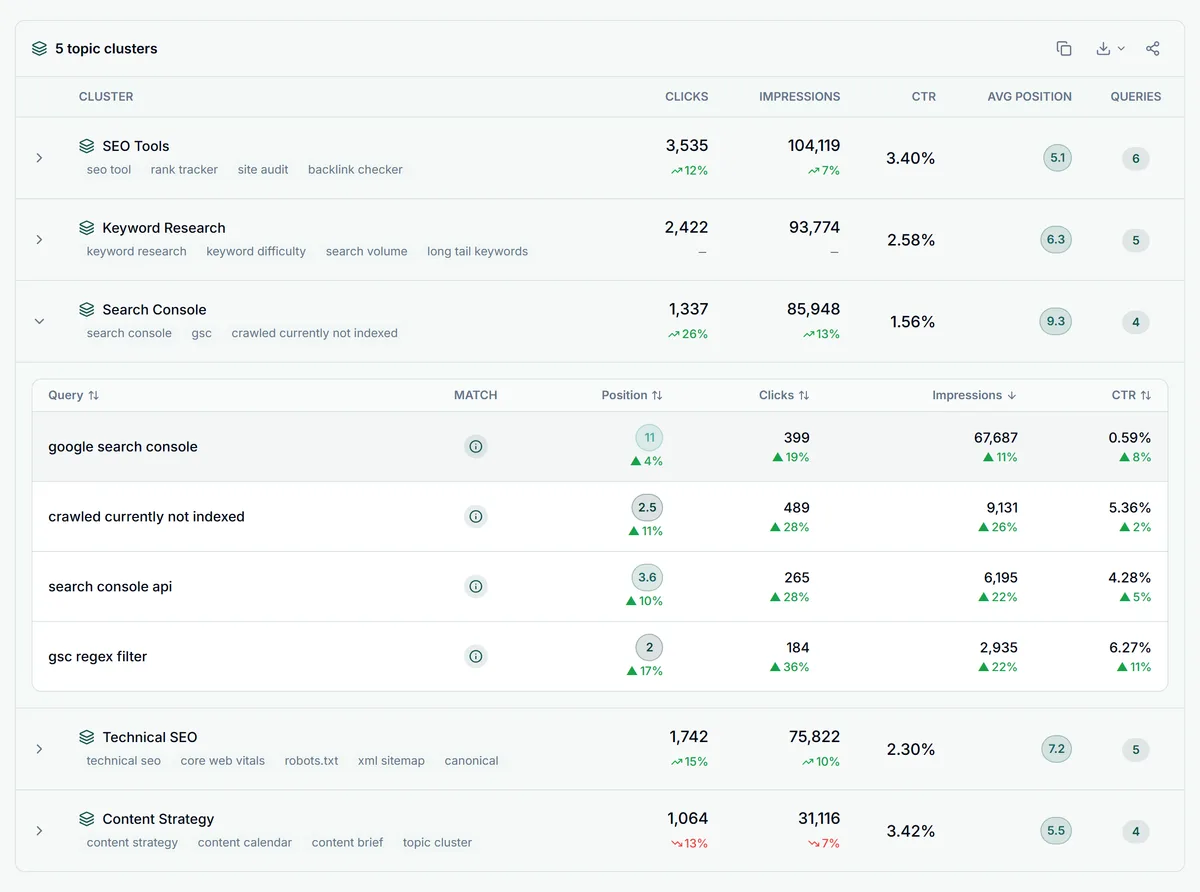
The fastest way to do keyword research with Google Search Console: organize your existing queries into logical topic clusters and see at a glance which themes drive clicks, which have high impressions but low CTR, and where your average position is slipping.

  • Group keywords by topic clusters
  • Track aggregate clicks, impressions, CTR, and average position per cluster
  • Drill down into individual queries
Try interactive demo
The Topic Clusters report in GSC Wizard: five keyword clusters with clicks, impressions, CTR, average position and change on the previous period, with one cluster expanded to show its queries

SEO Reports & Opportunities

Every report surfaces specific, actionable opportunities. Try each one interactively.

Content Decay Map

Detect content decay - pages losing clicks, impressions, or average position over time. Heatmap view with adjustable threshold sensitivity lets you spot declining content before it becomes a real traffic problem.

Try demo

Keyword Cannibalization

Identify keyword cannibalization - queries where multiple pages compete and split clicks between them. Expand rows to see competing URLs with average position badges, so you know which page to consolidate or strengthen.

Try demo

CTR Benchmark & Optimization

Pinpoint CTR optimization opportunities by comparing your actual click-through rate against expected benchmarks for each average position. Bar chart and query table show exactly which titles and descriptions are underperforming.

Try demo

Striking Distance Keywords

Find your striking distance keywords - queries already ranking in positions 4–20 that are one optimization away from page-one clicks. Estimated click gains and one-click position-range filters make prioritization instant.

Try demo

Topic Clusters

Group keywords into clusters and track aggregate performance with trend indicators.

Try demo

Traffic Forecast

ML-powered predictions with configurable growth rates, conversion rates, and revenue modeling.

Try demo

On-Page SEO

Check if your top queries appear in page titles, meta descriptions, and H1 headings with actionable suggestions.

Try demo

Experimental Analytics

CTR optimization curve analysis, opportunity scoring, cannibalization entropy, time-series decomposition, and change point detection. Includes Core Web Vitals correlation overlays to connect page experience signals with ranking changes.

Try demo

Internationalization

Track hreflang performance, detect country-level cannibalization, and compare international properties.

Try demo

Sampling Impact

Measure how much GSC data is hidden by sampling. See exactly how many clicks and queries are missing.

Try demo

SEO Experimentation

Run A/B tests on SEO changes. Compare control vs treatment groups with statistical significance testing.

Try demo

URL Clustering

Group URLs by path structure to analyze performance at directory level. Visualize the long-tail distribution.

Try demo

New to Google Search Console?

Our FAQ explains key GSC concepts like striking distance keywords, clicks vs impressions, Core Web Vitals, indexing issues, and more - so you can get the most out of every report.

Learn more in our FAQ
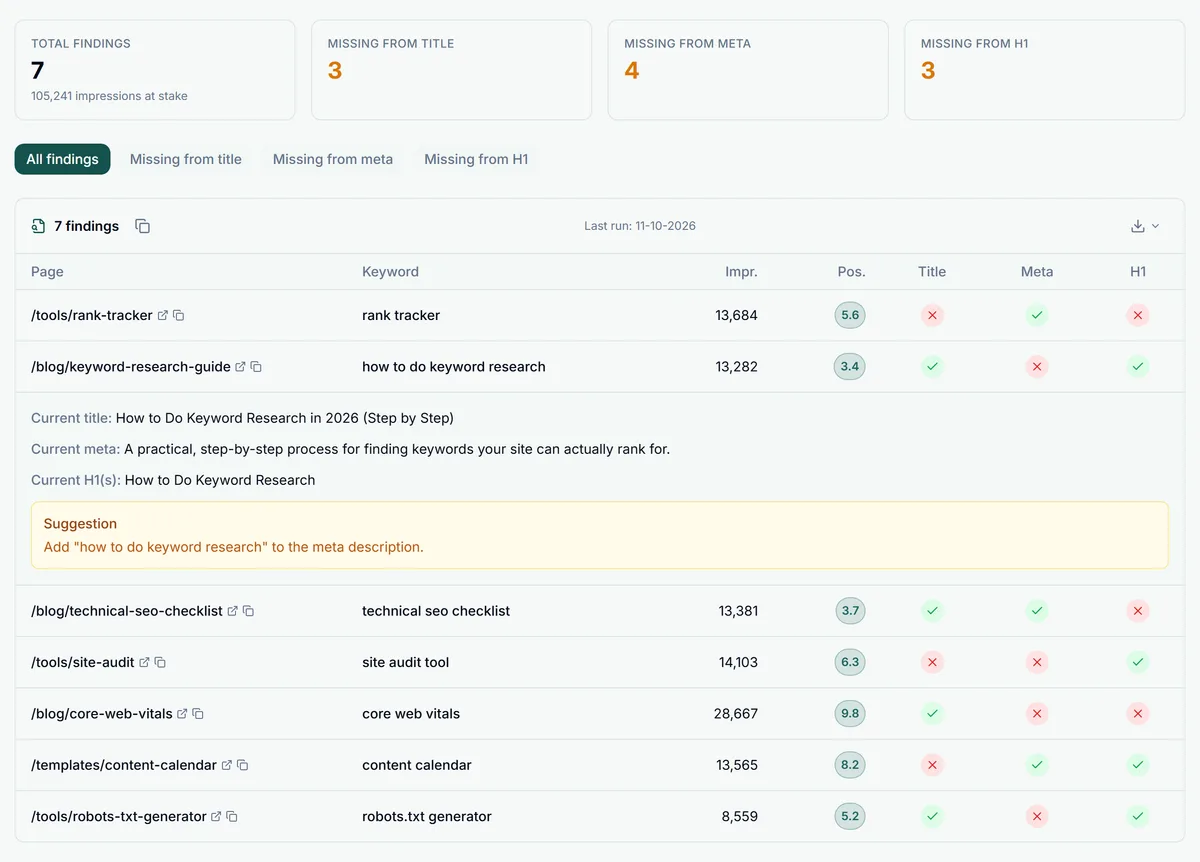
The On-Page SEO Check in GSC Wizard: finding totals and a table showing whether the top keyword of each page appears in its title, meta description and H1, with one finding expanded to show a rewrite suggestion

On-Page SEO Analysis

Automatically check if your top-performing queries appear in page titles, meta descriptions, and H1 headings. Get actionable suggestions to improve on-page optimization and lift CTR without leaving GSC data behind. Works alongside the URL Inspection tool workflow to close the loop between what Google sees and what you've written.

  • Crawls your pages for title, meta, and H1 content
  • Matches top queries to on-page elements
  • Generates specific optimization suggestions
Try interactive demo

Internationalization Report

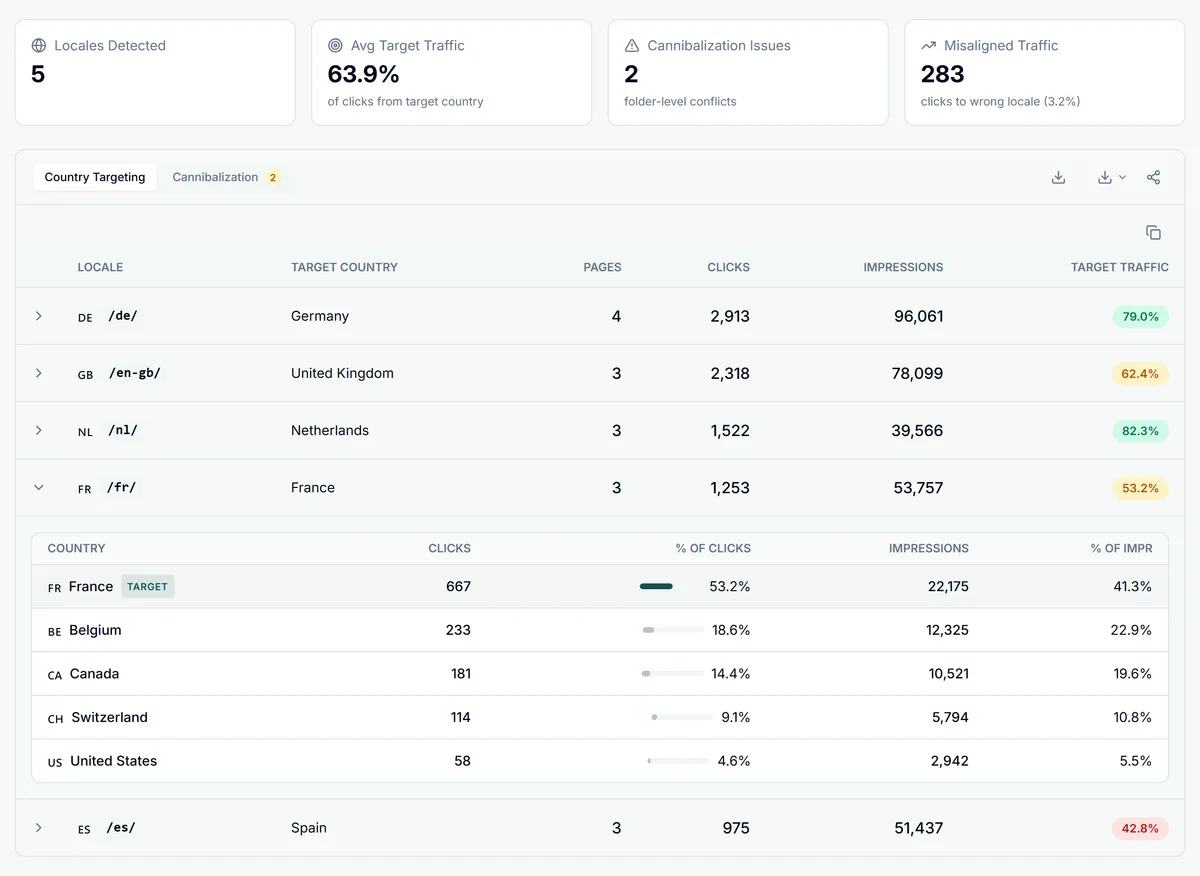
Track hreflang performance, detect when the wrong locale ranks in a country, and compare international properties side by side.

  • Auto-detect locale URL patterns (/de/, /nl/, /en-gb/)
  • Country-level traffic targeting analysis
  • Cross-property comparison for country domains
Try interactive demo
The Internationalization report in GSC Wizard: locales detected, average target-country traffic, cannibalization issues and misaligned clicks, above a country targeting table with the French folder split by country
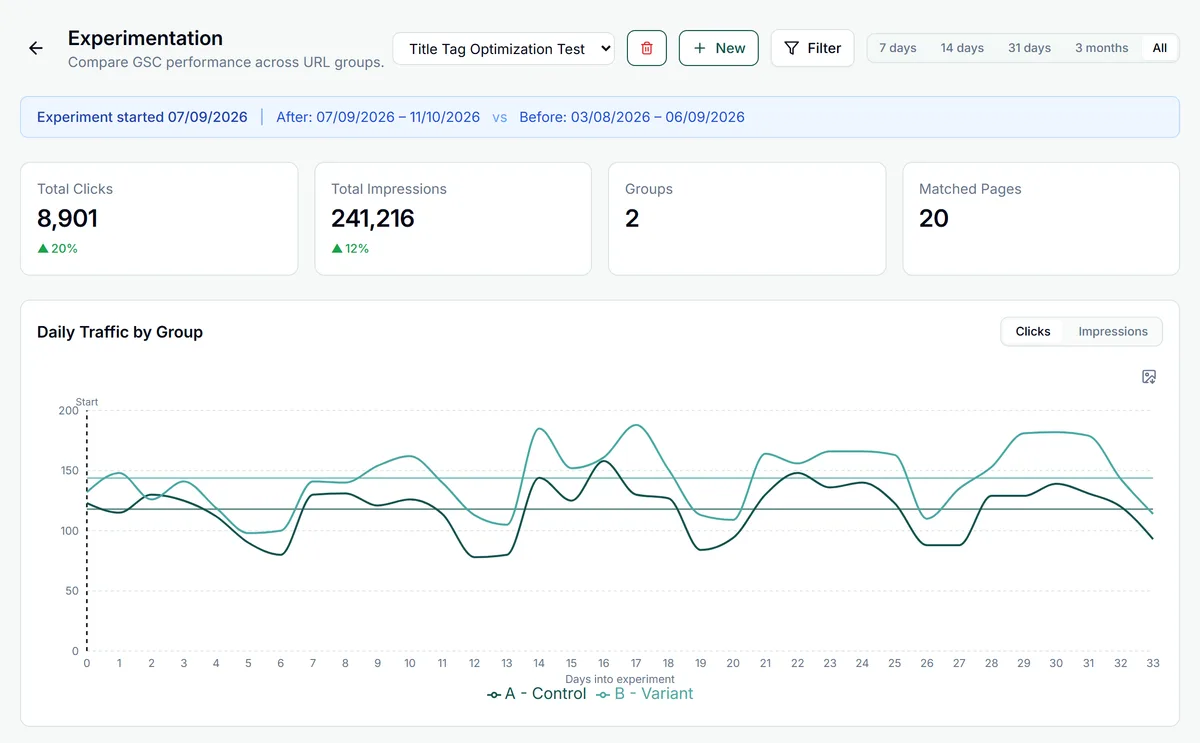
An SEO A/B test in GSC Wizard: the Title Tag Optimization Test with its before and after windows, total clicks up 20%, and daily clicks for a control group and a variant that pulls ahead after launch

SEO A/B Testing

Run controlled experiments on SEO changes. Define control and treatment groups, then measure the impact on clicks, average position, and CTR with statistical significance testing. Ideal for validating title tag rewrites, Core Web Vitals improvements, and content refreshes.

  • Upload or auto-generate page groups
  • Track clicks, impressions, CTR, and average position per group
  • Statistical significance with p-values and effect sizes
Try interactive demo

Multi-Search Engine Support

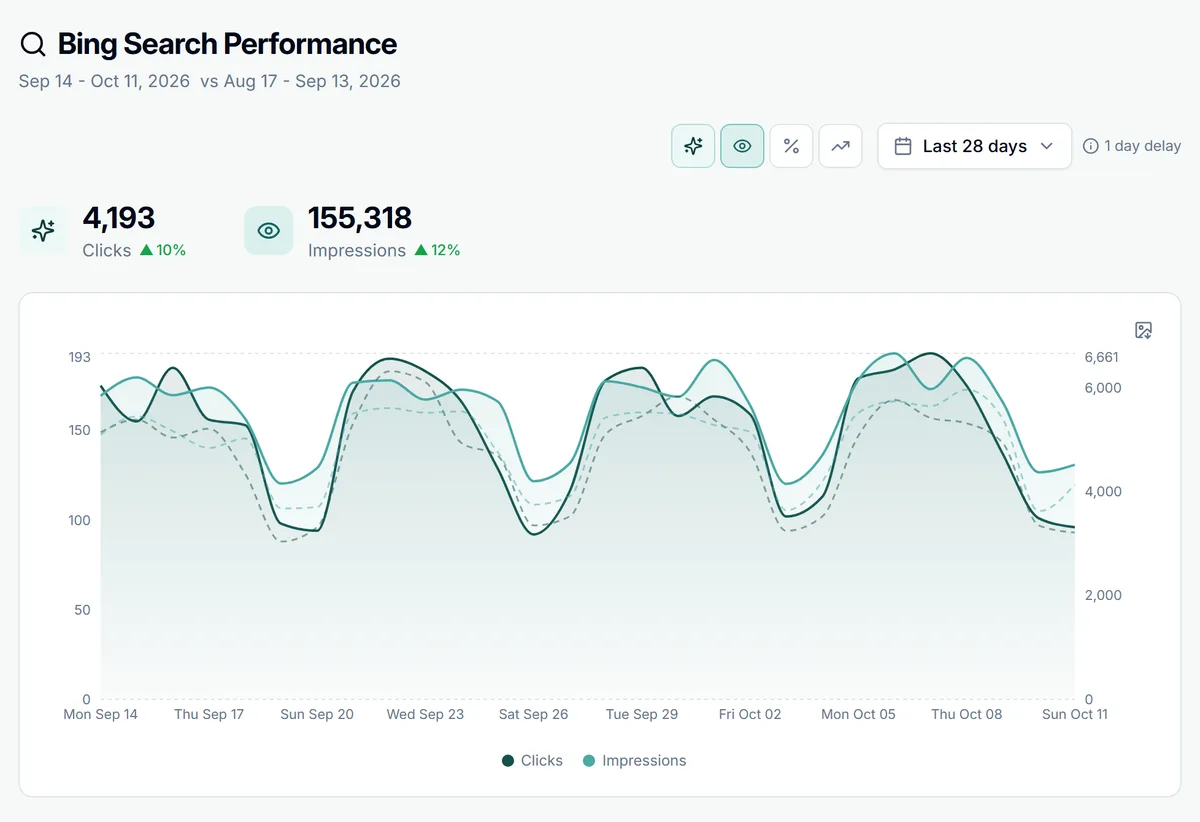
See your performance across Google, Bing, and Yandex in one unified view. Connect Bing Webmaster Tools and Yandex Webmaster alongside Google Search Console to get the full picture of your organic search presence. Yandex Webmaster support is available on every plan. Your AI assistant can read the Bing and Yandex data too, through the Bing Webmaster Tools MCP and the Yandex Webmaster MCP.

  • Google Search Console, Bing Webmaster Tools & Yandex Webmaster in one dashboard
  • Compare rankings and traffic across search engines side by side
  • Unified metrics with per-engine breakdowns
  • Spot opportunities where you rank on one engine but not others
The Bing Search Performance overview in GSC Wizard: 28 days of Bing clicks and impressions with the change on the previous period, and a daily chart of both periods

Google Analytics 4, Built In

Couple a Google Analytics 4 property to each site and see traffic, engagement, and conversions right next to your Search Console clicks. No more jumping between tabs to connect what people search for with what they actually do on your pages.

  • Sessions, active users, engagement rate, and key events with period-over-period comparisons
  • Breakdowns by channel, source / medium, landing page, country, and device
  • Ecommerce reporting: revenue, transactions, average order value, and top products
  • A dedicated AI / LLM traffic view for visits from ChatGPT, Perplexity, Gemini, and more
  • Export any GA4 table to CSV or a shareable HTML report
Explore GA4 reports

Read-only connection via Google OAuth. We never modify your Analytics data. GSC vs Google Analytics →

Google Analytics
Last 28 days
Sessions
18,430
+12.4%
Active Users
12,840
+9.1%
Engagement
64.2%
+3.0%
Key Events
1,204
+18.7%
Organic Search
9,210
Direct
4,120
AI / LLM referralsNew
860

Google Merchant Center for Shops

Link a Google Merchant Center account to a property and see how your products do in free listings, next to the merchant listings Search Console reports for web Search. The two count different surfaces, so they are shown side by side, never added together.

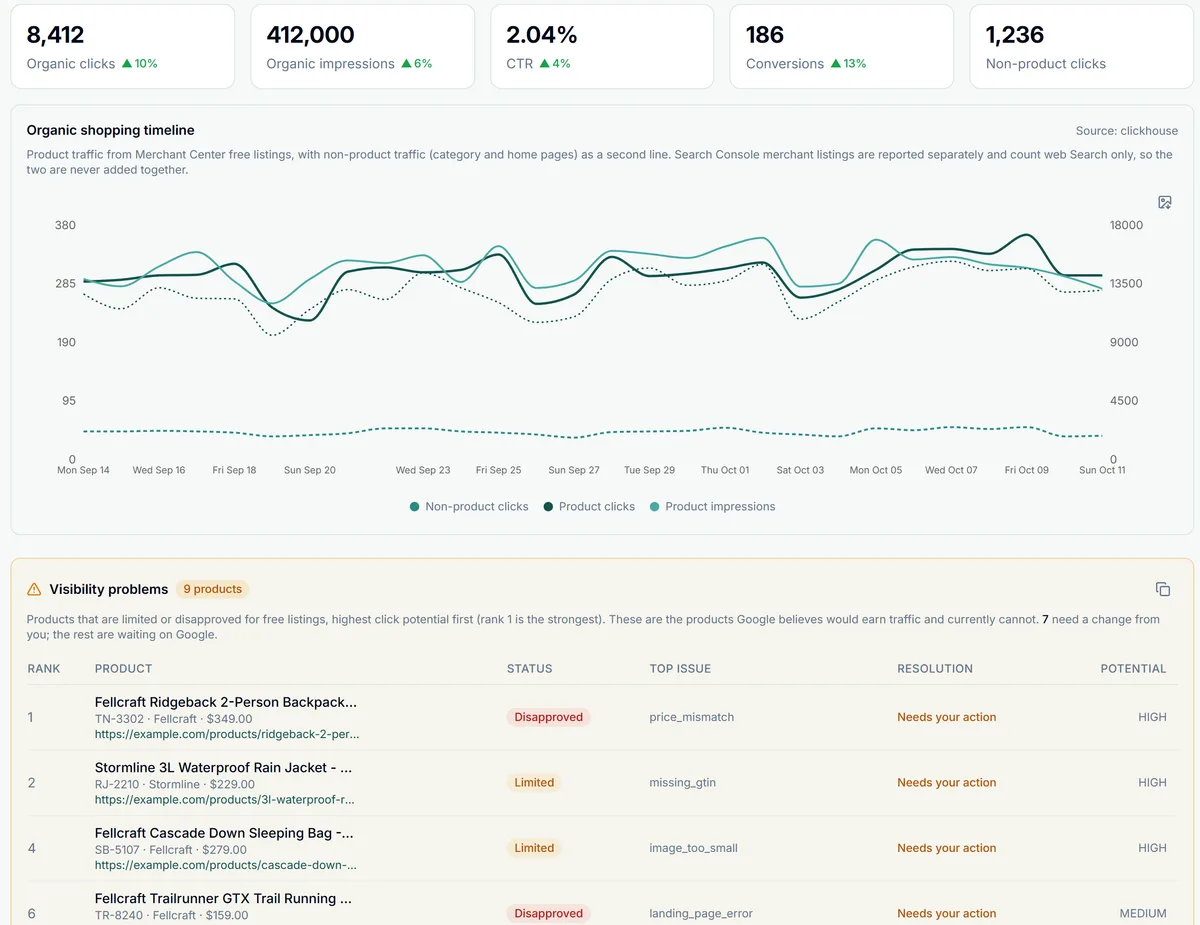
  • Organic Shopping: free listing clicks, impressions and conversions across the Shopping tab, Search, Images, Lens, YouTube and Maps, per product, brand or category
  • Visibility problems: every limited or disapproved product, ranked by Google's own click-potential estimate, with the issue to fix
  • Market insights: competitor visibility per country and category, price benchmarks with suggested prices, and best sellers you do not stock
  • Feed Audit: 21 checks on titles, descriptions, images, identifiers and categories, plus a crawl that compares each product page with its feed entry, scored 0-100 and rerun monthly
  • Title Hygiene: title and description lengths, duplicate titles, repeated words and the most frequent words across the whole catalog
  • GSC Merchant Listings: product results in web Search per search appearance, the products behind them and the queries that find them, no Merchant Center needed
  • Alerts to Slack, Microsoft Teams or a webhook when free listing clicks drop, the feed score falls or a product gets disapproved, and the same data in ChatGPT and Claude through the Merchant Center MCP

Google offers no read-only Merchant Center permission, so its consent screen asks to manage your product listings. GSC Wizard only reads your reports and catalog; it never edits products or your feed.

The Organic Shopping report in GSC Wizard: free listing clicks, impressions, CTR, conversions and non-product clicks, the daily timeline, and the products held back from free listings ranked by click potential
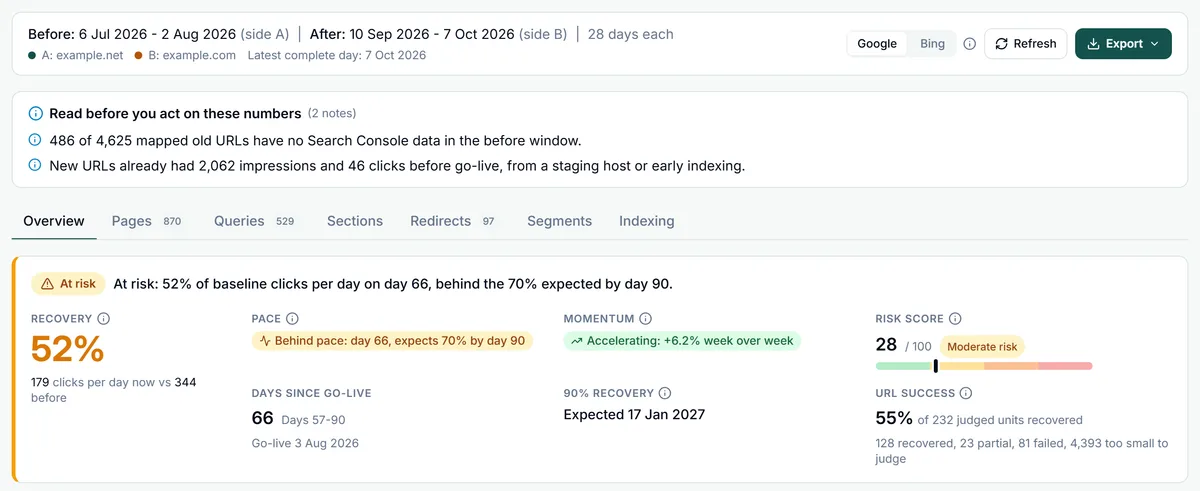
Migration Compare in GSC Wizard on day 66 of a domain move from example.net to example.com: the Migration health banner marked At risk with 52% recovery, behind pace, momentum accelerating, risk score 28 and 55% URL success, with the Redirects tab showing 97 problems

Migration Compare

Moving to a new domain, switching to https or restructuring your URLs? Set the go-live date and Migration Compare puts the old site before launch next to the new site after it, whether the move is between two Search Console properties or inside one (by URL prefix or regex).

  • Before and after go-live: the latest days or the first days after launch against the same number of days before it, or everything since go-live against a period you pick, with an optional baseline from the same weeks last year
  • Recovery and risk: clicks per day against the baseline, judged against the pace expected for the migration's age, a projected recovery curve with a likely range, and a 0-100 risk score with recommendations
  • Redirect verification: upload your old-to-new URL mapping and GSC Wizard checks each redirect for chains, loops, temporary redirects, wrong or broken targets and noindex or canonical problems on the new page, or import a Screaming Frog export instead
  • Where traffic went: pages, queries, site sections and URL templates, country and device splits, and Google's own view of old and new URLs from URL Inspection
  • Save a migration with alerts on and its redirects are re-checked automatically, with new redirect problems sent to Slack, Microsoft Teams or a webhook; export pages and queries as CSV, or the whole analysis as an HTML report you can download or share
Read the Migration Compare docs

Redirects are checked only for old URLs on sites in your account, and the checker respects robots.txt.

And much more...

Search Console in Slack

Scheduled daily, weekly and monthly reports per property, plus event-driven SEO alerts, posted to the channels you choose. Acknowledge or snooze without leaving Slack.

Slack integration

Search Console in Microsoft Teams

The same SEO alerts as native Adaptive Cards in a Teams channel: indexing, Core Web Vitals, traffic drops and algorithm updates. No app to install and no admin approval.

Microsoft Teams integration

Google Analytics 4

Connect a GA4 property to view sessions, engagement, key events, and ecommerce revenue next to your Search Console data, including AI / LLM referral traffic.

Learn more

Indexing Monitor

Track indexing issues including pages stuck as "discovered - currently not indexed" or "crawled - currently not indexed". Monitor sitemap errors and coverage status changes over time. Learn about indexing issues.

Learn more

Core Web Vitals

Track Core Web Vitals (LCP, INP, CLS) plus FCP and TTFB with real-user field data from the Chrome UX Report. See ~9 months of trends, break down by device, follow Chrome's experimental soft-navigation and ad metrics, and get weekly alerts by email, Slack or Teams when a metric regresses. Learn about Core Web Vitals.

Learn more

CSV Export

Export any data table to CSV for further analysis or reporting.

Dark Mode

Full dark mode support for comfortable late-night SEO sessions.

Privacy Mode

Blur sensitive data for screenshots and presentations with one click.

Country Breakdown

Understand where your traffic comes from geographically with country-level analytics.

Device Analytics

Compare performance across desktop, mobile, and tablet with device-specific insights.

Sampling Impact

Measure how much data Google hides due to sampling. See hidden clicks and queries at query and page level.

URL Clustering

Group URLs by path structure and analyze performance at the directory level with long-tail distribution charts.

Content Groups

Organize pages into custom content groups and track aggregate performance with AI-powered categorization.

Experimental Analytics

CTR optimization curves, opportunity scoring, entropy analysis, time-series decomposition, and change point detection. Correlate with Core Web Vitals signals.

Google Search Console Guides

Dive deeper into the GSC features that power these reports.

Working from a phone? There is no official Google app, so see how to add Search Console to your iPhone or Android home screen, or compare the best Search Console mobile apps.

Ready to try GSC Wizard?

Start turning your Search Console data into growth today. No credit card needed.

Try for free (no creditcard needed)

Prefer to work in ChatGPT? Install the GSC Wizard app for ChatGPT.

Built by Jan-Willem Bobbink

A digital marketer, developer and above all, a SEO / GEO enthusiast from the Netherlands. I built GSC Wizard to make Google Search Console insights faster, clearer and more actionable for everyone.

Search Console tips in your inbox

Practical GSC and GA4 workflows, product updates and SEO experiments. No spam, unsubscribe anytime.