Part of the GSC Wizard MCP

Bing Webmaster Tools MCP

Ask your Bing Webmaster Tools data in plain language and get real numbers, with Bing's quirks explained. The GSC Wizard MCP gives Claude, ChatGPT and any MCP-capable assistant your live Bing clicks, impressions, queries, landing pages, crawl health, inbound links and keyword demand, on the same connector as your Google Search Console data.

Same connector endpoint: mcp.gscwizard.com

One connector, three search engines

Google + Bing + Yandex

The Bing tools live on the same MCP as the Search Console and Yandex Webmaster tools. Your assistant can ask how a property does in Google and in Bing in one conversation, and Bing's index also feeds Yahoo, DuckDuckGo and Ecosia, so the Bing side is bigger than the Bing logo suggests.

The Bing tools read Bing Webmaster Tools live, through your own Bing API key. The model reads the numbers, it does not invent them.

Which Bing data the MCP can read

Thirteen read tools cover Bing Webmaster Tools, and one write tool tells Bing when pages change. Ask in plain language; the assistant picks the right tool.

Sites & verification

The sites in your Bing Webmaster account, with whether Bing has verified each one. Bing only serves data for a verified site, so the assistant knows which properties have Bing data before it asks.

list_bing_sites

Daily traffic

Bing clicks and impressions per day for a property, up to about 16 months back, with totals for the window you choose. Rows run oldest first, so a trend reads as a trend.

get_bing_traffic_stats

Top queries & landing pages

The queries and the pages Bing reports for the window, with clicks, impressions, CTR (0 to 100) and impression-weighted position, ranked by clicks. Bing dates these rows by week, so a window selects whole weeks.

get_bing_query_stats get_bing_page_stats

Query & page pairs

Which query drives which page: pairs assembled across the top pages, the queries behind one landing page, and the week-by-week trend for one exact query and page pair, the only place Bing reports a true pair-level position.

get_bing_query_page_stats get_bing_page_queries get_bing_query_page_trend

Crawl stats & crawl issues

How many pages Bing crawled and indexed each day, with the response codes it got, plus the URLs where Bing hit 4xx or 5xx errors, redirects, robots blocks or malware, with the issue codes decoded into words.

get_bing_crawl_stats get_bing_crawl_issues

Inbound links

The number of inbound links Bing has recorded for each of your URLs, most linked first. Google's Search Console API has no links endpoint at all, so this is the one first-party backlink count an assistant can read.

get_bing_link_counts

Keyword demand

Bing's weekly impression volume for any keyword, exact and broad match, per country and language. Marketplace demand rather than your own rankings, so it takes no property, and it reaches back about six months.

get_bing_keyword_stats

Sitemaps & submission quota

The sitemaps and feeds you submitted to Bing, with their status, type, dates and URL counts decoded, and the daily and monthly URL submission quota you have left on the property.

get_bing_feeds get_bing_url_submission_quota

Push changes with IndexNow

Tell Bing (and Yandex, Seznam and Naver) that pages changed, up to 100 URLs per call. A write tool, so it needs a read & write key and an IndexNow key on the property. A 202 means accepted, not indexed. See the IndexNow MCP.

submit_indexnow_urls

The same assistant can call the Search Console and Yandex Webmaster tools for the property, so it can set the Bing side next to the other two. It compares trends and query lists; it never averages a Bing position with a Google one.

Honest numbers

Bing's quirks travel with the data

The Bing Webmaster API is generous in what it covers and odd in how it dates and samples things. Those are not gaps GSC Wizard can close, so the tools explain them in their descriptions and in the response itself: a window that lands between Bing's weekly dates comes back with an emptyBecause note, every list says what it is sorted by, and totalRows sits next to the rows that made the cut. The assistant passes that on instead of reading a sample as a total.

  • Weekly rows. Query, page and pair rows carry one date per week, so a window selects whole weeks, and a window with no week date in it is empty even on a site with traffic every day.
  • Top rows only. Bing reports its top queries and pages, so the query rows never add up to the daily traffic totals. The totals are the truth; the rows are the detail.
  • Pairs are assembled. Bing has no endpoint that returns query and page together, so the pairs tool asks Bing one top page at a time and says truncated when it stopped early.
  • Position is impression-weighted. One average per query or page, Bing's way, not Google's. The trend tool for one exact pair is the only true pair-level position.
  • Sixteen months, then six. Traffic, query, page and pair history reach back about 16 months; crawl stats and keyword demand about six. A day Bing did not report is missing, not zero.
  • Verified sites only. Bing serves data for a site it has verified in your Bing account. An unverified one answers with a not-verified error that names the fix, and a Search Console domain property is mapped to its Bing site for you.
  • Exact URLs. The per-page tools need the page exactly as Bing lists it, scheme, www and trailing slash included, so the assistant takes it from the page list rather than typing it.
get_bing_query_stats · response, trimmed example data
{
  "siteUrl": "sc-domain:example.com",
  "bingSiteUrl": "https://example.com/",
  "range": { "startDate": "2026-09-05", "endDate": "2026-10-02" },
  "rowCount": 100,
  "totalRows": 1864,
  "queries": [
    {
      "query": "running shoes for flat feet",
      "clicks": 412,
      "impressions": 9860,
      "ctr": 4.18,
      "position": 3.6
    },
    ...
  ],
  "sortedBy": "clicks",
  "sortOrder": "desc",
  "thenBy": "impressions",
  "dataSource": "bing"
}

The default is the top 100 queries; totalRows tells the assistant how many distinct queries Bing reported before that cut, so it says "top 100 of 1,864" rather than mistaking the cap for the total.

Only in Bing

Links, crawl health and keyword demand, through an API

Google shows crawl stats and links in the Search Console interface but keeps them out of its API, and it publishes no keyword volume at all. Bing exposes all three. Through the MCP, your assistant can read how many inbound links Bing counts to each URL, which URLs its crawler could not fetch and why, how many pages it crawled and indexed each day, and how often any keyword is searched on Bing, exact or broad match, week by week.

For Google-side indexing questions, the Search Console tools run URL Inspection in bulk; see the Google Search Console MCP.
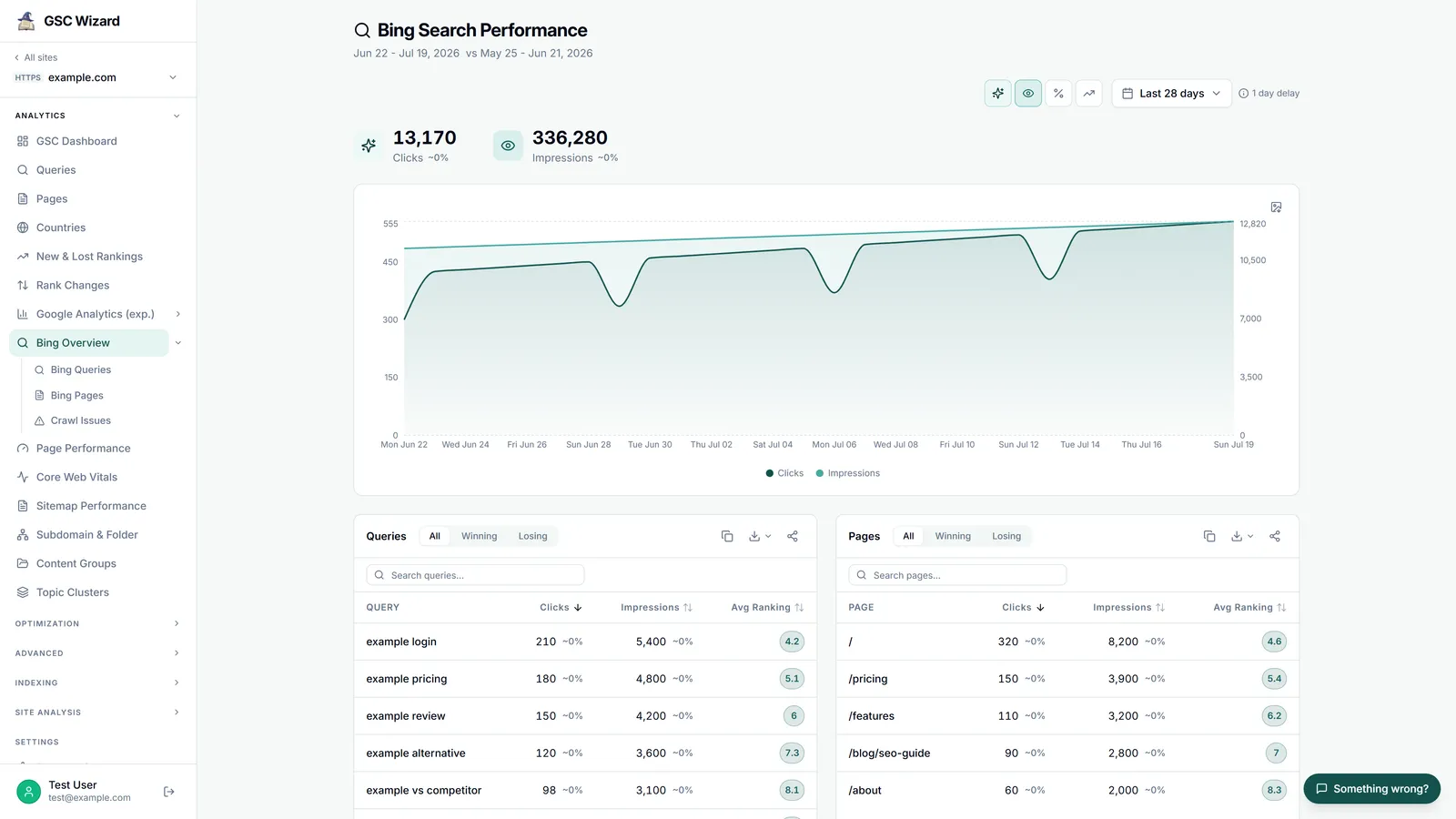
The Bing Webmaster Tools overview in GSC Wizard with crawl health, submission quota and a traffic summary for example.com
The Bing Overview report in GSC Wizard, read from the same Bing API key (example data).

A few things you can ask it

Once your Bing key is saved, type these into Claude, ChatGPT or any MCP client in your own words. It reads from the same properties you already have in GSC Wizard.

"How much traffic does Bing send my site compared with Google over the last three months? Same property, both trends."

"Which pages get clicks from Bing but rank past position 20 in Google Search Console for the same queries?"

"Which Bing queries led to my pricing page in the last eight weeks, and how did the top one trend week by week?"

"Is Bing's crawler hitting errors on my site? List the URLs with 5xx responses or robots blocks, most linked first."

"Which of my URLs have the most inbound links according to Bing, and do any of them return errors to its crawler?"

"How many Bing impressions does 'trail running shoes' get per week in the US, and how does that compare with 'hiking shoes'?"

Setup

Connect Bing in a few minutes

1

Generate an API key in Bing Webmaster Tools

Sign in to Bing Webmaster Tools, open Settings, then API access, and generate a key. Bing only reports on sites it has verified in your account; if your sites are already verified in Search Console, Bing can import them in one step.

2

Save the key in GSC Wizard

Open Account settings, find the Google account the property belongs to, paste the key under Bing Webmaster Tools, test it and save. The key is stored encrypted and set per Google account, so an agency keeps each client's Bing key with that client's Search Console connection. The four Bing reports in the app light up at the same time.

3

Ask your first Bing question

Add mcp.gscwizard.com as a connector in your AI assistant (or paste an API key). If no Bing key is saved for the property yet, the tools answer with a short notConfigured note and the fix instead of an error.

Works with Claude, ChatGPT, Gemini, Grok and any MCP-capable client; see the configs for every MCP client. On a property shared with you, the Bing tools read with the owner's key, so collaborators see the same Bing data the owner does.

Frequently asked questions

What is a Bing Webmaster Tools MCP?

An MCP (Model Context Protocol) server is a standard connector that lets an AI assistant such as Claude or ChatGPT read live data and call tools. A Bing Webmaster Tools MCP exposes your Bing Webmaster account to the assistant, so it can pull your real Bing clicks, impressions, queries, landing pages, crawl health and inbound links from Bing instead of guessing them.

Which Bing data can the MCP read?

Thirteen read tools cover Bing Webmaster Tools: the sites in your Bing account with their verification status; daily clicks and impressions; top queries and top landing pages with clicks, impressions, CTR and position; query and landing-page pairs, the queries behind one page, and the trend for one exact query and page pair; daily crawl stats with a response-code breakdown; URLs with crawl issues; inbound link counts per URL; impression volume for any keyword; the sitemaps and feeds submitted to Bing; and the remaining URL submission quota. A separate write tool submits changed URLs to IndexNow, which Bing runs.

Why do Bing query rows not add up to the traffic totals?

Bing reports only its top queries and pages, and it dates those rows by week rather than by day. So a window selects whole weeks, a window that holds no week date comes back empty, and the sum of the query rows is always below the daily traffic totals. The tools say this in their descriptions and in the response, so the assistant reports the numbers with the caveat attached instead of presenting a floor as a total.

How do I connect Bing Webmaster Tools to GSC Wizard?

Generate an API key in Bing Webmaster Tools under Settings, API access, then paste it into GSC Wizard under Account settings on the Google account the property belongs to, test it and save. The key is stored encrypted. From then on the Bing reports in the app and the Bing tools in the MCP read with that key. Without a key the Bing tools answer with a short notConfigured note and the fix instead of an error.

Does it work on properties that are shared with me?

Yes. Property-scoped Bing tools read with the Bing key on the property owner's Google account, so on a property shared with you the assistant sees the same Bing data the owner sees. The two tools that are not tied to a property, the Bing site list and keyword demand, use a Bing key on your own account. The Search Console, GA4 and Yandex tools on the same connector follow their own sharing rules.

Do I need a subscription?

MCP access is included in every GSC Wizard plan, and every new account starts with a 7-day free trial. Bing Webmaster Tools and its API key are free from Microsoft. See pricing.

The rest of the connector

Put Bing next to Google in your AI assistant

Traffic, queries, pages, crawl health, inbound links and keyword demand from Bing Webmaster Tools, on the same connector as Search Console and Yandex, with Bing's quirks explained.

Search Console tips in your inbox

Practical GSC and GA4 workflows, product updates and SEO experiments. No spam, unsubscribe anytime.