See it in 96 seconds
The Merchant Center reports in GSC Wizard on an example shop, then the two automations from the Merchant Center MCP playbook: a Monday morning feed triage and a month-over-month shop report.
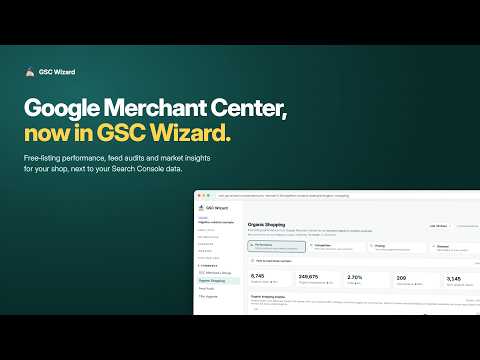
Ask your Google Merchant Center data in plain language and get real numbers, not guesses. The GSC Wizard MCP gives Claude, ChatGPT and any MCP-capable assistant your free listing performance, product issues, competitor visibility, price insights and feed audit, next to the merchant listings Search Console reports for web Search.
Same connector endpoint: mcp.gscwizard.com · Setup guides for ChatGPT and Claude
One connector, two shopping layers
Search Console + Merchant Center
The shopping tools live on the same MCP as the Search Console tools. Your assistant can read how your product results do in Search and how the same catalog does in free listings everywhere else Google shows it, in one conversation, for the same property.
The two layers count different surfaces, so the tools serve them side by side and never add them together.
The Merchant Center reports in GSC Wizard on an example shop, then the two automations from the Merchant Center MCP playbook: a Monday morning feed triage and a month-over-month shop report.
The first thing anyone does with shopping data is compare the two sources. They never reconcile, and the tools tell the assistant why, so it compares trends instead of totals.
No Merchant Center connection needed
Enriched product results in web Search only, for your own URLs: clicks, impressions, CTR and position per day, and the product pages behind them. Read live from the Search Console API, the same way Search Console builds its Merchant listings tab.
Needs a linked Merchant Center account
Free listing clicks, impressions and conversions across every free surface, counting a click only when it lands on the product page. Usually higher than merchant listings, because it covers more places. Conversions appear where you configured a Merchant Center conversion source.
The shopping tools find the Merchant Center account through the link you set per site in GSC Wizard, so you never paste a merchant ID. Ask in plain language; the assistant picks the right one.
Performance
The search appearances a property has, a daily clicks, impressions, CTR and position timeline, and the product pages that carry it. Any window shorter than 16 months, Search Console's retention.
get_merchant_listings_performance
Daily clicks, impressions and conversions plus the top offers, grouped by brand, Google category or your own product type.
get_organic_shopping_performance
Every Merchant Center account your connected Google accounts can read, which site each is linked to, and which are multi-client parents.
list_gmc_accounts
When a fixed tool does not expose the field, filter or ordering you need, the assistant can run its own Merchant Center Query Language report, such as offers ordered by impressions.
query_gmc_report
Product health
The eligibility and top issue of every problem product (or every product, if you ask), sorted by Google's own click-potential rank, with whether the fix needs you or is just pending Google.
get_product_listing_status
Account issues such as suspensions and policy warnings with their severity and the destinations they affect, plus checks on the terms of service, the free listings program and the claimed website.
get_gmc_account_health
Every feed with the state of its latest upload or fetch, the items created and updated, and the processing issues Google reported, so a broken feed is not mistaken for a ranking loss.
get_gmc_data_sources
Queue the audit, then read the Feed Score (0-100, split into feed and page), failures by severity, pass rates per check and the score history.
run_feed_auditget_feed_audit_resultsTitle and description lengths, missing descriptions, duplicate titles, offers repeating a word, and the top title words with brand tokens flagged, over a sample of up to 5,000 offers from the live product list. For full-catalog counts, the Title Hygiene report in the app reads every synced offer.
get_gmc_title_hygiene
Market insights
Who you compete with for one country, product category and traffic source: relative visibility, page overlap and how often they rank above you, or your trend against the category benchmark.
get_gmc_competitors
Your price against the market benchmark for each product, and Google's suggested sale price with the predicted change in impressions, clicks and conversions.
get_gmc_pricing_insights
Google's best sellers by country and category, weekly or monthly, with rank movement and a flag on the ranked products you do not stock.
get_gmc_best_sellers
Merchant Center lists your disapproved and limited products; it does not tell you which ones to fix first. The listing status tool sorts every product by Google's own click-potential rank, so a disapproved best seller comes before a limited accessory nobody searches for, and it separates problems that need a feed or site fix from ones that are only waiting on Google.
It reads the catalog snapshot GSC Wizard syncs daily, so every offer is counted, even in a catalog of tens of thousands. When a site has no snapshot yet, it falls back to a live scan of up to 5,000 products and says so.
| Rank | Product | Status | Top issue |
|---|---|---|---|
| 3 | Trail runner 2 | Disapproved | Price mismatch with landing page |
| 8 | Road shoe, women's | Limited | Missing GTIN |
| 14 | Running vest | Disapproved | Image could not be crawled |
| 27 | Merino socks | Pending | Waiting on Google |
21 checks over the synced catalog plus a crawl of your product pages, rolled into one Feed Score from 0 to 100. The assistant queues it, then reads the result once the audit has run.
Title and description length; duplicate titles, descriptions, images and URLs; GTIN, Google category, product type and the other required attributes; image size and ratio.
HTTP status, JSON-LD Product schema, whether price and title on the page match the feed, H1 and title-element counts, and page images missing from the feed. Crawled by GSCWizard-Bot on the hosts you approve.
Once Merchant Center is linked to a property, type these into Claude, ChatGPT or any MCP client in your own words.
"Which of my products are disapproved or limited in free listings, and which fixes would win back the most clicks?"
"How did free listing clicks and conversions change per brand over the last 28 days?"
"Where am I more expensive than the market, and what does Google predict if I adopt its suggested price?"
"Which of Google's best sellers in my category in Germany do we not stock yet?"
"Compare merchant listing clicks in Search Console with free listing clicks in Merchant Center. Are the two trends moving together?"
"Queue a feed audit, and once it has run, tell me the Feed Score and which checks fail most often."
CTR in the performance tools is a percentage from 0 to 100. Google's other rates, such as page overlap, predicted price effects and feed audit pass rates, are fractions from 0 to 1 (0.12 means 12%), and the tools pass them on that way, with a note saying so. Competitor visibility is a ratio: 200 means a competitor shows up two hundred times as often as you.
Connect Merchant Center on the Account page in GSC Wizard. Google offers no read-only Merchant Center permission, so its consent screen asks to manage your product listings. GSC Wizard only reads your reports and catalog; it never edits products or your feed.
Open a property, expand E-commerce in the sidebar, click Organic Shopping and pick the Merchant Center account it maps to. If Google first wants GSC Wizard registered with your Merchant Center account, the picker does it for you from your Merchant Center ID; Google can take up to five minutes to apply it.
Add mcp.gscwizard.com as a connector in your AI assistant (or paste an API key). If no Merchant Center account is linked, the tools answer with a short notConfigured note and the reason instead of an error, and the merchant listings tool keeps working from Search Console.
Works with Claude, ChatGPT, Gemini, Grok and any MCP-capable client; see the configs for every MCP client. The step-by-step guides show how to connect Google Merchant Center to ChatGPT and how to connect Google Merchant Center to Claude, Claude Code included. Running a shop? The ecommerce SEO guide shows how the Search Console and Merchant Center reports fit together.
An MCP (Model Context Protocol) server is a standard connector that lets an AI assistant such as Claude or ChatGPT read live data and call tools. A Merchant Center MCP exposes your Google Merchant Center account to the assistant, so it can pull your real free listing performance, product issues, competitor visibility, price insights and best sellers instead of guessing them.
They count different surfaces. Search Console merchant listings count enriched product results in web Search only, for your own URLs. Merchant Center free listings cover the Shopping tab, Search, Images, Lens, YouTube and Maps. Merchant Center clicks are therefore usually higher and the two never reconcile to one figure. The tools say so in their own descriptions, so the assistant compares the two trends instead of adding the totals.
No. Google offers no read-only Merchant Center permission, so its consent screen asks to manage your product listings, but GSC Wizard only reads your reports and catalog and never edits products or your feed. The one write tool, run_feed_audit, queues an audit inside GSC Wizard; it crawls your product pages and writes nothing to Merchant Center.
No. The merchant listings tool reads Search Console, so it works for any property with product results in Search, with no Merchant Center connection. The accounts tool only needs Merchant Center connected to your GSC Wizard account. The other eleven need a Merchant Center account linked to the site; without one they answer with a short notConfigured note and the reason instead of an error.
Yes, if the owner allows it. The merchant listings tool reads Search Console and works on any shared property. The Merchant Center tools also need the owner to enable the Merchant Center option on your invite, because Google restricts pricing and best-seller data to the retailer. Queuing a feed audit needs full access on the property.
MCP access is included in every GSC Wizard plan, and every new account starts with a 7-day free trial. All thirteen shopping tools work during the trial and on every plan; once a trial ends without a subscription, they stop answering until you subscribe. See pricing.
Yes. Since May 2026 Google offers the Merchant API MCP Access Service, an experimental alpha that gives developer tools raw access to the Merchant API, including data source writes. It is set up with a Google Cloud project, an access token and a project header. GSC Wizard is a hosted connector for Claude and ChatGPT that returns analysed answers instead. See where each one is better.
The core of the server: clicks, impressions, rankings, decay and indexing, read from a warehouse of your full history.
Ecommerce revenue, transactions and top products from GA4, to put next to your free listing clicks.
Site quality, queries and indexing history from Yandex, on the same connector as Google and Bing.
Organic Shopping, Feed Audit, Title Hygiene and GSC Merchant Listings, plus alerts to Slack, Teams or a webhook.
Free listings, product issues, competitors, prices, best sellers and a feed audit, next to Search Console's merchant listings, in the same connector.
Practical GSC and GA4 workflows, product updates and SEO experiments. No spam, unsubscribe anytime.