5 ways to connect Google Search Console to ChatGPT
ChatGPT can't open Search Console on its own - something has to sit in between. There is no official Search Console MCP. Here are the five ways people actually do this in 2026, what each one costs you in setup time, money, or row limits, and which one to pick for your situation.
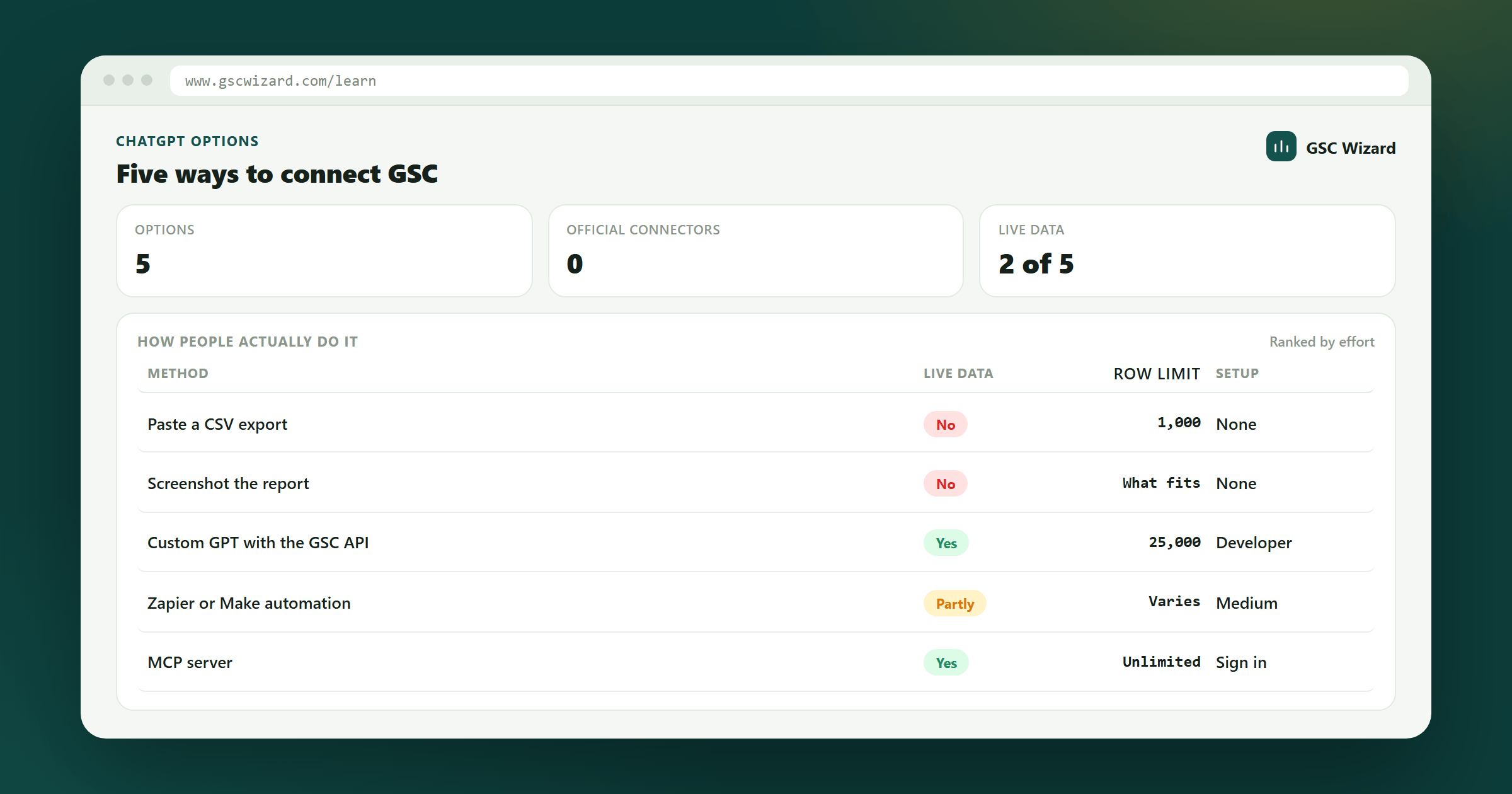
Pick the right way to get real GSC data into ChatGPT without over-building or hitting a row limit.
5 minutes to decide, 1-30+ minutes to set up depending on the route.
A Search Console property you own. For the DIY routes, a Google Cloud project too.
Why ChatGPT can't just read Search Console
Google doesn't expose Search Console data to ChatGPT, and ChatGPT has no built-in Google integration for it. Every route below is really the same shape: something authenticates to the Search Console API on your behalf, then hands the result to ChatGPT one way or another. The differences are in who builds and hosts that "something," how much of the raw API's limits you inherit, and whether ChatGPT gets a finished answer or a pile of rows to do arithmetic over.
Option 1: Export a CSV and paste it in
The zero-setup baseline. Export from the GSC UI, paste the table into a chat, ask questions about it.
Real limits: the Search Console UI caps exports at 1,000 rows per view, so anything past a small site loses its long tail before it even reaches ChatGPT. The model then does its own arithmetic over whatever you pasted, which is slow, burns tokens, and is where wrong totals creep in. It's also a single frozen snapshot - ask a follow-up about a different date range and you're exporting again.
Good for: a one-off gut check on a small site. Not good for: anything you'll want to ask a second question about.
Option 2: Build your own Custom GPT Action
For developers who want to own the whole stack. Register a Google Cloud project, enable the Search Console API, configure an OAuth consent screen with authorized redirect URIs pointing at chat.openai.com, write an OpenAPI schema describing the searchAnalytics.query endpoint, and wire it into a Custom GPT's Actions tab.
Real limits: the Search Console API defaults to 1,000 rows per request, tops out at 25,000 rows per request via rowLimit, and has a hard ceiling of 50,000 rows per day per site per search type even with pagination. Separately, Google gates OAuth apps requesting the Search Console scope behind its verification process: unverified apps are capped at 100 test users, and going past that needs a public privacy policy, a scope-justification video, and a review that can take weeks. If it's just for you, add yourself as a test user and skip verification entirely. If you want to hand it to a client or a team, budget the review time.
Good for: developers who want full control over the API surface, and only need it for themselves. Not good for: anyone who wants to skip the OAuth paperwork, or ship it to other people quickly.
Option 3: Self-host an open-source MCP server
A step up from a Custom GPT Action. Several open-source Google Search Console MCP servers exist - packages like gsc-mcp-server, mcp-server-gsc, and a handful of others on npm and GitHub. They're free, the code is readable line by line, and they work with any MCP client, not just ChatGPT.
Real limits: you're the ops team. You register your own Google Cloud OAuth credentials, and to reach it from ChatGPT (rather than a local MCP client like Claude Desktop) you have to deploy it yourself somewhere with a public HTTPS endpoint. Most of these servers are thin wrappers around the raw Search Console API: they hand back rows and JSON, not computed analysis, so you still inherit the same rowLimit ceilings as Option 2, and the model still does the arithmetic.
Good for: developers who want to self-host, inspect every line of code, and use the same connection across multiple AI clients. Not good for: anyone who doesn't want to run and maintain a server.
Option 4: A no-code data connector
Tools like Windsor.ai sit between dozens of ad and marketing platforms and destinations like ChatGPT, Sheets, or a BI tool. Search Console is one of many sources they support, connected through the real API rather than the UI's 1,000-row export, with a native ChatGPT app for a genuinely code-free setup in a few minutes. Free tier available; paid plans start around $19/month and scale with how many sources and accounts you connect.
What it isn't: an SEO tool. It streams GSC data (clicks, impressions, CTR, position, across query/page/device/country) plus generic AI insights layered on top, but it isn't built around SEO-specific mechanics like content decay, keyword cannibalization, or CTR-versus-position curves.
Good for: teams that already centralize a dozen other ad platforms through a connector like this and want Search Console on the same pane of glass. Not good for: if Search Console is the only source you care about and you want SEO-specific analysis, not just raw metrics with a chatbot on top.
Option 5: A purpose-built ChatGPT app for Search Console
This is where GSC Wizard for ChatGPT sits, and it's the one built specifically for this job rather than adapted to it. It's a native listing in the ChatGPT App Store: no Google Cloud project, no OAuth app of your own, no OpenAPI schema to write. Sign in with Google once and it reads the properties you've already connected in GSC Wizard.
The actual difference: every other option above hands ChatGPT raw rows and lets the model compute averages, spot trends, and catch cannibalization itself - the exact process that burns tokens and introduces wrong numbers. GSC Wizard computes the analysis server-side against a data warehouse first. Ask for content decay, keyword cannibalization, a CTR-versus-position curve, ranking changes, or a full SEO report, and ChatGPT gets back a finished, already-computed answer, rendered as an interactive card instead of a table of JSON.
Good for: anyone who wants real SEO analysis in ChatGPT with the least setup. Free to start, no credit card. Full setup walkthrough (about two minutes) and two more advanced routes - a custom MCP connector with the full tool catalogue, and the OpenAI Responses API for scripts - are in the step-by-step ChatGPT connection guide.
Which one should you actually use?
- One-off check on a tiny site → CSV paste. Don't build anything for a five-minute question.
- You're a developer who wants to own the whole stack, just for yourself → a Custom GPT Action, or a self-hosted MCP server if you want the same connection across multiple AI clients.
- You already centralize a dozen ad platforms through an ETL/BI layer → fold Search Console into that with a connector like Windsor.ai.
- You want SEO-specific analysis with the least setup → the GSC Wizard ChatGPT app (install it). No Google Cloud project, no row-limit math, no OAuth verification queue - just a finished answer.
Next playbook
Once ChatGPT can see your real numbers, the fastest way to put them to use is the Week 1 quick wins checklist →, or ask it directly for a content decay or cannibalization analysis and skip the manual version entirely.
Adding other data sources next to Search Console? Our roundup of the best SEO MCP servers → compares ten connectors on data provenance, hosting and cost, and covers why connecting five of them at once makes your assistant worse rather than better.
Picked a route and want the mechanics? ChatGPT connectors for Search Console data in 2026 → goes deeper on the ChatGPT side specifically: what the connector-to-app-to-plugin renaming changed, which plans unlock developer mode, the Search Console row ceilings you inherit, and a troubleshooting table.
Written by Jan-Willem Bobbink · Published August 28, 2026