A free app for the Wix dashboard

SEO reporting data in Wix, straight from Google Search Console

Your Wix site gets its visitors from Google Search, and the numbers that show how are in Google Search Console. The GSC Wizard app adds a page to your Wix dashboard with your clicks, impressions, click rate and average position, the searches and pages behind them, and the searches that are close to page one.

The app is free and read-only, and it does not need a GSC Wizard account. It is not published on the Wix App Market yet.
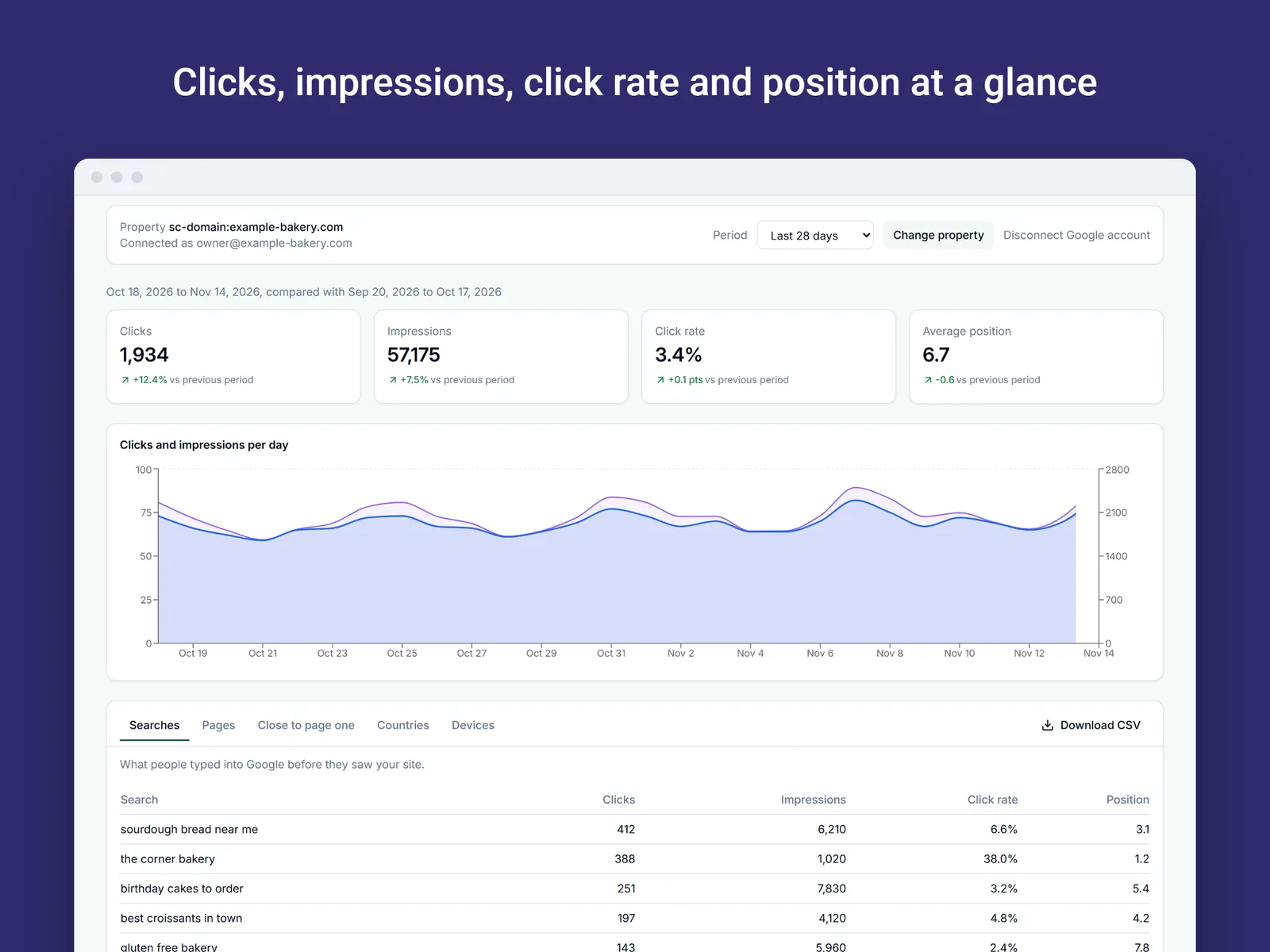
The GSC Wizard dashboard page for Wix: tiles for clicks, impressions, click rate and average position with the change against the previous period, a daily chart, and a table of searches
The Search performance page for the last 28 days (example data for a made-up bakery).

The short answer

Wix has no built-in view of your Google Search Console data. The GSC Wizard app adds one as a page inside your Wix dashboard, so you can see how your site does in Google Search without leaving Wix or exporting anything.

  1. Open the app from your site’s dashboard. It starts with clearly labelled example data.
  2. Connect Google in a popup, with read-only access to Search Console.
  3. Check the property, which is preselected when it matches your site, and read your own numbers.
Why in the Wix dashboard

Search data where you already manage the site

Google Search Console is free and has the real numbers, but it is another login, another interface and a vocabulary of its own. I built this app so a Wix site owner can read the important parts without learning all of that.

The searches that bring visitors

See the exact words people typed into Google before they saw your site, and which of your pages they landed on.

Change, not just totals

Every headline number comes with its change against the period before, so you can tell whether search traffic is growing or slipping.

A short list of what to improve

The “close to page one” table lists searches where your site ranks between positions 4 and 20, so you know which pages to work on first.

What you get

What the Wix dashboard page shows

One page, with a period picker for the last 7 days, 28 days, 3 months, 6 months or 12 months. Every number is set against the period before it.

Part of the pageWhat it tells you
ClicksVisits to your site from Google Search, with the change against the previous period.
ImpressionsHow often your site was shown in search results.
Click rateClicks divided by impressions.
Average positionYour average ranking in Google, where 1 is the top result.
Daily chartClicks and impressions per day, to see when traffic rose or dipped.
SearchesWhat people typed into Google before they saw your site.
PagesWhich of your pages appear in Google and get the clicks.
Close to page oneSearches where your site ranks between position 4 and 20, with the most impressions first.
Countries and devicesWhere the searches came from, and whether on phones, computers or tablets.

Each of the tables downloads as a CSV file, so you can keep a copy or open it in a spreadsheet.

Find the searches that are close to page one

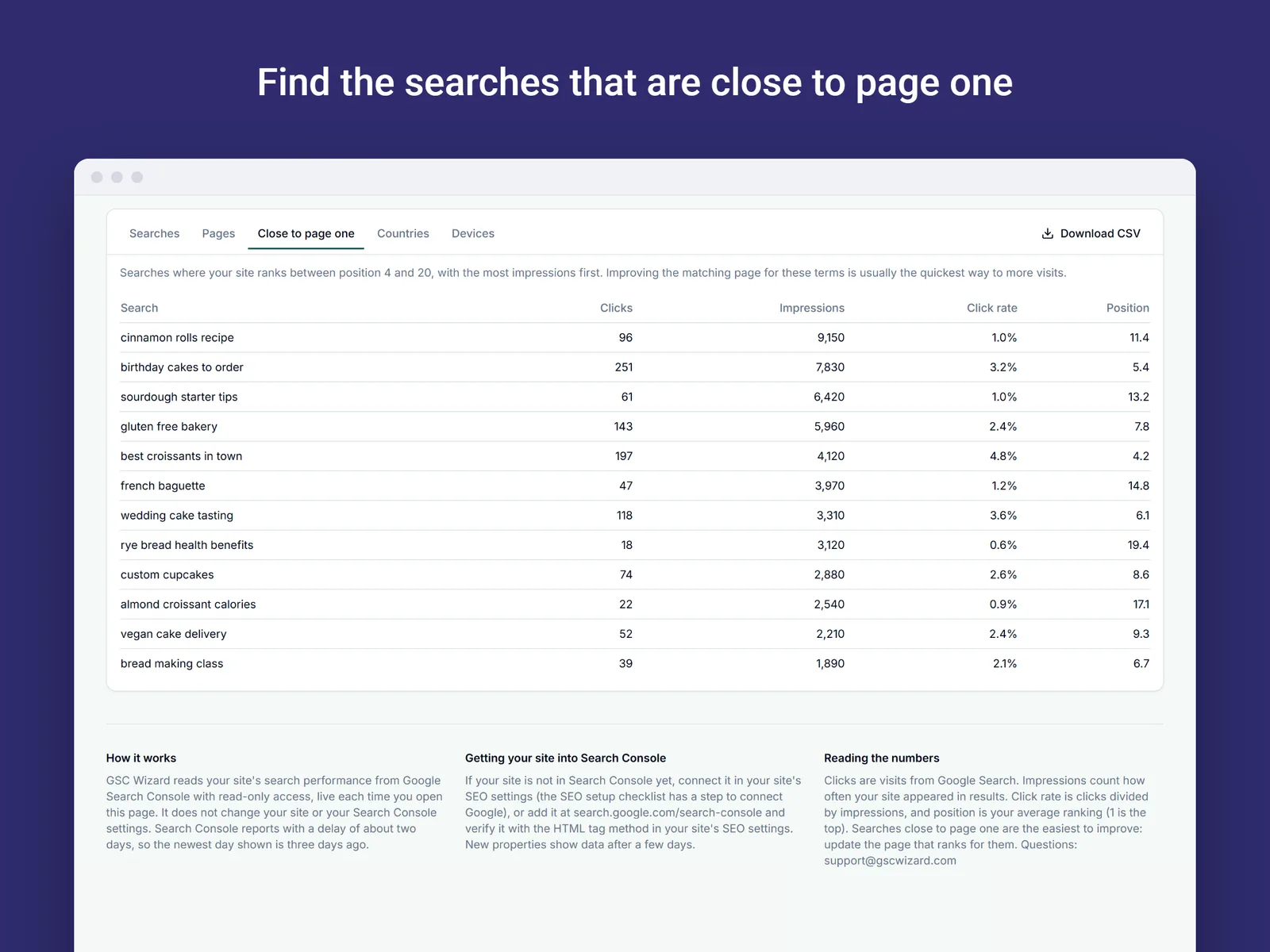
A page ranking at position 11 gets very few clicks, while the same page at position 5 gets many more. This table lists the searches where you are between positions 4 and 20, sorted by how often your site is shown for them.

Improving the page that matches one of these searches is usually the quickest way to more visits, which makes this the table I would read first.

The Close to page one table in the GSC Wix app: searches with clicks, impressions, click rate and a position between 4 and 20, most impressions first, with a Download CSV button
The Close to page one table (example data).
Setup

Connected in a few clicks

You need your site in Google Search Console and the Google account that has access to it. You do not need a GSC Wizard account.

1

Open the app

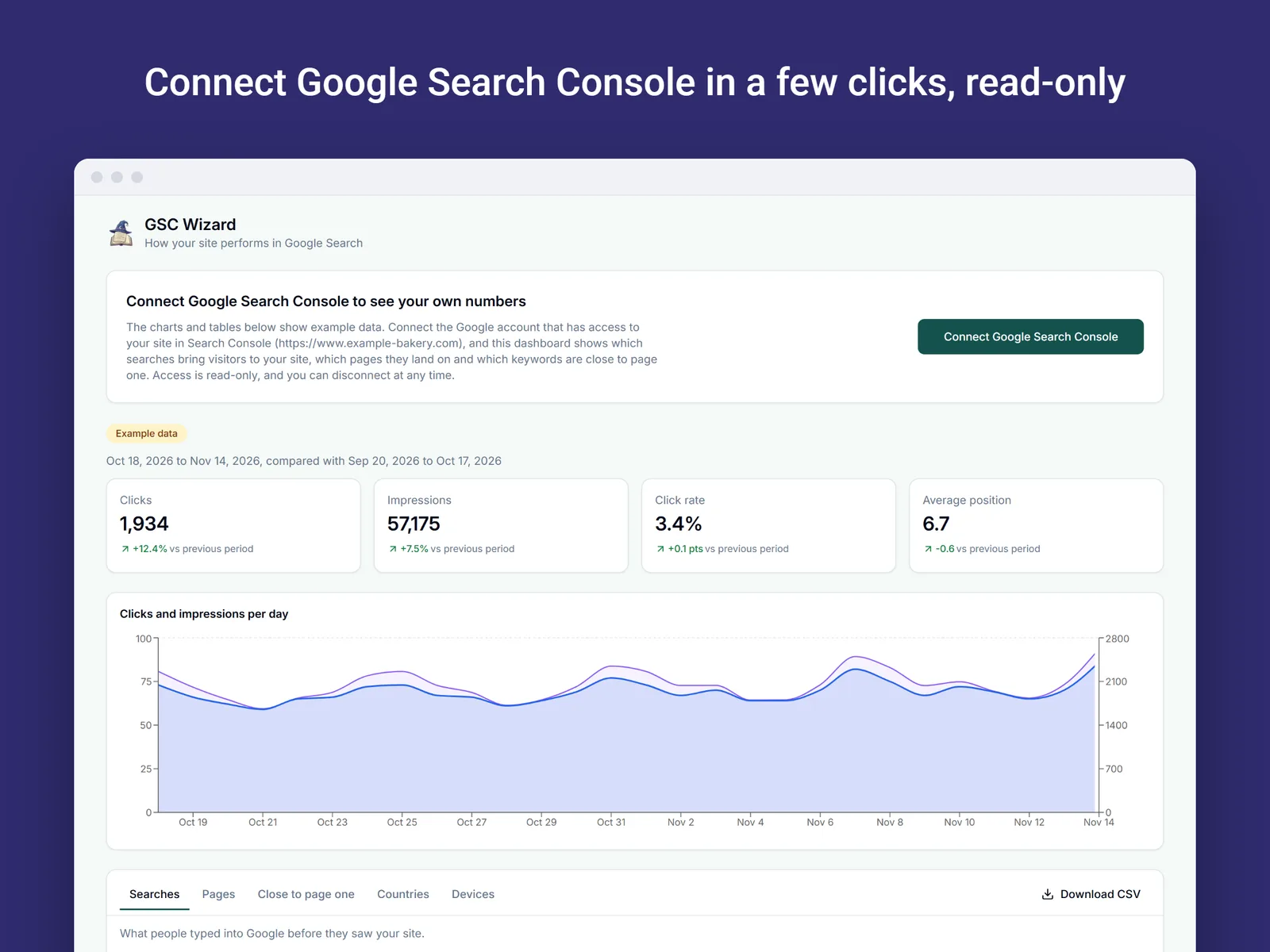
Open GSC Wizard from your site’s dashboard. The first time, it shows example data for a made-up bakery and a button to connect Google Search Console.

2

Connect Google

The button opens a popup that shows your site address and then Google’s own sign-in. Once it says Search Console is connected, the dashboard moves on by itself.

3

Pick the property

The Search Console property that matches your site is preselected. Choose Show this property and your own report loads. You can change the property later.

The GSC Wizard page before Google is connected: a Connect Google Search Console button with a note that access is read-only, above the example data
Before Google is connected, the page shows labelled example data.

If your site is not in Search Console yet

The dashboard explains how to add it. Connect Google in your site’s SEO settings (the SEO setup checklist has a step for it), or add the site at search.google.com/search-console and verify it with the HTML tag method in your site’s SEO settings.

A new property shows data after a few days. Search Console also reports with a delay of about two days, so the newest day on the page is three days ago.

Data and permissions

What the app can see and what it keeps

Read-only, nothing from Wix

Access to Google Search Console is read-only: the app never changes your site or your Search Console settings. It reads no data about your visitors, members, orders or contacts from Wix, and it runs no analytics or cookies inside your dashboard. Disconnecting Google in the app revokes the access at Google.

Kept for each installation

The app instance ID that Wix assigns, your site’s public address, and, after you connect, the Google account’s email address, an encrypted refresh token and the property you chose. Search Console data is read live and not stored, apart from a cache of up to one hour. Removing the app from your site deletes all of it.

Duplicated sites start unconnected

When a site with the app installed is duplicated, the copy gets its own installation and starts unconnected. The Google connection is never copied, so whoever receives a duplicate or a template has to connect their own Search Console.

Full detail is in the Privacy Policy. Questions go to support@gscwizard.com.

Want more than one page of numbers?

The Wix app is a separate, free product. I also run GSC Wizard as a full web app for Search Console data, with many more reports and alerts for people who manage several sites or do SEO for a living. You will find it on the features page. Nothing in the Wix app depends on it.

Frequently asked questions

Can I see Google Search Console data in my Wix dashboard?

Yes, with the free GSC Wizard app for Wix. It adds a Search performance page to your site’s dashboard. You connect Google Search Console once in a popup, and the page shows your clicks, impressions, click rate and average position, a daily chart, and tables of searches, pages, countries and devices. The app is not published on the Wix App Market yet, so this page describes how it works.

Is the app free?

Yes. The app is free, and it has no paid features or upgrade prompts.

Do I need a GSC Wizard account?

No. The Wix app does not need or create a GSC Wizard account. You only connect the Google account that has your site in Search Console.

Which Wix plans does it work with?

The app asks for no Wix business apps and reads no store, member or contact data from your site. I have not confirmed any plan requirements yet, so the listing will state them once the app is published. What you do need is your site in Google Search Console.

What if my site is not in Google Search Console yet?

The dashboard explains how to add it. Connect Google in your site’s SEO settings (the SEO setup checklist has a step for it), or add the site at search.google.com/search-console and verify it with the HTML tag method in your site’s SEO settings. A new property shows data after a few days.

How fresh is the data?

The numbers are read from Google Search Console each time you open the page, with a cache of up to one hour. Search Console reports with a delay of about two days, so the newest day shown is three days ago.

Can the app change my site or my Search Console settings?

No. Google access is read-only, so the app can look at your Search Console data and nothing else. You can disconnect it at any time, which revokes the access at Google. Removing the app from your site deletes what is stored for it, as described in the Privacy Policy.

Other places your Search Console data can land

See how your Wix site does in Google Search

A free, read-only page in your Wix dashboard with the clicks, searches and pages behind your Google traffic. It does not need a GSC Wizard account.

Search Console tips in your inbox

Practical GSC and GA4 workflows, product updates and SEO experiments. No spam, unsubscribe anytime.