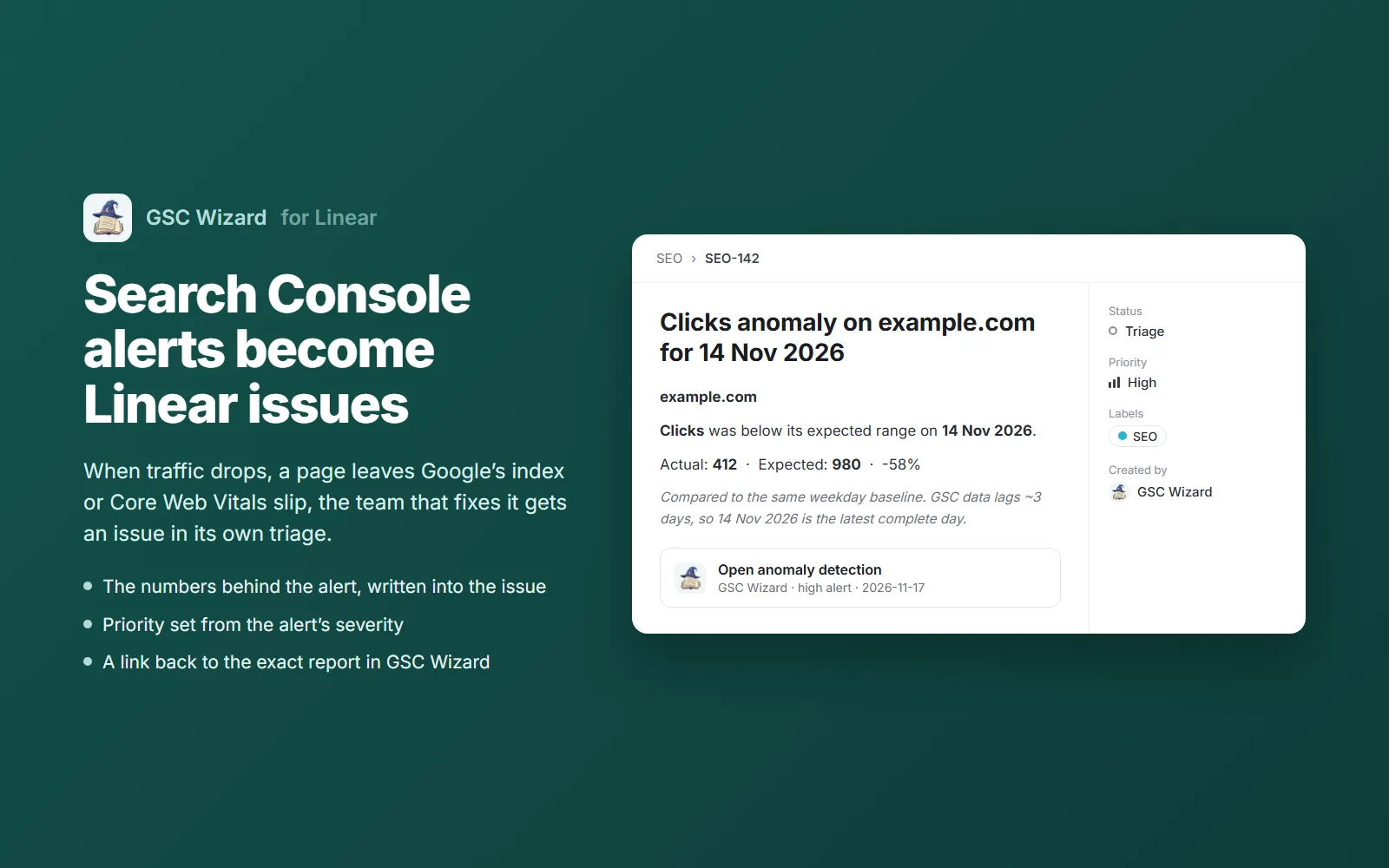
GSC Wizard watches your Google Search Console data and opens a Linear issue when something needs fixing: a traffic drop, a page that fell out of Google’s index, a Core Web Vitals regression or a broken redirect after a migration. The team that can fix it gets the problem in its own triage, with the numbers and a link to the report.
Included in every GSC Wizard plan and the 7-day trial. Nothing to install in Linear beyond approving the app.
The short answer
Linear has no built-in Search Console data. GSC Wizard adds it in the form engineering teams act on: one issue per SEO problem, created in the team you choose.
Most search losses are fixed by engineers: a release that dropped a canonical tag, a redirect map with holes, a template that made pages slow. The SEO report that spots it usually sits in a dashboard or a chat thread that the engineering team never opens.
Every issue carries the numbers behind the alert: actual against expected clicks, the affected URL, the before and after values. Nobody has to log in to an SEO tool to understand the ticket.
Critical alerts become Urgent issues, high becomes High, medium Medium and low Low, so an SEO problem is sorted against the rest of the team’s work in the same way.
The report the alert came from is attached to the issue, already filtered to the property, so whoever picks it up can see the trend before and after the fix.
Each team picks its own alert types, so indexing and migration problems can go to the platform team and content decay to the content team.
| Alert | What the issue tells the team |
|---|---|
| Traffic anomalies | A day when clicks, impressions, CTR or position fell outside the expected range, with the actual and expected values. |
| Sustained traffic shifts | The date a property’s traffic moved to a new level and stayed there, the kind of change a release or an algorithm update causes. |
| Indexing warnings | A page you track that Google dropped from its index or stopped crawling, with the URL. |
| Core Web Vitals regression | LCP, INP or CLS moving from good to worse in the Chrome UX Report, with the old and new values. |
| Content decay | A page or query losing clicks week after week, with the click change and how far its position slipped. |
| Migration issues | New redirect problems or a stalled recovery after a site move, from the daily re-check of a saved migration. |
| Rank changes | Tracked keywords that moved in or out of the positions you care about. |
| Merchant Center | Feed Score drops and high-potential products that are not eligible for free listings. |
| Broken Google connection | The Google account behind your data needs signing in again, before reports go stale. |
The full list, with how each detector works and when it runs, is in the alerts documentation.
You need a GSC Wizard account with your Search Console properties connected and an active plan or trial, and permission to install apps in your Linear workspace.
In GSC Wizard, open Account → Slack, Teams & Webhooks and click Connect Linear. Linear asks which workspace to add GSC Wizard to; approve it and you are back in GSC Wizard.
Pick the team, an optional label such as SEO, the alert types and a minimum severity. Add one row per team to split the work, for example indexing to the platform team and content decay to the content team.
The send button on the row creates a test issue in the team, so you know it works before the first real alert. From then on, every matching alert becomes an issue within minutes of detection.
GSC Wizard asks Linear for two permissions: read, to list your teams and labels in the picker, and issues:create, to create the alert issue and its link back to the report. It never reads, edits or deletes the issues already in your workspace.
An alert becomes one issue per team, and a retry after a Linear outage cannot open a second one. Each team row can be paused, resumed or deleted at any time.
Disconnecting in GSC Wizard revokes the access at Linear and deletes the tokens. Removing the app in Linear works too: GSC Wizard is told at once and stops. Tokens are encrypted at rest.
Linear is for work, so GSC Wizard sends it the findings that need someone to act. The weekly and monthly SEO reports, with headline numbers, winners and losers and ranking movers, go to the places people read: a Slack or Microsoft Teams channel, or a shared report for clients. Many teams use both: the report says how search is doing, the Linear issue makes sure the problem in it gets fixed.
The same alerts post to Slack and Microsoft Teams, and reach anything else through signed webhooks. In Jira, the GSC Wizard app for Jira shows Search Console numbers for the URLs in an issue. To ask questions about the data instead, connect it to an AI assistant through the GSC MCP server.
Yes, with GSC Wizard. Connect your Search Console properties to GSC Wizard, connect your Linear workspace, and pick a team. Every SEO alert you route to that team, such as a traffic anomaly, a deindexed page or a Core Web Vitals regression, becomes a Linear issue with the numbers behind it and a link to the report.
Traffic anomalies, sustained traffic shifts, indexing warnings, Core Web Vitals regressions, content decay, migration issues, rank changes, Merchant Center feed problems and broken Google connections, among others. Each team chooses its own alert types and a minimum severity.
From the alert’s severity: critical becomes Urgent, high becomes High, medium Medium and low Low. Informational alerts, such as a Google algorithm update, get no priority.
Not as issues. A report is information and an issue is work, so GSC Wizard sends Linear the findings that need someone to act. Scheduled weekly and monthly reports go to Slack, Microsoft Teams or a shared client report.
It asks for two permissions: read, to list your teams and labels, and issues:create, to create the alert issue and its link. It never reads, edits or deletes the issues already in your workspace, and you can disconnect it at any time from GSC Wizard or from Linear.
You decide how much arrives. Pick only the alert types a team owns, raise the minimum severity, and tune the detectors’ sensitivity in GSC Wizard. An alert is created once per team, and a team row can be paused when you need quiet.
The Linear integration is part of every GSC Wizard plan and works during the 7-day free trial. In Linear, you need permission to install apps in the workspace.
Connect Search Console to GSC Wizard, connect Linear, and pick the alerts each team should own.
Practical GSC and GA4 workflows, product updates and SEO experiments. No spam, unsubscribe anytime.