SEO rank checker

Check your Google rankings every day, with Google's own numbers

The Rank Checker follows the keywords you choose, per country and device, using the average position Search Console records from real searches. Nothing is scraped, there is no per-keyword fee, and every new keyword arrives with up to 16 months of history.

Start tracking rankings free

7-day free trial, no credit card needed.

500
Keywords per set
Daily
Automatic checks
16 months
History from day one
Alerts
Email, Slack, Teams
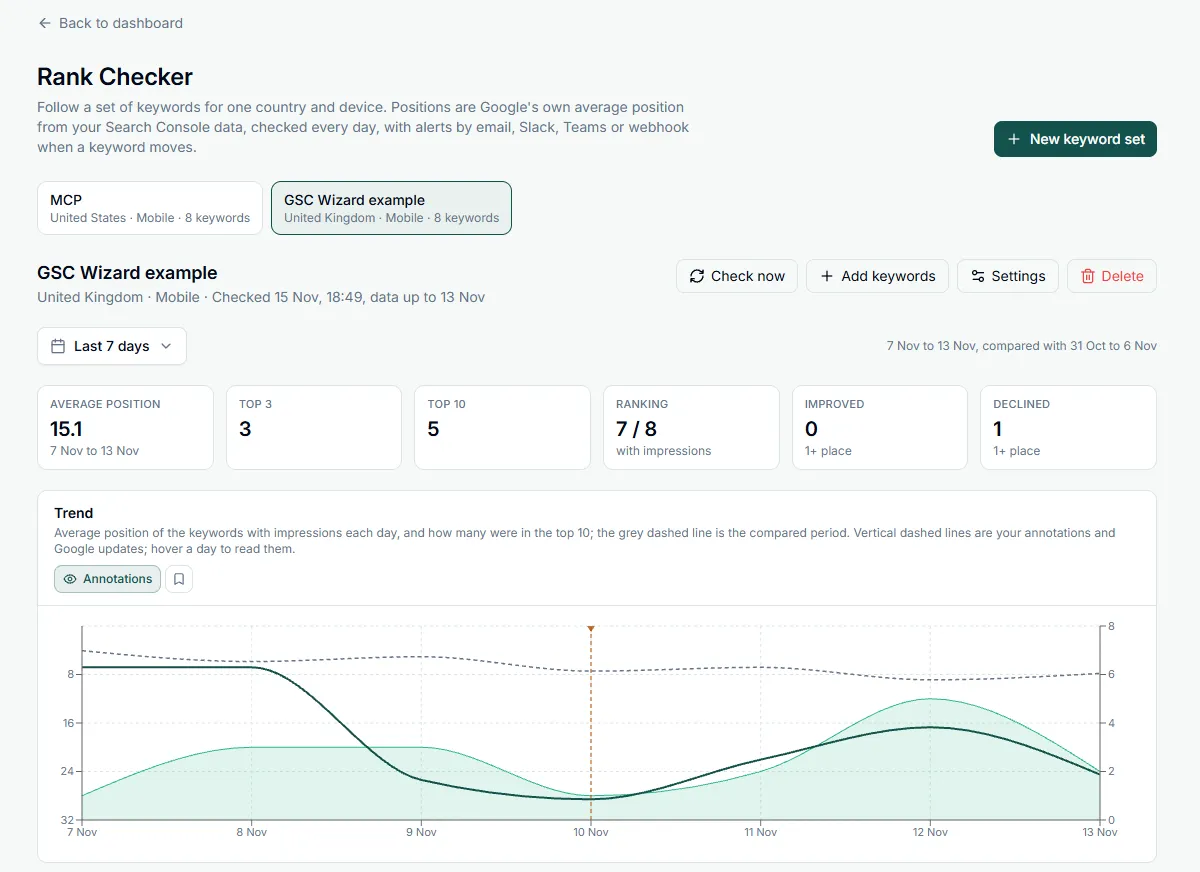
The GSC Wizard Rank Checker: a keyword set with average Google position, top 3, top 10, improved and declined keywords, and a daily position trend from Search Console
A keyword set for the United Kingdom on mobile, with the compared period as a dashed line and a Google update marked on the trend.

How the rank checker works

Connect Search Console once, make a keyword set, and the rankings keep coming in every day without you opening the page.

1

Make a keyword set

Pick a country and a device, then paste keywords, upload a CSV (a Search Console export works as it is), or pick them from your top queries, narrowed to a content group, a topic cluster, or branded and non-branded searches.

2

Checked every day

The first check loads up to 16 months of history, so the trend is there at once. After that every set is checked daily against Search Console's final data, and the positions are kept for two years.

3

Hear when keywords move

Get a rank alert when keywords drop or climb by the number of places you set, and a weekly report every Monday, by email or in Slack, Microsoft Teams or a webhook.

Rank checker examples

Four things the Rank Checker hands you, shown for an example running shoe shop on example.com that tracks 50 keywords in the United Kingdom on mobile. The numbers are made up, the layout is the real one.

Example 1: the keyword table

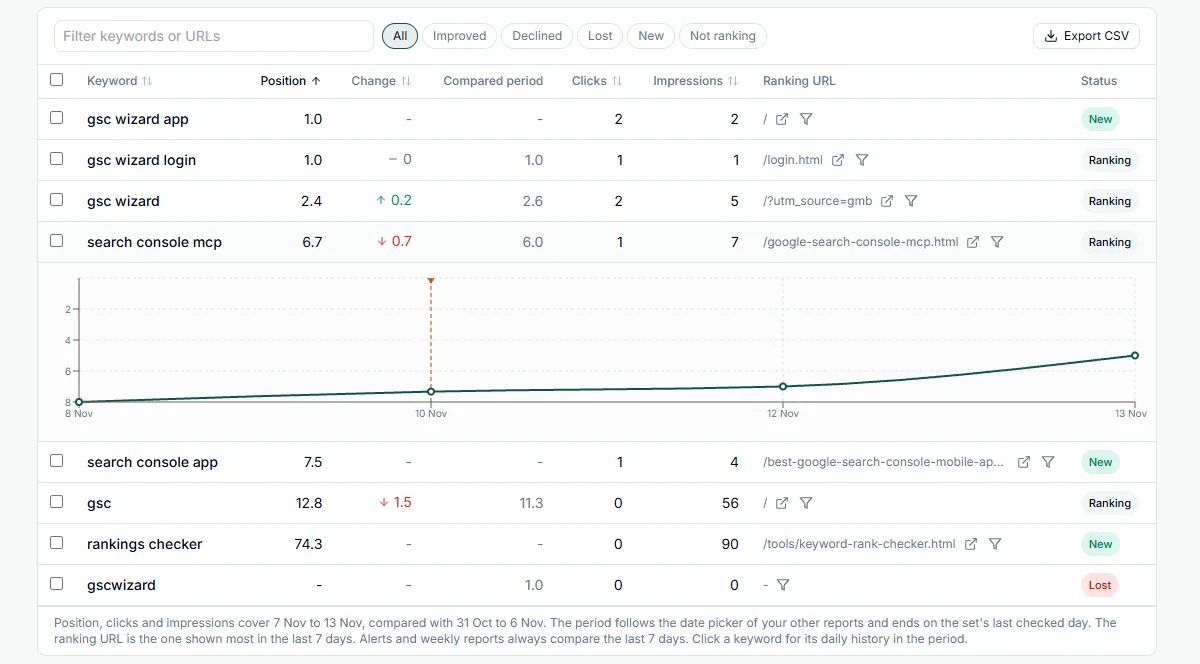
Each keyword shows its average position over the period, the change against the compared period, its clicks and impressions, the page Google ranks for it, and a status. Here the last 28 days are compared with the 28 days before, and two problems stand out at once: the waterproof shoes page lost more than four places, and the size guide no longer ranks at all.

Running shoes UK
United Kingdom · Mobile · last 28 days compared with the 28 days before
Keyword Position Change Status
trail running shoes 3.4 ▲ 2.1 Ranking
running shoes for flat feet 6.8 ▲ 0.6 Ranking
wide fit running shoes 8.1 0.0 Ranking
waterproof running shoes 11.9 ▼ 4.3 Ranking
carbon plate running shoes 18.2 - New
running shoe size guide - - Lost

Example 2: a rank alert in Slack

This set alerts on moves of three places or more, drops and gains, over the last 7 days. The same alert can go to your inbox, a Microsoft Teams channel or a webhook.

GSC Wizard APP
● Rankings dropped: Running shoes UK
Running shoes UK · example.com
United Kingdom · Mobile
2 keywords dropped
  • • waterproof running shoes: 7.6 → 11.9 (4.3 lower)
  • • running shoe size guide: 9.4 → not ranking
1 keyword improved
  • • trail running shoes: 5.5 → 3.4 (2.1 higher)

Search Console average position over the last 7 days up to 13 Nov, against the 7 days before or the keyword's last alert. Alerts at 3 places or more.

Example 3: the Monday weekly report

Switch on a weekly report per set and it arrives every Monday morning. It compares the last week with the week before, with the same week last year, or the last four weeks with the four before.

Weekly rank report: Running shoes UK
example.com · United Kingdom · Mobile · 7 to 13 Nov
Average position
9.2 ▲ 0.8
Ranking
46 of 50 ▲ 2
Top 10
31 ▲ 3
Clicks
2,914 ▲ 6%

7 improved · 4 declined · 2 new · 1 lost

Biggest gain: trail running shoes, 5.5 → 3.4

Biggest drop: waterproof running shoes, 7.6 → 11.9

Example 4: ask your AI assistant

The GSC Wizard MCP server gives Claude, ChatGPT and other assistants three Rank Checker tools: one lists your sets, one reads their positions, trends and keyword histories, and one creates a set or adds keywords to it. You can ask a question in plain words and get an answer from the same data as the page.

That makes it easy to go one step further than the numbers, for example by asking the assistant to compare the dropping page with the pages that overtook it, or to draft the Monday update for a client.

Which keywords in my Running shoes UK set dropped this week, and which pages rank for them?
get_rank_keyword_data · Running shoes UK
Two keywords dropped three places or more. waterproof running shoes fell from 7.6 to 11.9 and still ranks with /waterproof-running-shoes, so the page is indexed but losing ground. running shoe size guide went from 9.4 to not ranking; /guides/size-guide had no impressions for it after 9 Nov, which is worth checking in the Index Tracker first.

Use cases for a Search Console rank checker

Six ways people use keyword sets, each with the settings that make it work.

Agencies reporting to clients

Make one set per client with the keywords the contract is about, and switch on the weekly report. It lands in the client's Slack or Teams channel on Monday, and the property owner can add up to five extra email addresses. Clients you give read-only access see the same sets in the app without being able to change them.

Shops selling in several countries

Pick the United Kingdom, Ireland and Australia in one go and you get three sets with the same keywords. Side by side they show where a category is strong and where it needs work, for example an average of 4.1 in the UK against 15.6 in Australia for the same 40 product keywords.

Site migrations and redesigns

Before launch, fill a set with your 500 most valuable queries from the picker. Because the first check loads 16 months of history, the baseline is there before the switch. Set alerts to drops only, at one or two places over 7 days, and the first day of trouble reaches you instead of the monthly report.

Content refreshes

Rewrote a guide? Put the 20 queries it ranks for in a set, add an annotation on the day it went live, and compare the 28 days after with the 28 days before. The ranking URL column also tells you when Google starts showing a different page for a query than the one you updated.

Google core updates

Google updates are marked on every trend chart, so you can see whether a drop started on the day an update rolled out. Compare year over year to separate a seasonal dip from a real loss, and use a 28-day alert window to keep the day-to-day swings of a rollout out of your inbox.

Mobile, desktop and non-branded keywords

Track the same keywords on mobile and on desktop in two sets to find pages that rank well on one and badly on the other. Fill a set with non-branded queries only, from the picker's branded filter, to follow the rankings you have to earn rather than the ones your name brings in.

From a client project

Rewriting pages for LLMs cost top-3 Google positions within a week

In the summer of 2026 I restructured a client's main pages into short, self-contained paragraphs that a language model can lift into an answer, and in doing so removed their own way of explaining the topic and the examples from their own work. Retrieval by LLMs went up about 10%, and mentions and clicks from ChatGPT and Perplexity rose around 6%, but pages that had been in the top 3 in Google slipped below it in the first week, and a month later organic traffic was down 20%. Because Google still sent far more clicks than all LLMs together, we turned the changes back.

The first signal was the drop in top-3 positions, long before the monthly traffic report made it obvious. A keyword set on the money keywords of the pages you change, for the country and device your customers use, with alerts on drops of 3 places or more, tells you within days. Set one up before your next content change, so you see what it did to your rankings and not only to the numbers you hoped would go up.

What the position means

Search Console records the topmost position your site held each time it appeared in a search, and averages that over every search in the period. A keyword at 6.4 may have ranked 4th for some people and 9th for others, because results differ by location, device and search history.

That is why the Rank Checker will rarely match the one search you run in your own browser. What it gives you instead is the trend across all the searches real people made, in the market and on the device you chose.

  • Final data only: positions come from Search Console's final data, three days behind today, so a number never changes after you have seen it.
  • Noise filtered out of alerts: a keyword needs at least 10 impressions in both compared periods before it can trigger an alert, so one stray impression at position 40 cannot set one off.
  • Not ranking means no searches: a keyword shows as not ranking when nobody searched it in the period, or when Google left it out of the data to protect searchers' privacy, which it does for rare queries. Watch very low-volume keywords over 28 days rather than 7.
  • Exact match: a keyword matches the exact query Google reports, ignoring capitals, so "running shoes" does not include "running shoes men". Add the variants you care about as separate keywords.
  • One alert per drop: after an alert, the keyword's position at that moment becomes its reference, so you are not told about the same drop every day while the comparison window slides past it.
The GSC Wizard Rank Checker keyword table with one keyword opened, showing its daily Google position from Search Console

Why every keyword set has one country and one device

You can leave both on "All", but an average over every country and device describes no real search anywhere, and part of it may not even come from people. For most sites the right slice is one country and mobile.

Markets rank differently

A keyword at position 3 in the Netherlands and 35 in the United States averages out at something like 12. That number describes no real search, and a drop in your main market can disappear in it completely.

Mobile and desktop rank differently

The layouts and SERP features differ, and sometimes so does the page that ranks. Mixing the two blurs exactly the moves you want to see.

Rank tracker bots pollute the data

Scraping rank trackers load Google from data centers, usually as a desktop browser, and Search Console can count each load as an impression. When Google dropped the 100-results-per-page parameter in September 2025, many sites lost a large share of their desktop impressions overnight while their average position suddenly "improved". The Rank Checker reads the API, so it never adds an impression itself.

Search Console rank checking vs SERP scraping

Most rank trackers buy one scraped Google result page per keyword per day. Both approaches have their place, and this is how they differ.

GSC Wizard Rank Checker SERP-scraping rank tracker
Where the position comes from Google's average over every real search One result page, fetched once a day from one location
History when you add a keyword Up to 16 months at once Starts on the day you add it
Clicks and impressions per keyword Yes, next to the position Usually an estimated search volume instead
Cost per keyword None, included in every plan Usually priced per keyword or per check
Competitors' rankings No, only sites you have verified Yes
Keywords you do not rank for yet Shown as not ranking Usually tracked to position 100
Personalisation and location Included, because the searches were real Ignored, or simulated with a proxy
Which page ranks The page Google showed most in the last 7 days The page on that one fetched result page
Effect on your Search Console data None, it reads the Search Console API Can add bot impressions at the scraped position
Location detail Country and device Often down to city or postcode

Pick the Rank Checker when

you want to know how your own site does for the people who actually search, with clicks next to every position, history from the first day, and no bill that grows with every keyword you add.

Pick a scraping tracker when

you need competitors' positions, rankings for keywords nobody has found you for yet, SERP features, or results for one city. For a quick live look at any domain, the free Keyword Rank Checker runs on your own DataForSEO key.

Frequently asked questions

What is an SEO rank checker?
An SEO rank checker tells you where your pages appear in Google for the keywords you care about, and how that position changes over time. Most tools do this by scraping one Google result page per keyword per day. The GSC Wizard Rank Checker reads Google's own average position for your keywords from Search Console instead, so the numbers come from real searches by real people in the country and on the device you choose.
Why is the position different from what I see when I search myself?
Search Console records the topmost position your site held each time it appeared in a search and averages that over every search in the period. A keyword at 6.4 may have ranked 4th for some people and 9th for others, depending on their location, history and the results Google showed them. One search in your own browser is a single sample of that spread, while the Rank Checker gives you the trend across all of them.
How many keywords can I track?
Up to 500 keywords per keyword set and 50 sets per property, counting the sets of everyone who works on that property. Every set is one country and one device, either of which can be all countries or all devices.
How often are rankings updated?
Every set is checked once a day in the background, whether or not you open the page. The Rank Checker reads Search Console's final data, which runs three days behind today, so a position never changes after you have seen it. Check now runs a check straight away, for example after adding keywords.
Can I track my competitors' rankings?
No. Search Console only holds data for sites you have verified, so the Rank Checker tracks your own site. For a one-off live check of any domain, including a competitor's, use the free Keyword Rank Checker with your own DataForSEO key.
Does it cost extra per keyword?
No. The Rank Checker is included in every GSC Wizard plan, with no per-keyword or per-check fee, because it reads data Google already collects for your site instead of buying scraped result pages. Every plan starts with a 7-day free trial and no credit card. See pricing for the plans.

Every setting is explained in the Rank Checker documentation.

Related features

More ways to follow your rankings in GSC Wizard.

See where your keywords rank today

Connect Search Console, make your first keyword set, and get 16 months of ranking history within minutes.

Try the Rank Checker free for 7 days

Search Console tips in your inbox

Practical GSC and GA4 workflows, product updates and SEO experiments. No spam, unsubscribe anytime.