Rank Checker
Track the keywords you care about every day, per country and device, without scraping Google and without a per-keyword fee.
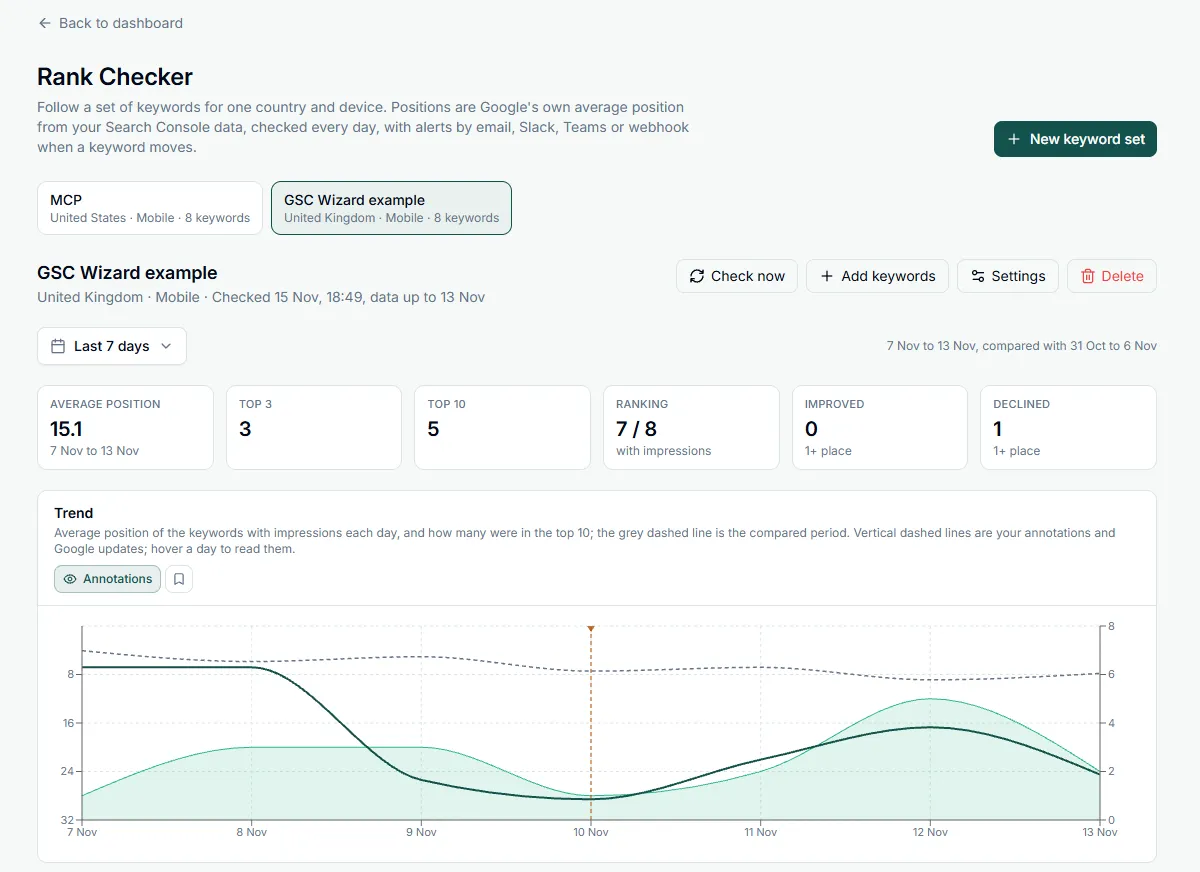
A keyword set is a list of keywords for one property, one country and one device (either can be “all”). Every day the Rank Checker reads Search Console’s own average position for exactly those keywords in exactly that slice, so the numbers are Google’s, from real searches, and no result page is scraped. Each set shows how its keywords moved, which URL ranks for each one, and the daily trend. Open it from Rank Checker in a property’s sidebar.
Create a keyword set
Click New keyword set, name it, pick the country and device, and add keywords in any of three ways:
- Paste them, one per line.
- Upload a .csv, .tsv or .txt file. A CSV is read from the column headed Keyword, Query or Top queries, so a Search Console export works as it is.
- Pick them from your top Search Console queries of the last 28 days for the country and device you chose, with their clicks, impressions and position. Narrow the list to a content group or topic cluster, or to branded or non-branded queries.
Pick several countries at once and the Rank Checker creates one set per country, with the same keywords and settings, up to 10 in one go. Tracking “running shoes” in the Netherlands, Belgium and Germany gives you three sets you can compare side by side.
- Up to 500 keywords per set and 50 sets per property, counting everyone’s. Keywords are matched case-insensitively against the exact query Google reports.
- A new keyword gets up to 16 months of history at its first check, so its trend is there from day one. The Rank Checker keeps two years of daily positions after that.
- Changing a set’s country or device later points it at a different slice of your data, so the set starts its history again.
When positions are checked
- Every set is checked once a day in the background. You do not need to open the page.
- The Rank Checker reads Search Console’s final data, which runs three days behind, so a position never changes after you have seen it. The line under the set’s name says when it was last checked and the last day it holds.
- Check now runs a check straight away, for example after adding keywords. It can run once every five minutes.
- If Search Console fails during a check, the set shows why and tries again later on its own.
What you get
- Six summary cards: average position, keywords in the top 3 and top 10, how many keywords rank, and how many improved or declined by at least one place.
- A trend chart of the set’s daily average position and its top-10 count, with the compared period as a dashed line, and your annotations and Google updates marked on it.
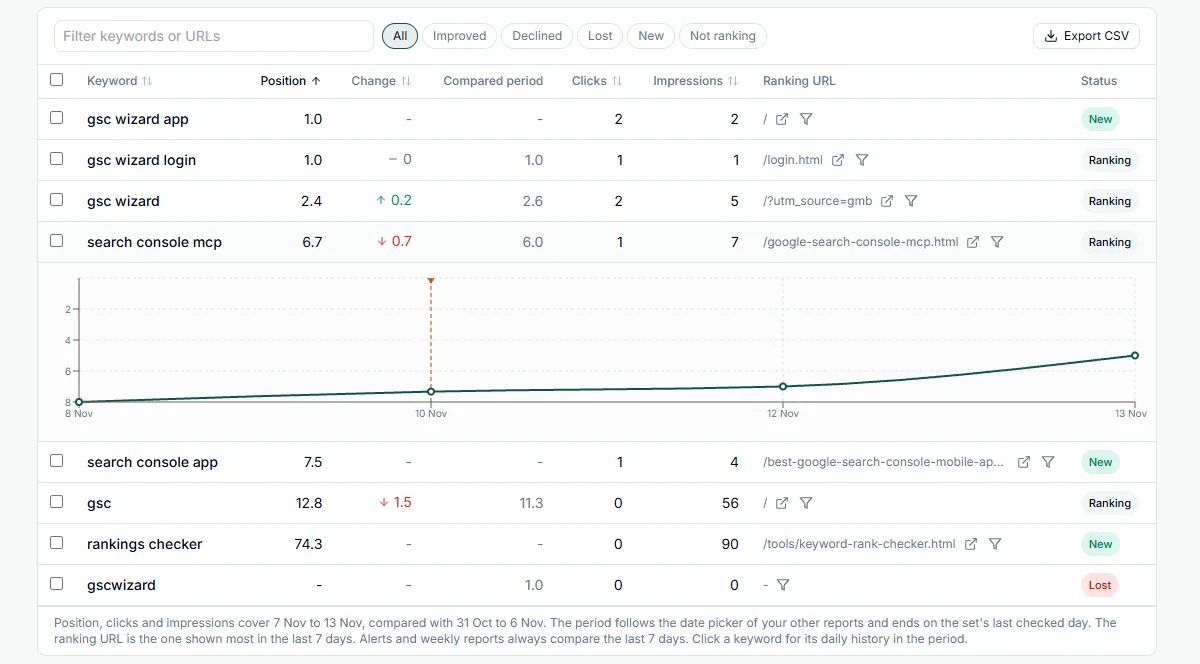
- A keyword table with position, change, the position in the compared period, clicks, impressions, the ranking URL (the page shown most in the last 7 days) and a status: Ranking, New, Lost or Not ranking. Filter it by keyword or URL, or by Improved, Declined, Lost, New and Not ranking.
- Click a keyword for a chart of its daily position over the period. Each row also links to the page and to the Queries report filtered to that keyword.
- The same date picker as your other reports, from the last 7 days to the last 16 months, with a previous-period or year-over-year comparison. The period ends on the set’s last checked day.
- CSV export of the keyword table, and removing keywords together with their history.
Rank alerts
Each set can tell you when its keywords move. In the set’s settings choose:
- How far a keyword has to move: 1, 2, 3, 5 or 10 places (3 by default).
- Which way: drops only, or drops and gains.
- What to compare: the last 7, 14 or 28 days against the same number of days before. A longer comparison alerts a few days later but ignores day-to-day noise.
- Email goes to your own address. The property owner can add up to five more addresses; each gets its own copy.
- Slack, Microsoft Teams or a webhook: tick Rank changes in a subscription under Slack, Teams & webhooks.
A keyword needs at least 10 impressions in a window before its position counts for an alert. Below that, one stray impression at position 40 would move the average by tens of places.
Weekly report
Switch on a weekly report per set and it arrives every Monday morning: average position, top 3 and top 10, clicks, and the biggest gains and drops. It compares the last 7 days with the 7 days before, the same week last year, or the last 4 weeks with the 4 before.
- By email, to your own address and, for the property owner, the extra addresses of the set.
- To Slack, Microsoft Teams or a webhook, through each subscription that has Rank Checker weekly reports ticked.
Why the position is an average
Search Console records the topmost position your site held each time it appeared in a search, then averages that over every search in the period. A keyword at 6.4 may have ranked 4th for some people and 9th for others, so the Rank Checker will rarely match one search in your own browser. What it gives you is the trend over real searches, for the market and device you chose. A keyword nobody searched for in the period shows as Not ranking, because Search Console has no impression to average.
Working as a team
Keyword sets belong to the property, so everyone you share it with works from the same sets. See Sharing & team access for inviting people.
- Everyone with access sees every set on the property, whoever made it. A set someone else made shows their name.
- The owner and members with full access can create sets and change, check, add keywords to or delete any set. Members with read-only access can view the sets but not change them.
- Emails go to the person who made the set. Alerts and the weekly report by email reach the set’s creator; make your own set to get them yourself. Slack, Microsoft Teams and webhook subscriptions receive the alerts of every set on a property you can open.
- Extra email addresses can only be added by the property owner, to sets they made.
- When someone loses access to the property, or deletes their account, the sets they made move to the property owner and keep running.
From an AI assistant
The MCP server has three Rank Checker tools: list_rank_keyword_sets lists your sets with their last check, get_rank_keyword_data returns a set’s positions, trend or one keyword’s history, and add_rank_keywords creates a set or adds keywords to one.
Part of Rankings & rank changes. Related: New & Lost Rankings, Rank Changes, Index Tracker.