Linear
The same alerts, as issues in the Linear team that fixes them. A traffic drop or a deindexed page lands in triage with its numbers and a link to the report.
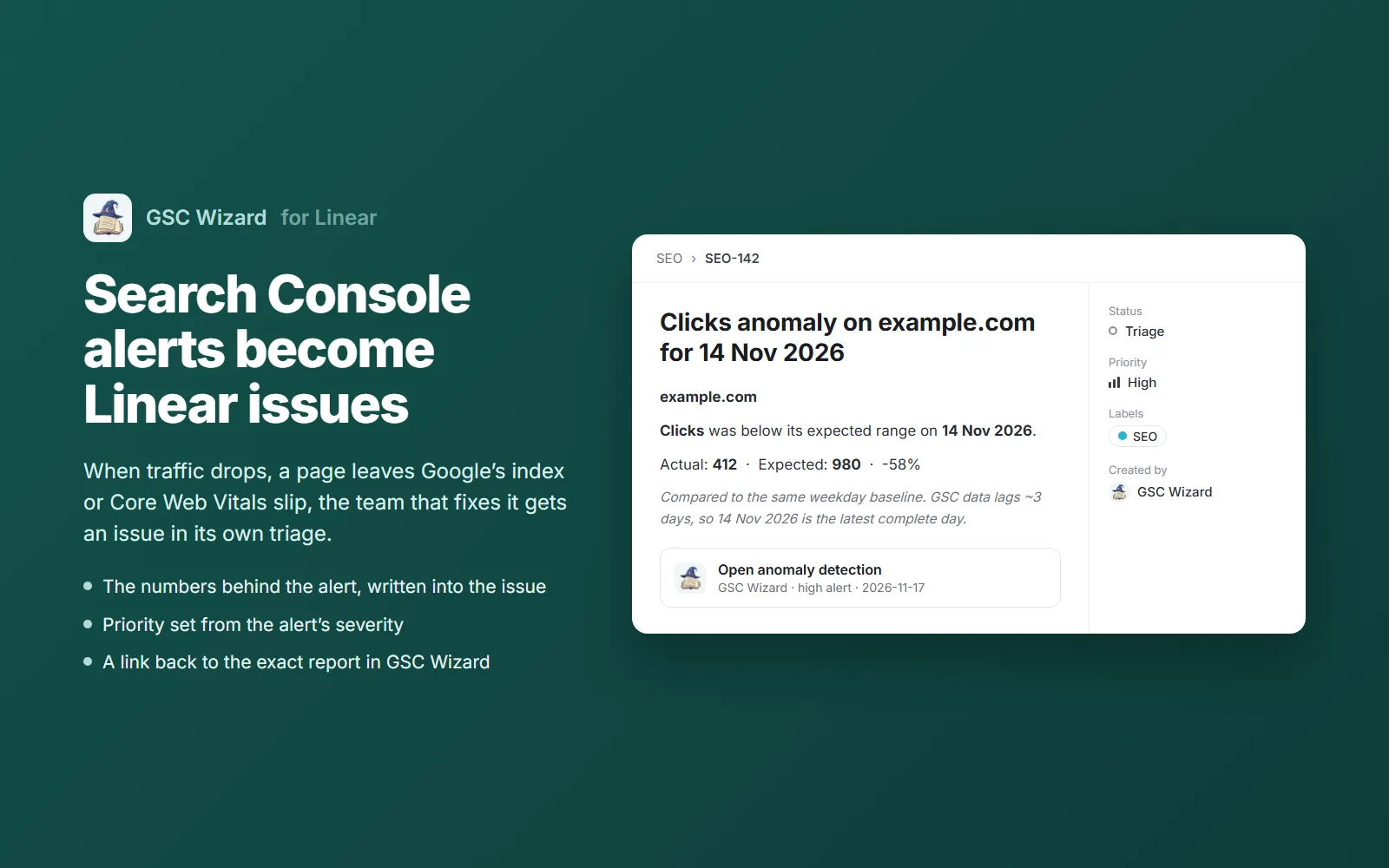
A Linear team subscribes to alert events exactly the way a Slack or Teams channel does, and receives each one as a new issue. GSC Wizard creates the issue as the app, so it shows GSC Wizard as its creator, and it never reads, edits or deletes anything else in your workspace. Set it up under Account → Slack, Teams & Webhooks; Slack is not needed.
Connecting a workspace
- Open Account → Slack, Teams & Webhooks and click Connect Linear in the Linear section.
- Linear asks you to approve GSC Wizard for a workspace. Pick the workspace and approve. You need to be allowed to install apps in it; on some plans that is an admin.
- You land back on the settings page with the form open. Several workspaces can be connected; Connect another workspace adds one.
Sending alerts to a team
- Pick the workspace and the team. Only teams the app can see are listed.
- Optionally pick a label to put on every issue, for example SEO. The list shows the team’s labels and the workspace’s shared ones.
- Tick the alert types and choose a minimum severity, the same choices an alerts subscription offers. Each matching alert becomes one issue.
- Click Send alerts to this team, then the send icon on the new row: it creates a test issue in the team, so you know it works before the first real alert. Close or delete that issue afterwards.
To split properties or alert types across teams, add one row per team, each with its own types and severity.
What an issue contains
The same content an alert posts to Slack, written as an issue.
- Title: the alert’s headline, for example Clicks anomaly on example.com for 14 Nov 2026.
- Description: the property, the numbers behind the alert (actual against expected, the change, the affected URL) and a note on how to read them, such as the roughly three-day Search Console lag.
- Priority from the alert’s severity: critical becomes Urgent, high High, medium Medium, low Low, and info (algorithm updates) No priority.
- Link: the report the alert came from, attached to the issue with the GSC Wizard icon, already filtered to the property.
- The label you picked, and the team’s default status for new issues (usually Triage or Backlog).
Delivery behaviour
- Issues are created on the same job as Slack, which runs every ten minutes, so an issue appears within minutes of detection.
- An alert is created once per team. A retry after a timeout cannot open a second issue: every issue has a fixed id, and Linear refuses a duplicate.
- Linear outages and rate limits are retried on later runs. A destination is paused, with the reason on its row, when the workspace removes the app, the access can no longer be renewed, or the team is gone.
- Rows can be paused and resumed at any time. Deleting a row stops new issues at once; issues already created stay in Linear.
Permissions and data
GSC Wizard asks Linear for two permissions and uses nothing more.
read: lists the workspace’s teams and labels for the picker, and reads the workspace name.issues:create: creates the alert issue and its link back to GSC Wizard.- The access and refresh tokens are encrypted at rest (AES-256-GCM). Nothing from Linear is stored beyond the workspace, team and label names and ids.
- The issue carries the alert’s content into your workspace: the property, and depending on the alert, page URLs, search queries and metric values. Everyone who can see the team can read it.
See the privacy policy for how GSC Wizard handles data.
Disconnecting
- Disconnect next to the workspace revokes the tokens at Linear and deletes them here, together with every team row on that workspace.
- Removing GSC Wizard in Linear (Settings → Applications) has the same effect on delivery: Linear tells GSC Wizard, and the workspace’s rows pause until you reconnect.
Troubleshooting
“Reconnect this Linear workspace first”
The app was removed from the workspace, or Linear stopped renewing its access. Click Reconnect; paused rows resume on their own.
A team is missing from the list
The app only sees the teams it has access to. A private team may need the app added to it in Linear first.
“Linear refused the issue” on a test
Usually a label that was deleted or turned into a group, or a team that was archived. Delete the row and add it again with the current team and label.
Part of Slack, Teams & webhooks. Related: SEO reporting data in Linear, Alerts, Microsoft Teams, Outbound webhooks.