Alerts
Post to a channel the moment something changes: a broken connection, an indexing warning, a traffic drop, an algorithm update.
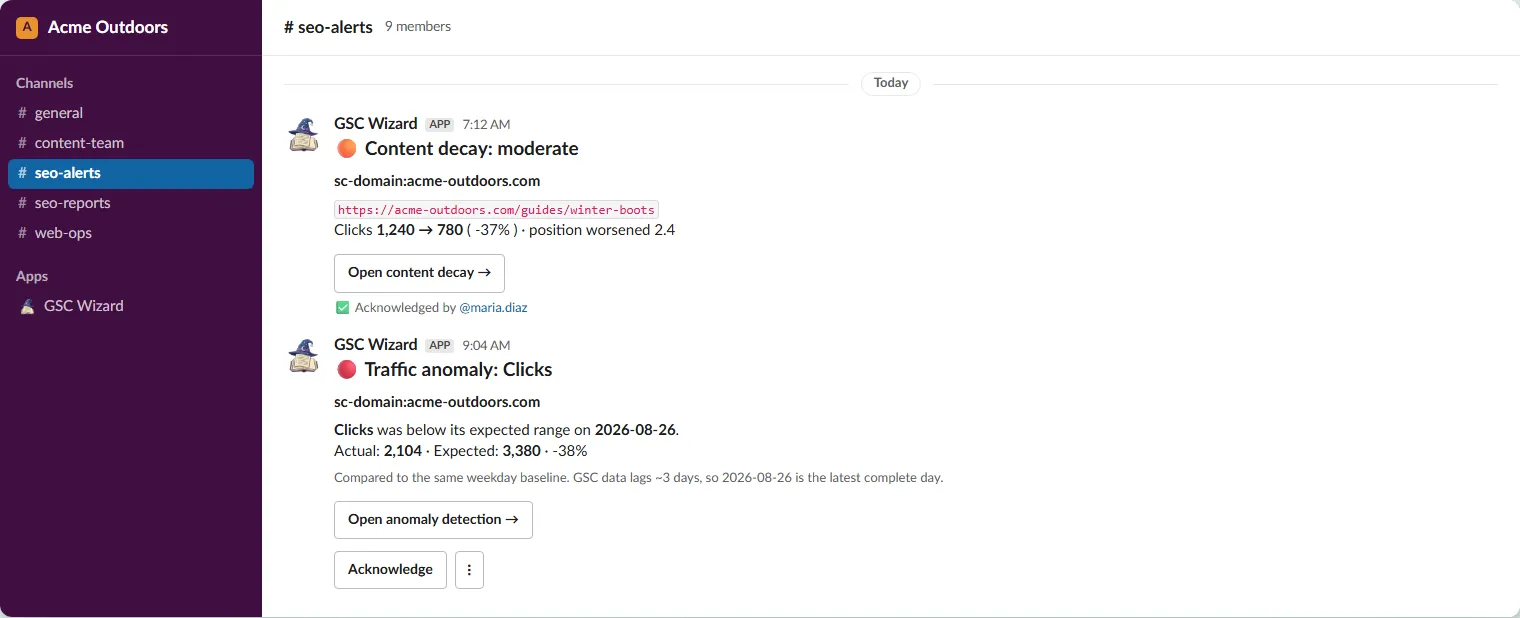
An alerts subscription is a channel plus a set of alert types plus a minimum severity. Unlike a report, it can cover one property or all of them, which makes a single “SEO alerts” channel for a whole portfolio a two-minute setup.
What can raise an alert
Tick the types you want. Anything you leave unticked is never posted to this channel.
- Broken Google connection: a token refresh failed, so ingest and trackers pause until you reconnect.
- Connection restored: a previously broken connection is working again.
- Indexing warnings: deindexed, stale-crawl, reindexed, or checks-paused notices from the Index Tracker.
- Core Web Vitals regression and recovered: a CrUX metric dropped a rating bucket week over week, or climbed back. See Core Web Vitals.
- Google algorithm update: a core, spam, reviews, or ranking update started rolling out.
- Traffic anomalies: a single day whose metric fell outside its expected range.
- Sustained traffic shifts: a confirmed step change in the level of the series, correlated with any algorithm update in the same few days.
- Content decay: pages or queries newly losing clicks against their baseline.
- Experiment readouts: weekly uplift, significance, and power for your active experiments.
- URL Inspection quota: the daily inspection cap was reached for a property.
- IndexNow failures: a IndexNow submission batch that was rejected.
- Bing crawl issues: crawl issues on your verified Bing Webmaster properties.
- Migration issues: new broken or wrong redirects, newly noindexed or canonicalised redirect targets, or a recovery that stalls or drops, on a saved migration with alerts on. Only the account that saved the migration receives them.
Severity
Every event carries a severity: critical, high, medium, low, or info. The subscription’s minimum severity drops anything below it. For traffic changes the severity follows the size of the move, so a 30 percent drop is critical where a 10 percent one is medium.
Some things are only ever sent at info: connection restored, Core Web Vitals recovered, an experiment readout where nothing reached significance, and the newly-indexed notices from the tracker. Set the minimum severity to info to receive them. The form warns you when your threshold hides something you ticked.
Real-time or bundled
- Real-time posts each event on the next delivery run after it is detected, and that job ticks every ten minutes.
- Bundled daily collects a day of events into one message, sent at the hour and timezone you choose. Good for noisy types and for channels people read once a day.
An event reaches a given channel once. Several subscriptions on the same property each get their own copy, and each has its own acknowledge state.
When each detector runs
Detection is hourly, but the heavier scans have a fixed slot (times are UTC).
- Every hour: connection broken and restored, indexing warnings, URL Inspection quota, IndexNow failures.
- 06:00 traffic anomalies. 07:00 sustained traffic shifts. 10:00 Bing crawl issues.
- About once a day per saved migration: migration issues, from the re-check of each saved migration with alerts on.
- Mondays: content decay at 08:00, experiment readouts at 09:00.
- Core Web Vitals alerts come from the weekly CrUX check, and algorithm-update alerts when Google publishes the update.
Tuning the detectors
The Advanced panel on an alerts subscription controls what gets detected, not only what this channel receives.
- Anomaly metrics: which series the anomaly detector scans (clicks, impressions, CTR, average position). Clicks alone when nothing is picked. Each extra metric is checked separately, so it can add alerts.
- Traffic anomaly sensitivity: a modified Z-score for a single day. Lower catches more. Default 3.5.
- Sustained shift sensitivity: the size of a level shift relative to the series’ own variation, which is a different scale. Lower catches more. Default 2. Values of 3 and above could never fire, so the list stops at 2.5.
- Anomaly direction: drops only (the default), or drops and spikes.
- Content decay scans: pages (the default), queries, or both. Both doubles that property’s weekly warehouse reads.
- Content decay items per run: caps how many decaying items a property emits each week, most severe first. Default 10.
Detection runs once per property, on the widest of the subscriptions covering it: the lowest sensitivity, every selected metric, spikes if any one asks for them, and the largest item cap. Delivery does not narrow it again, so a channel can receive what another subscription widened.
Muting
Alert messages carry a mute menu, so anyone in the channel can quiet a type without opening the app. A mute can cover one alert type or the whole channel, for 24 hours, 7 days, or until cleared.
Active mutes are listed on each subscription in Account → Slack, Teams & Webhooks, with an x to clear them. A mute set three weeks ago in a message nobody can find would otherwise be a mute nobody can undo. Details in Using it from Slack.
Part of Slack, Teams & webhooks. Related: Adding the Slack app, Using it from Slack, Outbound webhooks.