How to measure AI Overviews on your branded queries
In September 2026 Google started showing AI Overviews on most branded searches. Search Console does not tell you which of your queries show one. This playbook sets up the brand definition and the clusters that make the impact visible anyway, so you know where it costs clicks and what to fix.
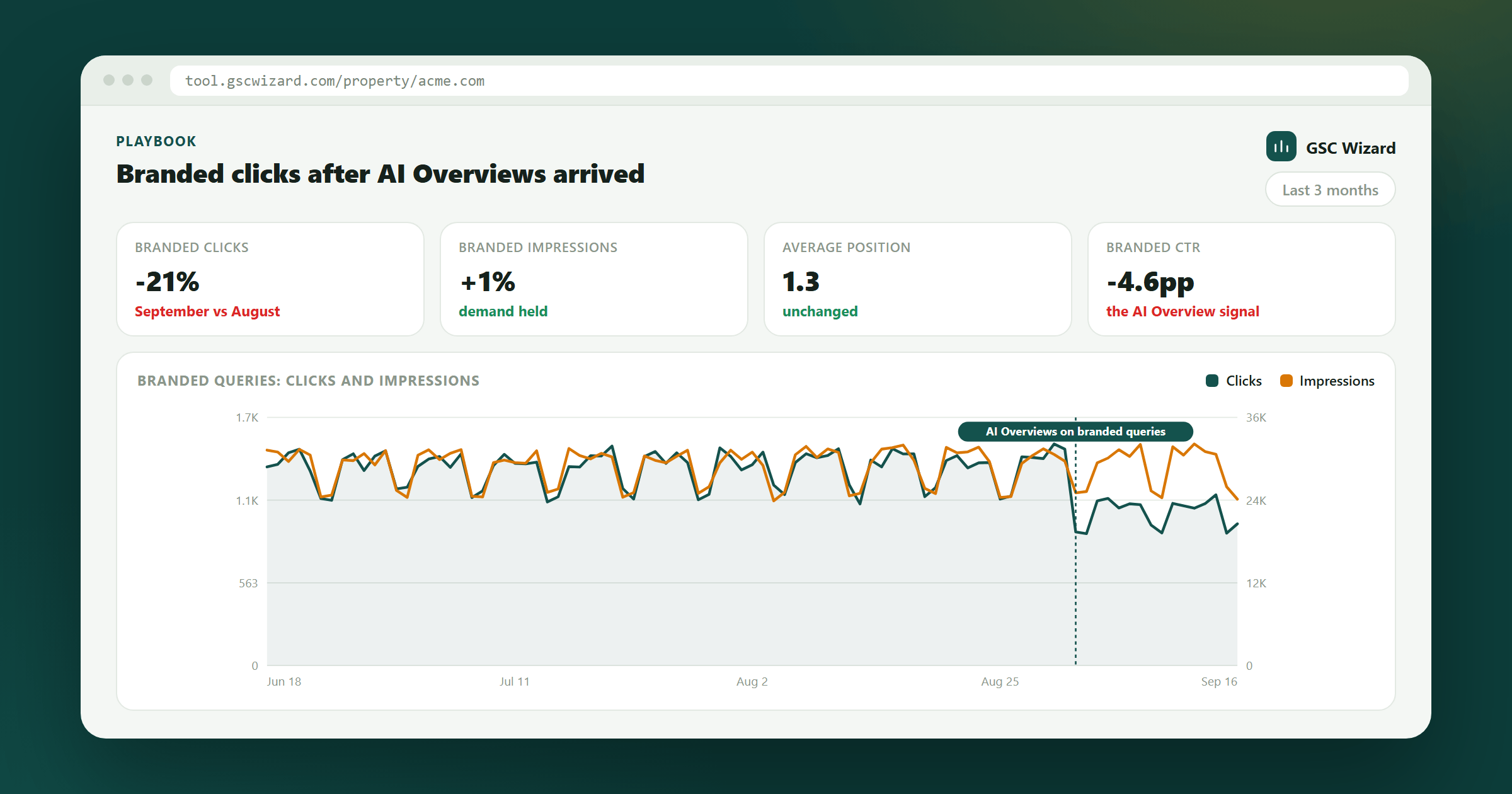
Split branded traffic by intent and find the clusters where CTR fell while rankings held.
30 minutes to set up, 15 minutes a month after that.
GSC connected, data back to at least July 2026, a list of your brand and product names.
What changed in September
Two independent datasets show the same jump, measured in different ways:
- DemandSphere tracks branded keywords daily across all markets and devices. The share returning an AI Overview went from 26.12% on 1 September to a peak of 90.48% on 27 September, and was 82.06% on 29 September. Google made no announcement. (DemandSphere, 1 October 2026)
- Ahrefs looked at 92.5 million branded-keyword crawls on US desktop. The monthly average went from 61.3% in July to 65.1% in August and 73.3% in September, and on 29 September it was 82.91%. In a separate panel of 100 bare brand names, 5 of 98 usable results had an AI Overview on 1 July and 63 of 100 did on 30 September. In 48 of those 63, the AI Overview sat in position one, above the brand's own site. (Ahrefs, 2 October 2026)
Neither dataset measures clicks, and neither tells you whether your brand is affected. A third-party keyword panel is not your keyword set. Your own Search Console data is the only place where you can see the effect on your site.
Why branded queries need their own check
On a generic query, an AI Overview competes with ten other sites. On your brand name it competes with you, for people who were already looking for you. Two risks follow:
- Lost clicks on queries you used to win by default. Ahrefs' earlier study found a 58% lower click-through rate for the top-ranking page when an AI Overview was present. That study was not about branded queries, so treat it as a direction, not a forecast.
- Someone else tells your story. In the Ahrefs brand panel, Wikipedia appeared in 41 of the 57 AI Overviews where the sources were visible, YouTube in 22 and LinkedIn in 13. A pricing answer built from an old YouTube review is still a pricing answer.
What Search Console can and cannot show
The Performance report has no AI Overview flag per query. The Generative AI performance report shows which pages appeared in AI Overviews and AI Mode, but by page, not by query, and it is not in the API. So you cannot filter for "branded queries with an AI Overview".
What you can see is the footprint. When an AI Overview lands above your result, your position and your impressions mostly stay where they were and your CTR drops. If you split branded traffic into intent groups, that pattern shows up in some groups and not others, and that tells you where to look.
Step-by-step
- Set your branded keywords. Property Setup → Branded keywords. Add the brand name, common misspellings, the domain without its extension and your product names. Plain keywords match anywhere in the query, ignoring case. For a pattern, wrap it in slashes:
/acme ?corp|acmecorp/. Then open the Queries report with the branded filter on and scroll the non-branded side for brand variants you missed. - Build branded topic clusters by intent. Property Setup → Topic clusters (CSV import works too). One cluster per thing people want when they search for you. A query can sit in more than one cluster, so keep the patterns tight. A starting set, with acme as the brand:
- Brand name only:
/^acme$/ - Login and app:
/acme.*\b(login|log in|sign in|app|account)\b/ - Pricing:
/acme.*\b(price|prices|pricing|cost|plans?|discount|coupon)\b/ - Reviews and trust:
/acme.*\b(reviews?|legit|scam|complaints?|reddit)\b/ - Comparisons:
/acme.*\b(vs|versus|alternatives?|competitors?)\b/ - Support:
/acme.*\b(contact|support|cancel|refund|phone|help)\b/ - Questions:
/^(how|what|why|which|when|who|can|does|is)\b.*acme/
- Brand name only:
- Annotate the change. Add an annotation on 1 September 2026 ("AI Overviews expand on branded queries") with the scope set to all your properties, so every chart you open later shows where the change started.
- Compare August with September per cluster. Open Topic Clusters with the branded filter on and set the period to the last 3 months in Cluster Performance Over Time. For each cluster, read three numbers together:
- Position flat, impressions flat, CTR down: the results page changed above you. This is the AI Overview signal.
- Impressions down: fewer people searched for you. That is demand, not layout.
- Position down: a ranking problem. Fix that first, separately.
- Check CTR against your own curve. Advanced analysis → CTR curve, with the branded filter on. Branded queries at positions 1 to 2 that sit well below the expected CTR are your shortlist.
- Look at the actual results page. For the top 10 queries in each cluster with a CTR drop, search in a private window in your main market. Note whether there is an AI Overview, whether it is correct, and which sources it cites. Ten searches per cluster, once a month, in a spreadsheet. This step is manual on purpose: you are checking a results page, not running a tracking product.
- Fix the owned page behind each affected cluster. If the pricing answer is wrong, the pricing page needs current prices, the plan names and the date they apply from, high on the page. If the support answer points to a third-party forum, your help page needs the exact steps. If comparisons are answered from a review site, you need your own honest comparison page. Write lines that say which product, market, version and date the page applies to. Then check the Generative AI performance report for whether those pages start to appear.
What not to do
- Do not build a page for every brand + modifier combination. Google treats pages made at scale to steer AI answers as scaled content abuse. Improve the page that should already answer the query.
- Do not rewrite every paragraph to repeat your brand name. Clear headings, a line that says who a page is for, and dated facts do more.
- Do not judge on clicks alone. Someone who reads your correct pricing in an AI Overview and then signs up still converts. Check branded conversions in GA4 before you rewrite anything.
Do it from your AI assistant
The same checks run through the GSC Wizard MCP. Ask for branded performance and topic cluster performance for August versus September, and the assistant pulls both. The results page check in step 6 stays manual.
Caveats
DemandSphere and Ahrefs track different keyword sets, and Ahrefs only looked at US desktop. DemandSphere's daily numbers moved by ten points between 27 and 28 September, so Google is still adjusting. A CTR drop at a stable position is consistent with an AI Overview but does not prove one, which is why step 6 exists. Read the setup guide for topic clusters for the full rule syntax.
Next playbook
If the CTR drop shows up on non-branded queries too: recover CTR on under-performing pages →
Written by Jan-Willem Bobbink · Published October 7, 2026