How to cluster your Search Console queries into topics to find opportunities
To cluster your Google Search Console queries into topics, you give every query a topic, using regex or phrase rules, shared words (n-grams) or semantic embeddings, and then add up clicks and impressions and compute the impression-weighted position and CTR for each topic. The opportunities are the topics with plenty of impressions but a page-two position or a weak CTR, the topics where several of your URLs split the same queries, and the topics that get impressions without a page written for them. This playbook walks through each method with its honest trade-offs, a worked example, and the way GSC Wizard does it.
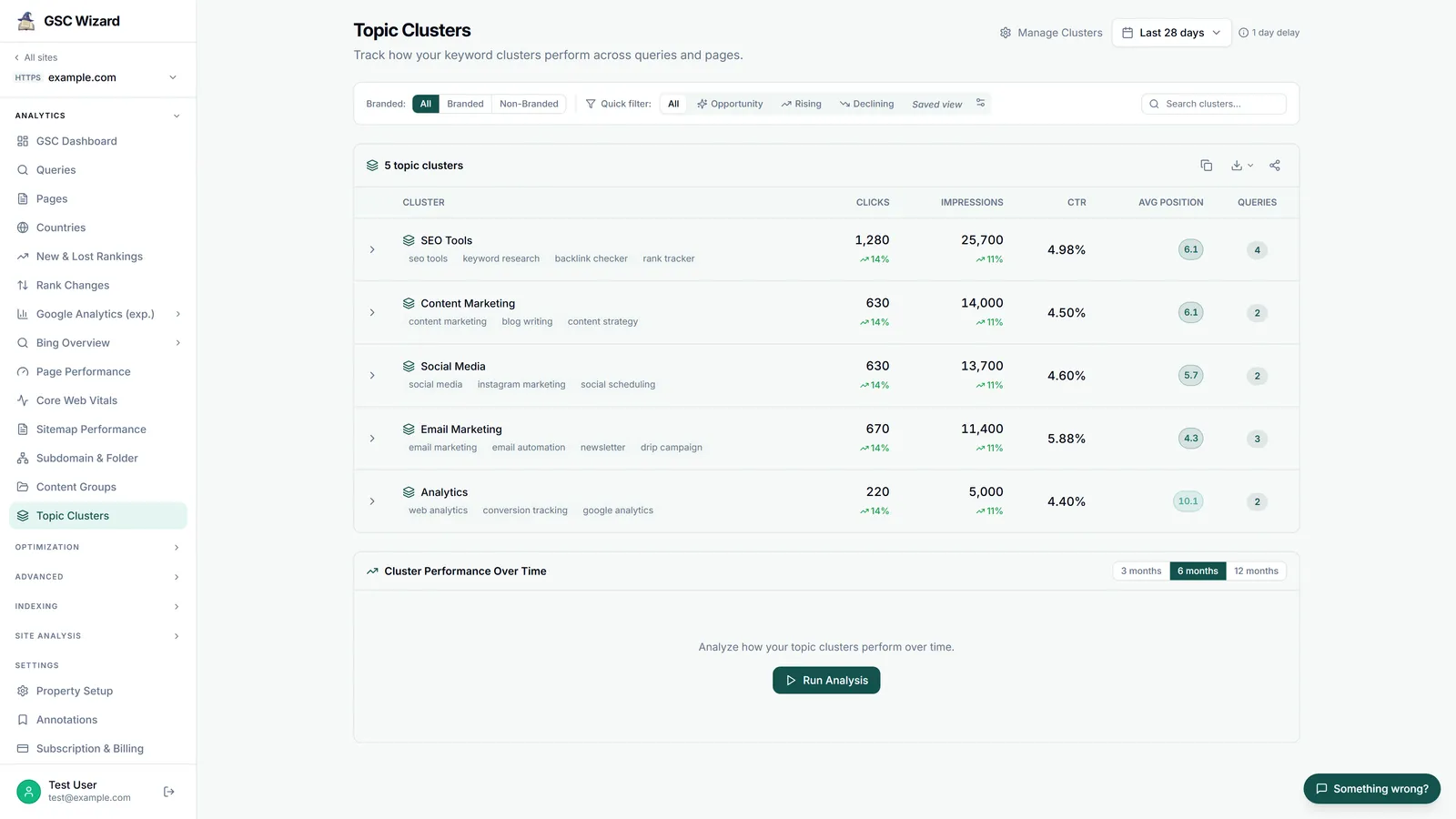
10 to 30 named topics with totals per topic, and a short list of topics worth working on.
About an hour for a first set of rule-based clusters, then a few minutes a month.
A Search Console property with at least three months of query data, and a spreadsheet or a GSC Wizard account.
Why group Search Console queries into topics at all
Search Console reports queries one row at a time, and on any site with real traffic most of those rows are tiny. A query with 40 impressions a quarter tells you nothing on its own, but two hundred phrasings of the same question add up to a topic you can rank for, write for and track. Grouping also turns a list nobody reads into a short table you can act on: which subjects bring you traffic, which ones you are close to winning, and which ones are slipping. It is the same reason the striking distance playbook works better per topic than per query, because one page usually serves a whole cluster.
Before you start, take two kinds of queries out. Branded queries behave differently from everything else (they rank high and click well), so cluster them separately or not at all; Search Console's branded queries filter now splits the Performance report into a Branded and a Non-branded view on eligible sites. And if your query list has picked up long, prompt-shaped strings that AI visibility tools send to Google on a schedule, filter those out too, or they will form a cluster of their own that no searcher ever typed. The Query Analysis report in GSC Wizard labels them as LLM tracker probes so you can exclude them.
Three ways to cluster GSC queries, compared
There are three practical methods (the second comes in two variants, n-grams and SERP overlap), plus the grouping Google itself now shows in Search Console Insights. They trade control against coverage: rules are predictable but only find what you thought of, and embeddings find what you missed but give you groups you have to check by hand.
| Method | What you need | Catches synonyms? | Same result next month? | Best for |
|---|---|---|---|---|
| Regex or phrase rules | Search Console's regex filter, or a tool that saves the rules | Only the ones you write into the rule | Yes | Tracking topics you already know, reporting to clients |
| N-grams in a spreadsheet | An export of your queries and some formulas or a short script | No, only shared words | Yes, if you keep the same settings | A quick first map of what your site is found for |
| SERP overlap | The top 10 results for every query, from a paid SERP data source | Yes, as far as Google ranks the same pages for them | No, the results move | Deciding whether two queries need one page or two |
| Embeddings | An embedding model, Python, and a clustering algorithm | Yes, also across languages | No, new queries and settings move the groups | Discovering topics in a large, messy query set |
| Google's Query groups | Nothing, if your property has enough queries | Yes, including misspellings and other languages | No, Google says the groups may change | A quick look at your biggest and trending topics |
Google's own option deserves a sentence first. In October 2025 Google added Query groups to Search Console Insights, a card that "groups similar search queries" and shows the total clicks per group, sorted as Top, Trending up and Trending down. Google writes that "the groups are computed using AI; they may evolve and change over time" and that they "are available only to properties that have a large volume of queries". So it is a good free overview if you have it, but you cannot define the groups, they are not stable enough to track month over month, and smaller sites do not get the card at all.
Method 1: regex groups in the Search Console filter
In the Performance report, add a Query filter, choose Custom (regex), and write one pattern per topic, for example cold.?brew|iced coffee concentrate. According to Google's help page on advanced filtering, "the RE2 syntax is used", matching is partial (the pattern can match anywhere in the query unless you anchor it with ^ or $), and matching is not case-sensitive unless you start the pattern with (?-i). RE2 has no lookaheads or backreferences, so patterns copied from a JavaScript or PCRE cheat sheet sometimes fail; the Search Console regex filter FAQ has working examples.
The strength of this method is that you decide exactly what belongs in a topic, and the same pattern gives the same group next month. The weakness is that Search Console shows one filtered view at a time, so comparing twelve topics means twelve filtered views and copying each total into a sheet by hand, and the query table under each view stops at 1,000 rows (see the 1,000-row limit). There is also a subtler catch: Google's deep dive on performance data explains that anonymized queries, those "that aren't issued by more than a few dozen users over a two-to-three month period", are left out of the tables and are only "included in chart totals, unless you filter by query". A regex group therefore always carries fewer clicks than the pages that serve it, and the gap is largest on long-tail topics.
Method 2: n-grams in a spreadsheet, or SERP overlap
For an n-gram map, export your queries with clicks, impressions and position for three to twelve months (the interface export stops at 1,000 rows, so use the Search Console API or the bulk data export on a large site). Lowercase every query, split it into words, drop stop words such as "how", "the" and "for", and fold simple plurals so "grinders" and "grinder" count as one word. Then count how many queries contain each single word (unigram) and each pair of neighbouring words (bigram). Pairs that recur across many queries, like "cold brew" or "burr grinder", are your candidate topics; give each query the most specific candidate it contains and pivot the metrics by topic. Throw away words that appear in a large share of all queries, such as "coffee" on a coffee site, because a topic that contains half the site is not a topic.
N-grams are fast, free and repeatable, and they explain themselves: a query sits in "cold brew" because it contains those words. What they cannot do is see meaning. "French press" and "cafetiere" end up in different topics, and a misspelling like "coldbrew" misses its group. SERP overlap fixes that from the other side: you fetch Google's top 10 for every query and put two queries in the same cluster when they share enough ranking URLs, for example three or more. That measures what Google treats as the same intent, which makes it the best method for deciding whether a topic needs one page or two, but it costs a SERP lookup per query, the results move with location, device and date, and it scales badly past a few thousand queries. GSC Wizard does not do SERP-overlap clustering, because it works only from your own Search Console data and does not scrape Google results.
Method 3: embedding-based semantic clustering
An embedding model turns each query into a vector of numbers so that queries with similar meaning end up close together, whatever words they use. A typical pipeline embeds every query with a multilingual model (so "cafetière" and "french press" can land together), reduces the vectors to a handful of dimensions with UMAP, and clusters them with HDBSCAN or k-means. You then name each cluster after its biggest queries and add up the metrics as before. This is the method that finds topics you did not know you had, and it handles misspellings, word order and other languages far better than rules.
The costs are real, though. You need Python or a paid embedding API, and the result depends on settings: change the minimum cluster size, or add three months of new queries, and the groups shift, which makes month-over-month tracking unreliable. HDBSCAN also leaves a share of queries as noise that belongs to no cluster. Semantic closeness is not the same as one intent either: "cold brew maker" and "cold brew recipe" sit next to each other in vector space, but one wants a product page and the other a recipe. The workflow I recommend is to discover topics with embeddings or n-grams once, then write the topics you care about down as rules, and track the rules.
A worked example: the same queries, three methods
The queries below are invented for a fictional coffee shop to show how the methods disagree; they are illustrative, not data from a real site. The regex rules are cold.?brew for Cold brew, french press|press pot|cafeti[eè]re for French press and grinder for Grinders. The embedding column shows the kind of grouping an embedding model tends to produce, not the output of an actual run.
| Query (illustrative) | Regex rules | N-gram topic | Embedding cluster |
|---|---|---|---|
| cold brew ratio | Cold brew | cold brew | Cold brew |
| how much coffee for cold brew | Cold brew | cold brew | Cold brew |
| coldbrew concentrate recipe | Cold brew (the .? allows the missing space) |
concentrate (the word "coldbrew" is not "cold brew") | Cold brew |
| iced coffee concentrate | None, no rule mentions it | concentrate | Cold brew |
| french press grind size | French press | french press | French press |
| cafetiere how many scoops | French press (the synonym is in the rule) | Unassigned, the word appears too rarely | French press |
| best burr grinder for espresso | Grinders | burr grinder | Grinders |
| coarse grind for press pot | French press | grind | Grinders or French press, it could go either way |
The pattern is typical. Rules are exact but blind to anything you did not write down ("iced coffee concentrate"), n-grams split topics along spelling, and embeddings group by meaning but blur the line between neighbouring intents ("coarse grind for press pot"). None of them is wrong; they answer different questions.
What to do with your clusters to find opportunities
Once every query has a topic, sum clicks and impressions per cluster, and compute average position and CTR weighted by impressions (a plain average of positions lets a query with 3 impressions count as much as one with 30,000). Compare the same period last year or the previous period so every cluster has a direction. Then look for four patterns.
- Clusters with high impressions and weak CTR or position. Sort by impressions and look for clusters averaging position 8 to 25 or with a CTR well below the rest of the site. Google already connects you with the topic, you are just not winning it. Open the cluster, find the two or three queries that carry most of its impressions, and improve the page that ranks for them, starting with the title and the first screen of content; the striking distance and CTR recovery playbooks cover the edits.
- Cannibalization inside a cluster. For each cluster, count how many of your URLs get impressions for its queries. If three pages each rank around position 15 for the same cluster, Google cannot decide which one to show and none of them gets to page one. Pick the strongest page, merge or redirect the others, and point internal links at the winner, as in the cannibalization playbook.
- Content gaps. A cluster that earns impressions through a page that is not about it (your home page ranking 30th for a how-to question, or a category page ranking for a comparison) is asking for a dedicated page. The same goes for the queries no cluster caught: read that leftover list once a quarter, because a new topic usually shows up there first.
- Clusters moving over time. Track each cluster monthly. A cluster whose impressions climb while clicks stay flat is gaining visibility it is not converting yet, and a cluster sliding for three months in a row is decaying, which the content decay playbook deals with. Clusters also make a site migration readable: one lost topic is easier to fix than four hundred lost queries (see site migrations in Search Console).
Here is what that triage looks like on the fictional coffee shop, again with invented numbers:
| Cluster (illustrative) | Impressions | CTR | Avg. position | URLs with impressions | What it says |
|---|---|---|---|---|---|
| Cold brew | 48,000 | 0.9% | 13.4 | 1 | Page-two topic with demand: improve the one page |
| French press | 21,000 | 1.6% | 11.2 | 4 | Four pages split it: consolidate first |
| Grinders | 9,500 | 4.8% | 5.1 | 2 | Healthy: monitor, no work needed |
| Iced coffee | 6,200 | 0.3% | 27.8 | 1 (the home page) | Content gap: write a dedicated page |
How GSC Wizard clusters Search Console queries
I built GSC Wizard's clustering around rules, because rules are what you can track and explain, and I want to be precise about what each part does and does not do.
Topic Clusters (rule-based, defined by you). In Property Setup you create a cluster as a name plus a list of up to 100 keywords, typed in or imported from a CSV file. A plain keyword matches any query that contains it, ignoring case, and a keyword wrapped in slashes, like /cold.?brew/, is a regular expression. A query joins a cluster when any of its keywords matches, and a query can belong to more than one cluster, in which case it counts fully in each, so the cluster totals are not meant to add up to the site total. When you click Run Analysis, the Topic Clusters report matches the rules against every query of the property for the chosen period, from the stored warehouse data when the property is in full storage and from the Search Console API otherwise, so it is not limited to the 1,000 rows the Search Console interface shows. Each cluster gets clicks, impressions, CTR, an impression-weighted average position and a query count, with the change against the previous period, and expands to its matched queries with the keyword that caught each one.
The report has a branded and non-branded switch (driven by the brand terms you save on the property) and three quick filters that match the patterns above: Opportunity shows clusters with at least the median impressions of your clusters, an average position between 11 and 25 and a CTR of 1% or less; Rising shows clusters whose impressions grew at least 20% while clicks grew 5% or less; Declining shows clusters whose impressions fell 10% or more. A separate Cluster Performance Over Time section charts every cluster over 3, 6 or 12 months with a monthly table. The same clusters also work as a filter on the Queries, New & Lost Rankings, Rank Changes, Cannibalization, Query Decay and Page Poaching reports, which is how you check cannibalization or decay inside one topic. The Topic Clusters docs have the details, and Content Groups do the same thing for pages by URL rule.
What Topic Clusters does not do. It does not invent clusters for you: there is no automatic or semantic grouping in this report, and unlike Content Groups it has no suggestion helper. If you want help writing the rules, the GSC Wizard MCP server lets an AI assistant such as Claude or ChatGPT read your top queries, propose clusters, save them with create_topic_cluster or update_topic_cluster, and measure them with get_topic_cluster_performance, which also reports the queries no cluster matched. The grouping is then the assistant's judgment, so read the rules before you save them.
Automatic lexical topics in Migration Compare. The one place GSC Wizard clusters queries automatically is the Queries tab of Migration Compare, which groups the queries of a before-and-after comparison into topics so a migration that failed for one product line reads as one row. It is the n-gram method from above, made deterministic: it takes up to 5,000 queries (highest clicks first), drops stop words in seven languages and folds simple plurals, uses single words and word pairs that recur across at least three queries but not across more than 40% of them as candidates, gives each query its best candidate, and keeps the 25 biggest topics, with the rest under "Other queries". The same rows always give the same topics, and it uses no embeddings.
URL clustering, not query clustering. The Longtail Visualization clusters pages rather than queries: it ranks your URLs by clicks, smooths the cumulative click curve with a Gaussian filter and places two knee points where the curve bends hardest, which splits the site into Head, Chunky Middle and Long Tail. It needs at least 30 URLs (below that it shows the ranked list), runs in a Web Worker in your browser so a large site does not freeze the page, and is also available to AI assistants as get_longtail_clusters. It answers a different question from topic clustering, namely how dependent you are on a few pages, and the long-tail docs explain the tiers.
Semantic clustering. GSC Wizard does not group queries with embeddings, so if you want semantic clusters, run Method 3 yourself on a query export and bring the topics you want to track back into GSC Wizard as rules, where they stay stable from month to month. Every plan includes Topic Clusters, Migration Compare, the Longtail Visualization and the MCP server, starting at €17 a month with a 7-day free trial (see pricing).
Frequently asked questions
How do I cluster my GSC queries into topics to find opportunities?
Assign every Search Console query to a topic, with regex or phrase rules, shared word n-grams, or semantic embeddings, then add up clicks and impressions and compute impression-weighted average position and CTR per topic. The opportunities are topics with many impressions but an average position on page two or a low CTR, topics where several of your URLs split the same queries, and topics that get impressions without a page written for them.
Can Google Search Console group queries into topics by itself?
Partly. Search Console Insights has a Query groups card that groups similar queries with AI and shows clicks per group, but only for properties with a large volume of queries, and Google says the groups may change over time. In the Performance report you can filter queries with a custom regex, which shows one group at a time, so comparing your own topics side by side still means copying totals out by hand.
What regex syntax does the Search Console query filter use?
RE2. Google's help page says matching is partial by default, so a pattern matches anywhere in the query unless you anchor it with ^ or $, and it is not case-sensitive unless you start the pattern with (?-i). RE2 does not support lookaheads or backreferences.
Why do my cluster totals not add up to my site total?
Two reasons. Google leaves anonymized queries (rare queries) out of every query table and out of totals filtered by query, so the clustered queries always carry less than the site total. And if a query matches two clusters, a tool that allows overlap, as GSC Wizard's Topic Clusters does, counts it in both.
Is embedding-based clustering better than keyword rules?
It finds synonyms and translations that rules miss, so it is better for discovering topics on a large, messy query set. Rules are better for tracking: they give the same grouping every month and you can explain them to a client. A good workflow is to discover topics with embeddings or n-grams and then write them down as rules.
Does GSC Wizard cluster Search Console queries automatically?
Not in the Topic Clusters report: you define each cluster as a list of phrases or regex patterns and GSC Wizard measures it across the whole property. Migration Compare groups the queries of a migration into lexical topics automatically, and the Longtail Visualization groups URLs, not queries, into head, chunky middle and long tail. GSC Wizard does not cluster queries with embeddings; for semantic clusters, run an embedding model on a query export and bring the topics back as rules.
Can an AI assistant build the clusters for me?
Yes, through the GSC Wizard MCP server. An assistant such as Claude or ChatGPT can read your top queries, propose clusters, save them with create_topic_cluster and measure them with get_topic_cluster_performance. Check the proposed rules before you save them, because the grouping is the assistant's judgment.
Next playbook
Found a cluster where several pages compete? Fix that before you rewrite anything: fix keyword cannibalization →
Written by Jan-Willem Bobbink · Published November 4, 2026 · Updated November 4, 2026