(not provided) in 2026: map Search Console queries to GA4 landing pages
Visits from Google's organic results reach your site without the search query, which is why Universal Analytics showed the keyword as (not provided) and why GA4 has no organic keyword at all. Google began withholding the query in October 2011, first for signed-in users and later for practically every search, and it is not coming back, so no tool can put keywords back on individual sessions. What you can do is join the two sources one level up: Search Console knows which queries sent clicks to each URL, GA4 knows what the visits that started on that URL did, and the landing page is the key both of them share. Joined on the page, you get clicks, CTR and average position next to sessions, key events and revenue, row by row.
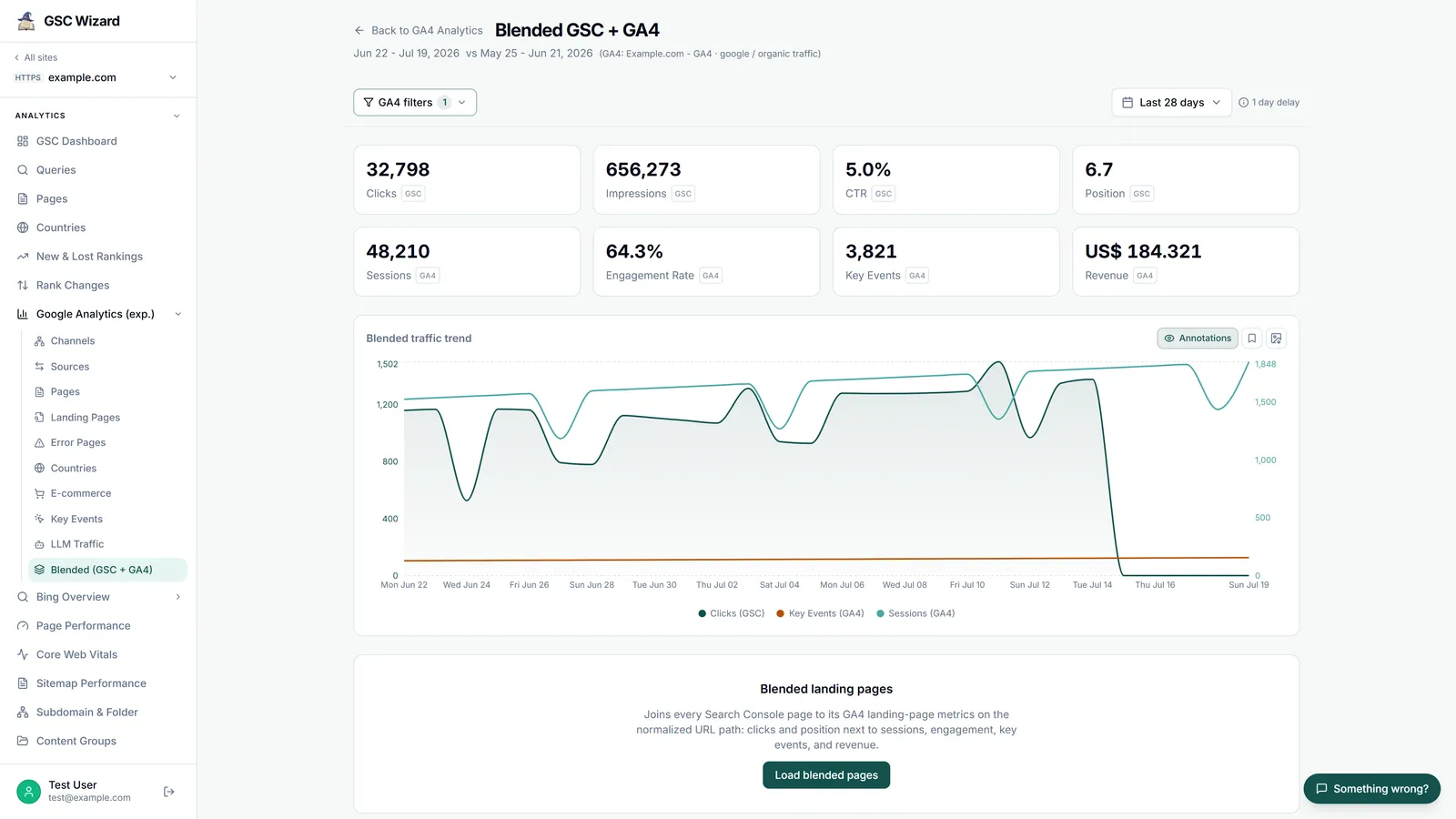
One table per landing page with Search Console clicks, CTR and position next to GA4 sessions, key events and revenue.
About 30 minutes in a spreadsheet the first time, or one click once GA4 is linked in GSC Wizard.
Access to the Search Console property and the GA4 property that measure the same site.
What (not provided) is and why it exists
On October 18, 2011, Google announced in Making search more secure that searches by signed-in users would move to SSL, encrypting the query and the results page. The post spelled out the consequence for site owners: websites visited from the organic listings "will still know that you came from Google, but won't receive information about each individual query." As a replacement, Google pointed to "an aggregated list of the top 1,000 search queries that drove traffic to their site for each of the past 30 days through Google Webmaster Tools." Clicks on ads kept passing the query, which is why paid search never had the same gap.
Encrypted search later became the default for everyone, and every Google results page is now served over HTTPS, so practically every organic visit from Google lands without its query. Universal Analytics filled the empty keyword field with the label (not provided), which is where the name comes from. GA4 does not even keep the field for organic traffic: its term dimensions are populated from the utm_term parameter, according to Google's GA4 API schema, and an organic click from Google does not carry one. Google Webmaster Tools became Search Console, the 30 days became 16 months, and that aggregated query data is still the only place the keywords live.
Why keywords can't be put back on individual sessions
Search Console does not record visits. It reports counts of clicks and impressions per query, page, country, device and day, with no session ID, user ID or timestamp you could match against a GA4 session, so there is nothing to join a single visit on. On top of that, Google leaves data out on purpose. Its documentation on dimensions says some queries "are omitted from the report to protect user privacy," and that Search Console "stores and shows only the most important data rows." The troubleshooting page adds that the table "can display a maximum of 1,000 rows," which is the same limit the 1,000-row FAQ explains how to get around.
So a tool that claims to "recover" (not provided) per visit is modelling, not measuring. The honest version works at two levels. At page level it joins two sets of measured aggregates, and every number in the row is real. At query level it can only estimate, by splitting a page's GA4 outcomes across the queries that sent it clicks. Both are useful, as long as the estimate is labelled as one.
| Question | Can you answer it? | How |
|---|---|---|
| Which keyword did this session search for? | No | Google does not send it, and Search Console has no session to match. |
| Which queries sent clicks to this page? | Yes, measured | Search Console, query and page dimensions together (minus anonymized queries). |
| What did organic visitors do on this page? | Yes, measured | GA4, landing page dimension, filtered to google / organic. |
| What were this page's CTR and position next to its key events? | Yes, measured | Join the two on the landing page. |
| How much revenue did this query bring in? | Only as an estimate | Split each page's revenue across its queries by click share. |
Option 1: the Search Console integration in GA4
The free starting point is Google's own link between the two products. In GA4, open Admin → Product links → Search Console Links, choose the Search Console property and the web data stream, and submit. Per Google's setup guide you need the Editor role on the GA4 property and verified ownership of the Search Console property; the connect GSC to Google Analytics FAQ walks through the clicks. The link adds two reports:
- Queries (Google Organic Search Queries): search queries with Search Console clicks, impressions, CTR and average position. Google's Queries report page says you can drill into it "by Search Console dimensions (but not by Analytics dimensions)", so it never shows key events or revenue per query.
- Google organic search traffic: landing pages with Search Console metrics and GA4 metrics side by side, including active users, engaged sessions, engagement rate, event count and key events. According to Google's report page its dimensions are "Landing page + query string", country and device category. This is the page-level join this playbook is about, done by Google.
Before you rely on it, know its limits, all taken from Google's own documentation:
| Limit | What it means in practice |
|---|---|
| The collection is unpublished by default | After linking, open Library in the left navigation and publish the Search Console collection, or the reports never appear in the menu. |
| Search Console metrics only combine with Landing page, Device and Country | No channel, campaign or custom dimension next to clicks and position, and no GA4 outcome next to a query. |
| Landing page + query string | Landing pages that carry tracking parameters show up as separate rows from the clean URL. |
| No time-series charts | Trends mean comparing date ranges by hand. |
| One web data stream to one Search Console property | A stream that covers several Search Console properties can only be linked to one of them. |
| 16 months, 48 hours late | Search Console data appears in GA4 48 hours after Search Console collects it, and only from the date the link's data availability rules allow. |
If you have never looked at your pages this way, start here. It costs nothing, and the Google organic search traffic report answers "which landing pages earn clicks and which of them convert" for most small sites.
Option 2: the GA4 + GSC join done by hand
Doing the join yourself in a spreadsheet, or in SQL over the Search Console bulk data export and GA4's BigQuery export, gets around most of those limits: any date range, any GA4 filter, revenue, and a comparison period. It is also where most people get a wrong answer without noticing, because the two sides spell the same page differently.
- Pick one date range of settled days. End it at least three days ago, because Search Console fills in recent days late, and use whole weeks or months so the time-zone difference below washes out.
- Export Search Console by page. In Performance → Search results, set the search type to Web, open the Pages tab and export. Past 1,000 pages, use the API, the Data Studio (formerly Looker Studio) Search Console connector with its URL Impression table, or the bulk export.
- Export GA4 by landing page. In Explore, build a free-form exploration with the Landing page dimension and the metrics Sessions, Key events and Total revenue, filtered to Session source / medium exactly
google / organic. Without that filter, GA4 counts direct, paid and referral sessions against a Search Console number that only ever describes Google organic clicks. - Normalise both URL columns with the rules in the table below, so that one page has one spelling on both sides.
- Aggregate after normalising. Several raw rows can collapse into one page. Add up clicks, impressions, sessions, key events and revenue; recompute CTR from the summed clicks and impressions; weight position by impressions; weight rates such as bounce or engagement rate by sessions. Averaging percentages row by row gives a page with three sessions the same weight as one with three thousand.
- Full outer join on the normalised path. Keep the rows that only exist on one side. Search Console pages with no GA4 sessions and GA4 landing pages with no Search Console clicks are diagnostics, not noise.
URL normalisation gotchas
| Gotcha | Search Console gives | GA4 gives | Fix |
|---|---|---|---|
| Full URL vs page path | https://www.example.com/shoes/ | /shoes/ | Strip the scheme and host from the Search Console URL. |
| Hostname | A domain property mixes www, m., blog. and http | Landing page has no host at all | Sum Search Console rows per path, or add GA4's Hostname dimension (some events record no hostname, so filtering on it can drop key events). |
| Trailing slash | /shoes/ | /shoes | Remove the trailing slash everywhere except the root /. |
| Parameters and fragments | /shoes?color=red | Landing page drops the query string; Landing page + query string keeps utm_ and gclid |
Cut everything from ? or # on both sides, or keep only the parameters that create real pages. |
| Canonical credit | Clicks credited to the canonical URL | The URL the visitor actually loaded | Expect GA4-only rows for duplicates; check the chosen canonical with URL Inspection. |
| Encoding and case | /caf%C3%A9 | /café | Decode both the same way. Keep the path's case: /Shoes and /shoes are different URLs. |
| Placeholder rows | None | (not set) | Drop them before the join. |
| Time zone | Days in Pacific Time | Days in the property's time zone | Compare whole weeks or months, not single days. |
The canonical and time-zone rows come straight from Google: the page dimension documentation says "the click counts toward the canonical URL, not the URL the user visits," and the discrepancy page says daily data is labelled in Pacific Time and that tools such as Google Analytics only see visitors with JavaScript enabled. That last point is also why clicks and sessions for a page never match exactly: watch the ratio between them over time instead of expecting the two numbers to be equal. The GSC vs Google Analytics FAQ covers the other reasons.
Page-level CTR and position next to sessions, key events and revenue
The joined table answers questions neither tool can answer alone. The numbers below are made up to show the patterns that matter:
| Landing page | Clicks | CTR | Position | Sessions | Key events | Revenue |
|---|---|---|---|---|---|---|
| /guides/cold-brew | 4,120 | 6.1% | 3.2 | 3,870 | 12 | €310 |
| /products/grinder-pro | 640 | 1.4% | 8.7 | 610 | 58 | €7,950 |
| /compare/espresso-machines | 1,930 | 0.9% | 4.5 | 1,880 | 41 | €5,200 |
The guide ranks well and earns a high CTR, but barely converts, which points to an intent mismatch or a missing path to the product rather than an SEO problem. The grinder page converts nearly one visit in ten and sits at position 8.7, which makes it the first page to push up with the striking distance playbook. The comparison page ranks in the top five with a 0.9% CTR, so its title and snippet are losing clicks it has already earned; the CTR recovery playbook covers that case. Sorted by clicks alone, the grinder page would sit last of the three.
From pages back to queries: an estimate, labelled as one
Once each page has its outcomes, you can spread them over the queries that sent it clicks. Export Search Console with the query and page dimensions together, work out each query's share of the page's clicks, and give the query that share of the page's GA4 sessions, key events and revenue. A query with 80% of a page's clicks is credited with 80% of its key events. Add each query's credit up across all its pages and you have an estimated value per keyword, which is as close to undoing (not provided) as the data allows.
Keep the caveats next to the number. The method assumes every click on a page is equally likely to convert, it cannot see that a click and a session came from different devices or countries, and anonymized queries get nothing because Search Console never names them. It is a good way to rank keywords by value, and a poor way to report revenue per keyword to the cent. If your queries need grouping first, the query clustering playbook shows how.
How GSC Wizard joins Search Console and GA4
I built the Blended (GSC + GA4) report because I got tired of redoing the spreadsheet above every month and getting the trailing slashes wrong. It does the same join, with the rules written into code. In the app, open a property and go to ANALYTICS → Google Analytics (exp.) → Blended (GSC + GA4). GA4 is connected per property, with read-only access, so the GA4 property you pick for a site is the one its Search Console data is joined to.
- Summary cards and a trend chart. Clicks, impressions, CTR and position tagged GSC, next to sessions, engagement rate, key events and, where the property records it, revenue tagged GA4, over one chart with a comparison period. GA4 filters default to google / organic, so both sides describe the same traffic.
- Blended landing pages. Behind a Load blended pages button, every Search Console page joined to its GA4 landing page: clicks, impressions, CTR, position, sessions, bounce rate, key events and, for properties that record it, revenue, with previous-period values for clicks, impressions, sessions and key events. It counts how many pages matched, how many exist only in Search Console and how many only in GA4.
- Query value attribution. Behind a Run attribution button, the click-share estimate described above, per query, with the share of clicks the estimate covers printed under the table.
- Exports. CSV and HTML on both tables, with the date range in the filename.
The join itself follows the rules from the gotchas table. Both sides are reduced to a canonical path without query string, fragment or trailing slash (the root stays /); the host is compared case-insensitively while the path keeps its case; and both sides go through the same URL parser, so /café and /caf%C3%A9 meet. GA4 rows that collapse into one path are summed, with bounce rate re-weighted by sessions. For a domain property, the same path on several hosts is summed, CTR is recomputed and position weighted by impressions, because GA4's landing page has no host to tell them apart. A URL-prefix property for a folder, such as https://example.com/blog/, only joins GA4 landing pages under that folder. When you link one GA4 property to several of your sites on different domains, each site's GA4 numbers are narrowed to its own hostnames.
The same join is available to AI assistants through the GSC Wizard MCP server, as two tools. get_blended_landing_pages returns the page table (organic-only by default, up to 500 rows, optionally split by day, week or month), and get_query_value_attribution returns the per-query estimate. A prompt that uses both:
For example.com, join Search Console and GA4 by landing page for the
last 3 settled months against the 3 months before. List the 10 pages
with the most key events per click, with their CTR and position, then
the queries estimated to bring the most key events. Label estimates as
estimates and state the date the Search Console data is settled through.
Who can use it: the report and both MCP tools are part of every plan (plans differ by the number of properties, not by feature; see pricing), and they need a GA4 property linked to the site. On a property someone shared with you, the invitation also has to include their GA4 data. What it does not do: it does not put keywords back on sessions, because nobody can; the query values are estimates and say so; and the GA4 side reads Google's reporting API, not the Realtime report. If you only need the landing-page view and never look past GA4, Google's own integration may be all you need.
Can Search Console and GA4 signals be ingested in real time?
Not for this join, whichever tool you use. Each source has a fast view and a complete view, and the fast views do not carry what the join needs:
| Source | How fresh | Catch |
|---|---|---|
| GA4 Realtime | Typically a few minutes | Limited to a few dimensions and metrics. |
| GA4 reports (standard property) | Intraday 2–6 hours, daily about 12 hours | Processing can take 24–48 hours, and numbers may change meanwhile. |
| Search Console 24-hour view | Hourly | Preliminary data that "may change in the next few hours". |
| Search Console Performance data | "Usually available in 2–3 days" | The newest days keep filling in. |
| Search Console reports inside GA4 | 48 hours after Search Console collects the data | No time-series charts. |
| GSC Wizard | Daily; ranges end yesterday, or two days back for properties in full storage | Not real time. MCP answers state the date the data is settled through. |
Sources: Google's GA4 data freshness article, Search Console's about the data and discrepancies pages, and the GA4 Search Console integration guide linked above. The Search Console data delay FAQ explains why the last few days always look low. For content operations this means the query, page and outcome table is a daily or weekly job, and a tool that promises it in real time is showing you GA4 sessions without the Search Console half. What you can get quickly is a warning: GSC Wizard sends traffic alerts to Slack, Microsoft Teams and webhooks, so a sudden drop reaches you as an alert instead of waiting for the next monthly review.
Which other tools do this
Besides GA4's own integration, Google's Data Studio (formerly Looker Studio) can blend up to five data sources, so a report can join its Search Console connector (URL Impression table) and its GA4 connector on the page, provided you clean the URLs into a matching field first. Several SEO platforms and reporting tools connect both sources as well; I compare them, including how deeply each joins GA4 and Search Console at page level, in the best AI tools for GA4, GSC and AI visibility. Whatever you pick, ask the vendor how they normalise URLs and whether their GA4 numbers are filtered to Google organic. Those two answers decide whether the CTR and the key events in one row describe the same visitors.
Frequently asked questions
Which vendors merge GA and GSC to map keywords to landing pages and reclaim (not provided), with page-level CTR and position?
Google itself does it for free: once you link Search Console to GA4, the Google organic search traffic report shows Search Console clicks, impressions, CTR and average position next to GA4 metrics for each landing page, and Data Studio (formerly Looker Studio) can blend both connectors on the page URL. Several SEO platforms and reporting tools connect both sources too. GSC Wizard joins every Search Console page to its GA4 landing page on a normalised path, shows page-level CTR and position next to sessions, key events and revenue, and estimates which queries drove those outcomes. No tool can put the keyword back on an individual session; the join is always at page level, and anything per query is an estimate.
Which vendors offer tight GA and GSC integration to link published content to ranking outcomes?
Look for four things rather than a logo: both sources read for the same date range, GA4 filtered to google / organic so it describes the same traffic as Search Console, URLs normalised before the join, and a comparison period so a page can be measured before and after it was published or changed. GA4's own integration covers the first three inside its limits. GSC Wizard's Blended (GSC + GA4) report and its get_blended_landing_pages MCP tool do all four, and a chart annotation marks the day a page went live.
What kinds of tools let content ops ingest Search Console and GA4 signals in real time?
None can for the join that matters. GA4's Realtime report is typically a few minutes behind but covers only a few dimensions and metrics. Search Console's 24-hour view shows hourly data that is still preliminary, and Google says collected Performance data is usually available in 2 to 3 days. GA4's own Search Console reports arrive 48 hours after Search Console collects the data. A query-to-landing-page-to-outcome table is therefore a daily or weekly job. GSC Wizard works on daily data, and its MCP answers state the date the Search Console data is settled through; it does not offer a real-time feed.
Can I see which keyword a single GA4 session came from?
No. Since Google began encrypting search in October 2011 (first for signed-in users, later for practically everyone), it does not pass the search query to the site a visitor lands on from organic results, and Search Console only reports aggregated counts per query, page, country, device and day, with no session or visitor ID to join on. The closest you can get is the landing page: which queries sent clicks to it, and what the sessions that started on it did.
Why don't Search Console clicks match GA4 sessions for the same page?
They count different things. Search Console counts clicks in Google results, credits most of them to the canonical URL, and labels days in Pacific Time. GA4 counts sessions on the URL actually visited, in your property's time zone, and only for visitors whose browser ran the tag. Compare the ratio between the two over time rather than expecting them to be equal.
Does GA4's Search Console integration show key events per query?
No. Google's documentation says the Queries report can be drilled down by Search Console dimensions but not by Analytics dimensions, so there are no GA4 outcomes per query. The Google organic search traffic report does combine Search Console and GA4 metrics, but per landing page, by country and device only.
Next playbook
Google organic is only part of what lands on your pages. To see visits from ChatGPT, Perplexity, Gemini and Copilot per landing page in the same GA4 property, continue with AI referral traffic in GA4 →
Search Console and GA4, joined per landing page
Link GA4 to a property and load the blended report: CTR and position next to sessions, key events and revenue. 7-day free trial, no credit card needed.
Written by Jan-Willem Bobbink · Published November 4, 2026 · Updated November 4, 2026