How to see ChatGPT, Perplexity, Gemini, Claude and Copilot traffic in GA4, page by page
GA4 already records visits from AI assistants: each one arrives as a session whose source is the assistant's domain, such as chatgpt.com, perplexity.ai, gemini.google.com, claude.ai or copilot.microsoft.com, and since May 13, 2026 Google's default channel group files the assistants it recognises under a new AI Assistant channel. To see which assistant sends the most traffic and which pages those visitors land on, build a free-form exploration with Session source filtered by a regex of AI referrers and Landing page + query string as the row, then add key events and revenue. This playbook gives you that regex, the exact clicks, and the limits, because GA4 counts clicks that reached your site, not citations, and Google's own AI Overviews and AI Mode arrive as plain google / organic.
Sessions, key events and revenue per AI assistant, split by landing page.
About 20 minutes in GA4, or one question over MCP.
A GA4 property with Editor access for the channel group, Viewer for the rest.
How ChatGPT, Perplexity, Gemini, Claude and Copilot show up in GA4
When someone clicks a link inside an AI assistant's answer, their browser opens your page and usually passes the assistant's web address along as the referrer. GA4 turns that into the session's source, so a visit from Perplexity shows up as perplexity.ai in the Session source dimension, exactly the way a visit from a blog would show up as that blog's domain. ChatGPT goes one step further and adds utm_source=chatgpt.com to many of the links it shows, which you will see on the end of landing page URLs in GA4. Because the tag travels inside the URL, it still names ChatGPT when no referrer comes through.
The table lists the source values to look for. They are the domains my own LLM Traffic report in GSC Wizard matches, collected from real properties, so treat the list as a starting point and check your own Session source report for variants.
| Assistant | Session source in GA4 | Worth knowing |
|---|---|---|
| ChatGPT | chatgpt.com, chat.openai.com | Many links carry utm_source=chatgpt.com; chat.openai.com is the old address. |
| Perplexity | perplexity.ai, www.perplexity.ai, pplx.ai | Google's AI Assistant channel text does not name Perplexity, so check where its sessions land. |
| Google Gemini | gemini.google.com, bard.google.com | The Gemini app, not Google Search. AI Overviews and AI Mode are a different story (see the limits below). |
| Claude | claude.ai, claude.com | Named in Google's release note for the AI Assistant channel. |
| Microsoft Copilot | copilot.microsoft.com, copilot.cloud.microsoft, m365.cloud.microsoft | The two cloud.microsoft hosts are Microsoft 365 Copilot, so work accounts show up there. |
| Others | deepseek.com, grok.com, meta.ai, mistral.ai, poe.com, you.com, phind.com, kimi.com, qwen.ai, genspark.ai | Small on most sites, but worth one line in the regex. |
The medium next to that source depends on when the visit happened and how it was tagged. Before May 2026 an untagged assistant visit was an ordinary referral (perplexity.ai / referral); since then a recognised assistant gets the medium ai-assistant. That is the reason every filter in this playbook works on the source, not on the medium or the channel alone.
Does GA4 have a built-in AI Assistant channel?
Yes, since May 2026. Google's What's new in Google Analytics page lists it under May 13, 2026 as "New AI Assistant traffic measurement" and says: "You can now identify how users are discovering your site through chatbots like ChatGPT, Gemini, and Claude via a new AI Assistant channel in your Default Channel Group reports." The same note explains what changes in the traffic-source dimensions: the medium becomes ai-assistant "when the referrer matches a recognized AI Assistant", the channel group becomes AI Assistant, and the campaign becomes (ai-assistant).
Google's Default channel group documentation defines the channel as follows: "AI Assistant is the channel by which users arrive at your site from sources like ChatGPT, Gemini, Deepseek, Copilot, or Grok. It excludes Google's AI Overviews and AI Mode." Its rule reads: "The medium is set to 'ai-assistant' and the campaign is set to '(ai-assistant)' if the referrer matches a list of AI Assistants."
Three details in that wording matter in practice. The channel works from Google's own list of assistants, and neither text names Perplexity, so look at where your perplexity.ai sessions end up before you trust the channel total. The release note does not say the channel was applied to older data, so expect the same visitors under Referral before mid-May 2026. And the rule is described in terms of the referrer, without saying what happens when the link also carries UTM tags. A custom channel group with your own regex solves all three, and Google states that "Custom channel groups can be applied to your reports retroactively."
Step 1: a quick look in the standard reports
Before you build anything, open Reports → Acquisition → Traffic acquisition with the primary dimension set to Session primary channel group (Default channel group), and look for the AI Assistant row. Then switch the primary dimension to Session source / medium and type chatgpt, perplexity, gemini, claude and copilot into the search box one at a time. This tells you within two minutes whether there is enough AI traffic to bother with the rest, and which medium your property files it under.
Step 2: a custom channel group with a regex for AI referrers
A custom channel group gives you one AI row in every acquisition report, including dates before Google's channel existed. You need the Editor role on the property, and a standard property can hold two custom channel groups of up to 50 channels each, according to Google's custom channel groups help.
- Open the channel groups. Go to Admin → Data display → Channel groups and click Create new channel group, which starts from a copy of the default group. Name it something like "Channels with AI".
- Add the AI channel. Click Add new channel, name it "AI assistants", and add the condition Source → matches regex with the pattern below. If your copy already contains Google's AI Assistant channel, add the regex to that channel as an extra OR condition instead of creating a second one.
- Move it above Referral. Google's help is explicit that "Traffic is included in the first channel whose definition it matches given the current order of channels in the group", so click Reorder and drag the AI channel above Referral. Leave it below Organic Search, so a google / organic visit is never counted as AI.
- Save and use it. Click Save group, then pick the new group as the primary dimension in Traffic acquisition, or as a dimension in an exploration.
This is the regex. GA4 uses full-match regex that is case-sensitive by default (Google's regex help says so in as many words), so the pattern matches whole source values, written in lowercase the way domains arrive. The first part matches each assistant's domain with or without a subdomain, and the part after the closing bracket catches tagged links whose utm_source is a bare name such as chatgpt.
(.*\.)?(chatgpt\.com|chat\.openai\.com|perplexity\.ai|pplx\.ai|copilot\.microsoft\.com|copilot\.cloud\.microsoft|m365\.cloud\.microsoft|gemini\.google\.com|bard\.google\.com|claude\.ai|claude\.com|deepseek\.com|grok\.com|grok\.x\.ai|mistral\.ai|meta\.ai|poe\.com|you\.com|phind\.com|kimi\.com|kimi\.moonshot\.cn|qwen\.ai|tongyi\.com|genspark\.ai|felo\.ai|iask\.ai|andisearch\.com)|chatgpt|openai|perplexity|copilot|gemini|bard|claude|deepseek|grok|mistral|lechatIt is the same pattern GSC Wizard's LLM Traffic report sends to the GA4 Data API, so an exploration filtered on it counts the same sources the report does; the report also adds whatever GA4's own AI Assistant channel catches, as described below. If you only care about the five big assistants, this shorter version does the job:
(.*\.)?(chatgpt\.com|chat\.openai\.com|perplexity\.ai|pplx\.ai|gemini\.google\.com|claude\.ai|copilot\.microsoft\.com|copilot\.cloud\.microsoft|m365\.cloud\.microsoft)|chatgpt|perplexity|gemini|claude|copilotGoogle's help page offers an example regex of its own, starting with ^.*ai| and including .*gpt.*. I would not copy it as is: the first branch matches any source that ends in "ai", and the second any source containing "gpt", so unrelated sites end up in your AI channel. Listing the domains is more work up front and gives you a number you can defend.
Step 3: AI referral sessions by landing page in an exploration
The channel group tells you how much AI traffic you get. The exploration tells you which pages it lands on, per assistant, which is the view most people are actually after.
- Start a free-form exploration. Go to Explore and pick Free form.
- Import the dimensions. Click the plus next to Dimensions and add Session source, Session source / medium, Landing page + query string and your new custom channel group.
- Import the metrics. Add Sessions, Engaged sessions, Key events, Session key event rate, Transactions and Total revenue.
- Lay out the table. Drag Landing page + query string into Rows and Session source into Columns, or put both into Rows if you prefer a long list you can sort. Drop the metrics into Values.
- Filter to AI. Under Filters, choose Session source, matches regex, and paste the regex from step 2. Alternatively filter on your custom channel group being "AI assistants".
- Sort and read. Sort by Sessions. Because ChatGPT's links carry
?utm_source=chatgpt.com, the same page can appear twice, once with and once without the query string, so read those rows together.
On a busy property an exploration over a long date range can be sampled, so check the data quality indicator before you put a number in a report. For a single assistant, the quickest route is the same exploration with the filter set to Session source exactly matching chatgpt.com.
Step 4: key events and revenue per AI source
With Key events, Transactions and Total revenue in the exploration, every row already shows what that assistant's sessions led to. Two cautions keep the numbers honest. Session source credits the session in which the conversion happened, so a visitor who discovers you in ChatGPT and comes back through Google a week later to buy is credited to google / organic in this view. And AI referral volumes are still small on most sites, so a single large order can make one assistant look like your best channel for a month; read revenue per assistant over a quarter, next to the session count.
If you mark a lead form or a signup as a key event, the Session key event rate column gives you a fair comparison between assistants and your other channels, which is usually the question a manager asks first: is this traffic worth anything compared with organic search?
What GA4 cannot show you about AI traffic
Every number above is a click that reached your site and ran your GA4 tag. A lot of AI-driven traffic never looks like that, and it is better to know the gaps before someone asks why the AI channel is so small.
| Traffic | Where it lands in GA4 | What to do instead |
|---|---|---|
| Clicks from Google AI Overviews and AI Mode | google / organic, not separable. Google's channel definition excludes them on purpose. | Search Console. Their clicks count inside the Web search type of the Performance report, which has no AI filter, and the separate Generative AI performance report shows their impressions per page, without clicks or queries. |
| Links opened from desktop and mobile assistant apps | Often (direct) / (none), because an app may pass no referrer. | ChatGPT's utm_source tag survives this; other assistants' app clicks are lost in Direct. |
| A URL copied from an answer and pasted into a browser | (direct) / (none), unless the copied URL kept its UTM tag. | Nothing reliable; watch Direct on pages you know are cited. |
| Answers that mention or cite you without a click | Nowhere. No visit, no session. | First-party citation data where it exists, such as Bing's AI Performance report for Copilot. |
| Visits before mid-May 2026 | Referral, not AI Assistant. | A custom channel group, which Google applies retroactively. |
The AI Overviews row is the one that surprises people most. Google's AI features and your website page states that "sites appearing in AI features (such as AI Overviews and AI Mode) are included in the overall search traffic in Search Console", reported "within the 'Web' search type" of the Performance report, and GA4 receives those clicks as normal Google organic visits. The Performance report has no filter that separates them. What Search Console does add is a Generative AI performance report, rolled out to all sites on August 31, 2026, which shows impressions in AI Overviews and AI Mode combined, by page, country, device and date, but no clicks and no queries. If your question is how Google's own AI surfaces treat your site, the answer lives in Search Console, and my guide on checking whether your website shows up in AI search covers what that data can and cannot tell you. For the landing-page side of the same problem, mapping Search Console queries to GA4 landing pages shows how to join the two.
How to see AI traffic next to your GA4 data without exports
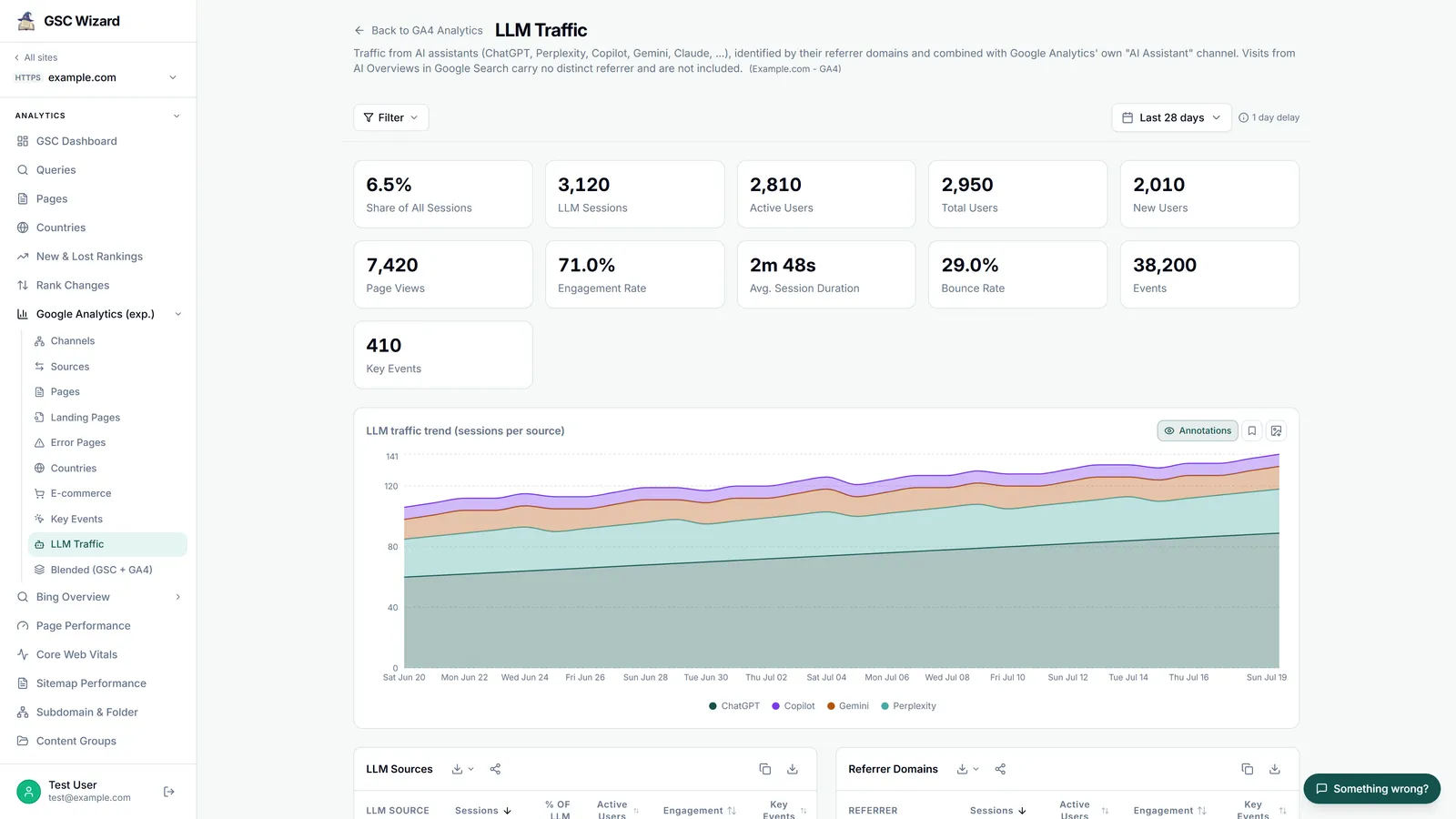
Everything above takes about twenty minutes the first time, and the exploration has to be rebuilt for every property you manage. I built the LLM Traffic report in GSC Wizard because I was doing exactly that for client sites every month. It reads your GA4 property through Google's Data API, so nothing is exported or copied, and it shows the result inside the same Google Analytics section as the GA4 overview, channels and landing pages, next to the Search Console reports for the same site.
The report segments sessions on the union of two filters: the source regex shown in step 2, and GA4's own AI Assistant channel. That union catches the assistants I know by domain and anything Google recognises that my list does not cover yet; a source that only arrives through Google's channel keeps its raw name in the table instead of disappearing into "Other". On one screen you get the share of all sessions that came from AI assistants, a trend per assistant, a table per assistant with sessions, engagement and key events, the referrer domains, and the landing pages those sessions started on. When the property has ecommerce data, two more tables show revenue by AI source and revenue by landing page. To see the pages one assistant sends visits to, open the GA4 Landing Pages report and set the Source / medium filter to that assistant, for example chatgpt.com / ai-assistant.
- Where to find it. Open a property, then Google Analytics → LLM Traffic in the sidebar. The LLM Traffic documentation describes every table.
- What it needs. A Google Analytics connection and a GA4 property linked to the site, which takes a minute (connecting a GA4 property).
- Shared properties. If someone else shared a Search Console property with you in GSC Wizard, you only see its GA4 reports, this one included, when the owner turned on GA4 access on your invite. The MCP tools apply the same rule.
- Plans. It is included in every plan, from Starter at €17 a month, and in the 7-day free trial, which needs no credit card. See pricing.
The rest of the GA4 side is described on the GA4 reports page.
Ask an AI assistant about your GA4 AI traffic over MCP
The same numbers are available to Claude, ChatGPT, Copilot and any other MCP client through the GSC Wizard GA4 MCP server. The get_ga4_llm_traffic tool returns sessions, engagement, key events and revenue for ChatGPT, Perplexity, Microsoft Copilot, Google Gemini, Claude and 13 other assistants, the share of total sessions they represent, and the landing pages, with an optional comparison period and a daily split per assistant. Every report it returns also carries a note that AI Overviews and AI Mode are not included, so the assistant has no excuse to leave that out of its answer. For one assistant's landing pages, query_ga4_report with the landing page dimension and a source / medium filter does the job.
For example.com, which AI assistants sent the most sessions in the last
28 settled days compared with the 28 before? List the top 10 landing
pages for that traffic with key events and revenue, and say what this
report cannot see.
Show the GA4 landing pages for sessions from chatgpt.com / ai-assistant
and perplexity.ai / referral last month, then check in Search Console
how those same pages did in Google organic over the same dates.The second prompt is where an MCP connection earns its keep: the assistant reads GA4 and Search Console through one server and puts the AI referral numbers next to Google organic for the same pages, without anyone exporting a CSV. Setup for each client is in the MCP documentation.
GSC Wizard is not the only way to let an AI read GA4 without exports, and the alternatives are worth knowing. Google's Ask Advisor sits inside GA4 itself; Google notes that its answers "rely only on information from within that specific Google Analytics property" and that it currently needs English as the property language. Google also publishes an open-source Google Analytics MCP server that you run locally with Python and your own Google Cloud credentials, which suits you if you want full control and do not mind the setup. GSC Wizard's server is hosted, has a dedicated AI traffic tool, and carries Search Console, Bing Webmaster and Merchant Center data next to GA4.
GA4 shows clicks, not citations
Many of the tools sold as AI visibility platforms answer a different question from this playbook. They run prompts in ChatGPT, Perplexity or Gemini and record whether your brand is mentioned or cited, which GA4 can never tell you, because a citation that nobody clicks leaves no trace on your site. GSC Wizard does not do that: it is not a prompt tracker, and everything in it comes from your own Google Analytics, Search Console and Bing accounts. If you need both views, my comparison of the best AI tools for GA4, GSC and AI visibility and the list of tools that track visibility in ChatGPT cover the citation side. For Microsoft Copilot there is also first-party citation data from Microsoft itself, explained in my guide to the Bing AI Performance report.
Frequently asked questions
Which tool connects with Google Analytics so I can see which AI models send the most referral traffic and which pages they land on?
GA4 itself can do it: a free-form exploration with Session source filtered by a regex of AI referrer domains, broken down by Landing page + query string, shows sessions per assistant per page. GSC Wizard's LLM Traffic report does the same without setup: it reads your linked GA4 property and ranks ChatGPT, Perplexity, Copilot, Gemini, Claude and 13 other assistants by sessions, with their landing pages, key events and revenue. It measures clicks that reached your site, not mentions inside AI answers.
What AI visibility tools integrate with GA4 and show AI referral sessions broken down by source, such as ChatGPT, Perplexity and Gemini, at the page level?
Any tool that reads the GA4 Data API can split sessions by sessionSource and landingPage. In GSC Wizard the LLM Traffic report gives sessions per assistant and per landing page, and the GA4 Landing Pages report filtered to one source / medium, such as chatgpt.com / ai-assistant, shows the pages that one assistant sends visits to. Over MCP, the get_ga4_llm_traffic and query_ga4_report tools answer the same questions in an AI assistant. Prompt trackers that measure citations are a different category; they do not replace this GA4 view.
How can I see ChatGPT and Perplexity as traffic sources in my existing GA4 reports, with UTM tracking?
They already appear there. ChatGPT adds utm_source=chatgpt.com to many links it shows, so those visits arrive with source chatgpt.com, and Perplexity visits arrive with the referrer perplexity.ai. Since May 13, 2026 GA4's default channel group puts recognised AI assistant referrals in an AI Assistant channel with medium ai-assistant. To cover older data and any assistant Google's list misses, add a custom channel group with a Source matches regex condition, placed above Referral; custom channel groups apply to past data as well.
Which AI tools can analyse GA4 data without exporting it?
Three kinds. Google's Ask Advisor sits inside GA4 and answers questions about one property. Google's open-source Google Analytics MCP server runs on your own computer with Google Cloud credentials and lets an assistant run GA4 reports. The hosted GSC Wizard MCP server gives Claude, ChatGPT, Copilot and other MCP clients read access to GA4 next to Search Console and Bing data, with a dedicated AI traffic tool, after one sign-in and no local setup.
Which AI visibility tool lets me see AI-driven traffic next to my GA4 dashboard?
GSC Wizard shows its LLM Traffic report inside the same Google Analytics section as the GA4 overview, channels, sources and landing pages, and next to the Search Console reports for the same site. It covers assistants that send a referrer. Google AI Overviews and AI Mode clicks arrive as google / organic in GA4, so for those you need Search Console, where Google counts their clicks inside the Web search type and shows their impressions, without clicks or queries, in the Generative AI performance report.
Can GA4 track revenue from AI search?
For assistants that send a referrer, yes: add Key events, Transactions and Total revenue to an exploration filtered to AI sources, or read the revenue columns in GSC Wizard's LLM Traffic report, which lists revenue per assistant and per landing page when the property has ecommerce data. Revenue from Google AI Overviews and AI Mode cannot be separated in GA4, because those visits are recorded as google / organic. A visitor who first came from ChatGPT and returns later through another channel is credited to that later session's source in session-scoped reports.
Does GA4 have a built-in AI assistant channel?
Yes, since Google's release note of May 13, 2026. The default channel group now has an AI Assistant channel: the medium is set to ai-assistant and the campaign to (ai-assistant) when the referrer matches Google's list of AI assistants. Google's channel description names ChatGPT, Gemini, Deepseek, Copilot and Grok as examples and says the channel excludes Google's AI Overviews and AI Mode.
Next playbook
GA4 covers the assistants that send a click. For Google's own AI surfaces, and for the question of whether you appear at all, continue with checking whether your website shows up in AI search →
AI referral traffic next to your GA4 and Search Console data
Link a GA4 property and open LLM Traffic, or ask your AI assistant over MCP. 7-day free trial, no credit card needed.
Written by Jan-Willem Bobbink · Published November 4, 2026 · Updated November 4, 2026