AEO and SEO reporting for agencies: what to put in a client report
An AEO and SEO client report should show clicks and impressions from Google Search Console, AI Overviews and AI Mode impressions from Search Console's Generative AI performance report, citations from Bing's AI Performance report, and AI Assistant referrals and key events from GA4, each under its own source and date range. Prompt tracker numbers can sit beside them as long as they are labelled as sampled. These sources count different events and never add up to one score, so the best agencies for AEO and SEO reporting keep them apart, log their changes with dates and end on conversions. Below is the template I would use, section by section, followed by what each number can prove, how often to report, what not to claim, how to get the data without client passwords, and where GSC Wizard helps and where it does not.
A client report where every number has a source, a date range and an honest label.
An afternoon to set up the template and access, then a recurring monthly slot per client.
Read access to the client's Search Console, Bing Webmaster Tools and GA4, plus a dated log of your work.
What are the best agencies for AEO and SEO reporting?
I cannot honestly name a best agency for AEO and SEO reporting, because I have never seen the reports these agencies send their clients, and a website's claims about its reporting tell you little about the document you would actually receive. What I can give you is the test. Ask every agency on your shortlist for a real client report with the client's name removed, then check whether each number names its source and date range, whether measured data is kept apart from estimates, whether the changes made that month are listed with dates, and whether the report ends with leads or sales rather than rankings alone. If you still need a shortlist, my list of AI SEO agencies is alphabetical, not ranked, and records what each agency publishes about its reporting, and how to choose an AI SEO agency covers the rest of the vetting, from red flags to the questions to ask before you sign.
If you run an agency and landed here for a template, the rest of this page is for you. For the software side, the best SEO reporting tools compares ten options on data source, Search Console depth, white-label delivery and price, and the best Google Search Console tools for agencies narrows that to multi-client Search Console work.
AEO and SEO client report template, section by section
Each row is one section of the report, in the order I would send them. The last column is the label to print next to the numbers, because most arguments about an AEO report start when a client reads one metric as if it were another.
| Report section | What to show | Where it comes from | Label it as |
|---|---|---|---|
| 1. Summary | Three or four sentences on what changed and why, plus the date range, the comparison period and the last date with complete data. | Written by you, from the sections below. | Your interpretation, kept apart from the data. |
| 2. Google Search | Clicks, impressions, CTR and average position by page and query, with branded and non-branded queries split. | Search Console, Performance report, Web search type. | Measured by Google. Includes AI Overviews and AI Mode clicks, which cannot be separated. |
| 3. Google AI visibility | Impressions in AI Overviews and AI Mode by page, country, device and date. | Search Console, Generative AI performance report. | Impressions only, both features combined. This report has no clicks and no queries. |
| 4. Bing Search | Clicks and impressions by query and page. | Bing Webmaster Tools, search performance. | Measured by Microsoft. Bing only. |
| 5. Microsoft AI citations | Total citations, average cited pages, citations per page, and grounding queries. | Bing Webmaster Tools, AI Performance report. | Citations, not visits. Grounding queries are grouped phrases and a sample. |
| 6. AI assistant referrals | Sessions from ChatGPT, Gemini, Copilot and similar assistants, by landing page. | GA4, the AI Assistant default channel. | Measured visits. Excludes Google's AI Overviews and AI Mode, which GA4 counts as Organic Search. |
| 7. Outcomes | Key events and revenue by channel and landing page, for Organic Search and AI Assistant side by side. | GA4, using key events agreed with the client. | The result the work is for. Shows what followed a visit, not what caused it. |
| 8. Prompt tracking (optional) | How often the chosen prompts named or linked the client, with the tool, the engines, the number of prompts and how often they run. | A prompt tracker. See ChatGPT rank tracking tools. | Sampled. The prompt set was chosen by the agency, so it is not a measure of demand. |
| 9. Work log | Every change made, with its date and the pages it touched, next to confirmed Google updates in the same period. | Your own change log or chart annotations. | Facts about the work. A date next to a trend is not proof of cause. |
| 10. Next month | The planned work, what you need from the client, and which number each task should move. | Written by you. | A plan, not a forecast. |
Keep a section in the report even when it is empty, and say why. Google notes that the Generative AI performance report may not appear when a site "hasn't received enough impressions in generative AI features", and on a small site that is a finding the client should see rather than a gap to hide. Sections 3 and 5 also need a monthly export kept per client: Google's report has an export button and shares the usual 1,000-row table limit, and Bing exports AI Performance data in CSV and Excel.
What each number can and cannot prove
A client report earns trust when it stops each metric at the edge of what it measures, so this is the table I would keep next to the template while writing the commentary.
| Number | What it can prove | What it cannot prove |
|---|---|---|
| Search Console clicks | People clicked through to the site from Google Search, including from links in AI Overviews and AI Mode. | How many of those clicks came from AI features, because they are reported within the Web search type. |
| Search Console impressions | A link to the site was in the results shown. Google generally counts it "whether or not the item is scrolled into view". | That anyone saw or read it. |
| Average position | Where the site tended to appear. An AI Overview occupies one position, and all its links share it. | Order inside an AI answer, or a place in any product other than Google Search. |
| Generative AI impressions | Links to the site were shown in AI Overviews or AI Mode, on which pages and in which countries. | Clicks, the queries behind them, a split between AI Overviews and AI Mode, or anything outside Google. |
| Bing citations | The site was visibly shown as a source in Copilot, Bing's AI summaries or select partners. | Visits. Microsoft says a citation "does not represent traffic, clicks, or user engagement" and that the report "does not measure rankings, authority, performance, or importance". |
| Bing grounding queries | Themes the site is cited for. | What users typed. Microsoft says they are "not full user questions or prompts", and its launch post calls the data a sample. |
| GA4 AI Assistant sessions | Visits arrived with a referrer on GA4's list of AI assistants. | Mentions without a click. Visits that arrive without a referrer cannot match the list, so treat the number as a floor. |
| GA4 key events and revenue | What those visitors did next, as far as the tag recorded it. | That SEO work caused it. Brand, seasons and other marketing move these too. |
| Prompt tracker scores | How often those prompts named the client on those runs. | Real demand, or what real users were shown. Every number comes from the vendor's own prompt runs. |
Which numbers never reconcile, and what to do about it
Tell the client this before the first report, not after they have opened Search Console and GA4 side by side. These pairs will differ every month, and none of the gaps means the tracking is broken. Google's page on data discrepancies gives its own list for Search Console against other tools, which is privacy filtering of rare queries, processing, a lag of 2–3 days, Pacific Time reporting, and tools such as Analytics that only see visitors with JavaScript enabled.
| These two | Why they differ | What to do |
|---|---|---|
| Search Console clicks and GA4 sessions | A click is counted by Google and a session by your tag, on different clocks and with different filters. | Compare the trend over weeks or months, and report both under their own labels. |
| Search Console chart and table totals | Google names aggregation by property or page, the 1,000-row table limit, and anonymized queries. | Quote the chart total for the property, and say so. |
| Generative AI impressions and Search Console clicks | The AI report has impressions only, and AI clicks sit inside all Web clicks. | Never divide one by the other. There is no AI CTR to report. |
| Google AI impressions and Bing citations | A link shown in one product against a source shown in another. | Show them in separate sections, and do not add them together. |
| Bing citations and GA4 Copilot sessions | A citation is not a visit, and a visit needs a referrer to be recognised. | Read them together by page. Do not calculate a conversion rate from one to the other. |
| GA4 AI Assistant and Google AI traffic | Google says the channel excludes AI Overviews and AI Mode, which land in Organic Search. | Say it in the label, so nobody reads AI Assistant as all AI traffic. |
| Prompt tracker results and anything measured | A designed sample against what real searches produced. | Keep it in its own section, marked as sampled. |
How often to report AEO and SEO results
My default is a full report once a month, a review of strategy once a quarter, and alerts for anything that cannot wait. Search Console's data usually arrives after 2–3 days and its newest days can be preliminary, and Microsoft describes citation volume as changing with "user demand, content freshness, model updates, partner refresh cycles", so a weekly AI number mostly reports noise and invites a client to worry about it. Send the report a few days after the period ends, and state the last complete date on the first page.
| Cadence | What goes in it | Who it is for |
|---|---|---|
| Alerts, as they happen | A sharp drop in clicks, indexing problems, and anything else that needs action before the next report. | The people doing the work. Pass it to the client only if they need to act. |
| Monthly | The full template above, against the previous period and the same period last year. | The client contact. |
| Quarterly | What changed in the trend, which work paid off and what stops, and any change to the prompt set or key events. | Whoever owns the budget. |
What not to claim in an AEO client report
- "AI traffic from Google" as a number. Search Console has no such figure, and GA4 puts those visits in Organic Search. You can report AI impressions and overall clicks, not AI clicks.
- An AI click-through rate. Dividing Generative AI impressions into any click number mixes a part with a whole it was never split from.
- One "AI visibility score". Adding impressions, citations, sessions and prompt scores produces a number with no unit, and nobody can check it.
- A citation as a visit, or a citation as a ranking. Microsoft rules out both in its own documentation.
- That your work caused a citation trend. Microsoft says these trends "cannot be attributed to a specific cause or event". Say what you changed and what followed, and leave the conclusion open when a Google update landed in the same weeks.
- A screenshot of one AI answer as proof. It shows one run of one prompt. Google notes that AI Mode and AI Overviews "may use different models and techniques, so the set of responses and links they show will vary".
- Prompt tracker share of voice as market share. It is a share of the prompts someone chose to run.
- Grounding queries as what customers ask. Microsoft says they are grouped phrases, not user questions.
- Guarantees, in the report or the proposal. Google writes that "No one can guarantee a #1 ranking on Google", and a guaranteed citation count is the same promise in new words.
How to get these numbers without client passwords
You never need a client's Google or Microsoft login, and an agency that asks for one is creating a risk for both sides. All three products let the client stay the owner and grant you a read-only role on your own account, which also gives you a clean exit when the contract ends. Google's guidance on hiring an SEO says that for an audit you should "only grant read access to Search Console (at this stage, don't grant them write access)".
| Product | Role to ask for | What it allows | Where the client sets it |
|---|---|---|---|
| Google Search Console | Restricted user | Google describes it as "simple view rights on most data". Performance, Links and rich result reports are open, URL Inspection is listed as "Fetch only", and a sitemap cannot be submitted, so move to full user only when a task like that needs it. | Settings, Users and permissions. Steps are in how to add a user in Google Search Console, and Search Console permissions explained lists each level. |
| Bing Webmaster Tools | Read only | Microsoft says this role can "see all features and reports" but "cannot change settings or add other users". | User management. The person added has to sign up for Bing Webmaster Tools first. |
| Google Analytics 4 | Viewer | Google says a Viewer "can see settings and data". | Access management in GA4 Admin. |
Google's permissions table gives restricted users "View all reports" but does not list the Generative AI performance report by name, so open it on your first day with the restricted user and tell the client if you need more. Agree in writing who owns each account, and keep the verified owner on the client's side. When you part ways, the client removes your user, and if you were ever a verified owner, your verification token too.
How to produce this report with GSC Wizard
I build GSC Wizard, so read this section knowing that. It covers sections 2, 4, 6, 7 and 9 of the template and the delivery, and it leaves sections 3, 5 and 8 to the products that hold that data. Connect Search Console with the read-only option, which asks Google only for the webmasters.readonly scope, and add the Bing and GA4 connections for the properties you report on. These are the parts an agency would use, each checked against the code when I wrote this page.
| Feature | What it does for the report | Limits to know |
|---|---|---|
| Shared reports | Save & share on an exportable table stores it as a named report in a client portal. This covers tables such as Queries, Pages, Countries, New & Lost Rankings, LLM Traffic and the Bing reports. | A saved copy of those rows rather than a live view, and not a public link. Up to 50 reports per account. |
| Report clients | A list of contacts (email and optional name) you pick from when sharing. Each is emailed a link and signs in with a magic link that is valid for three days. Access can be revoked or resent. | They see only the reports you shared, and they do not use a seat. |
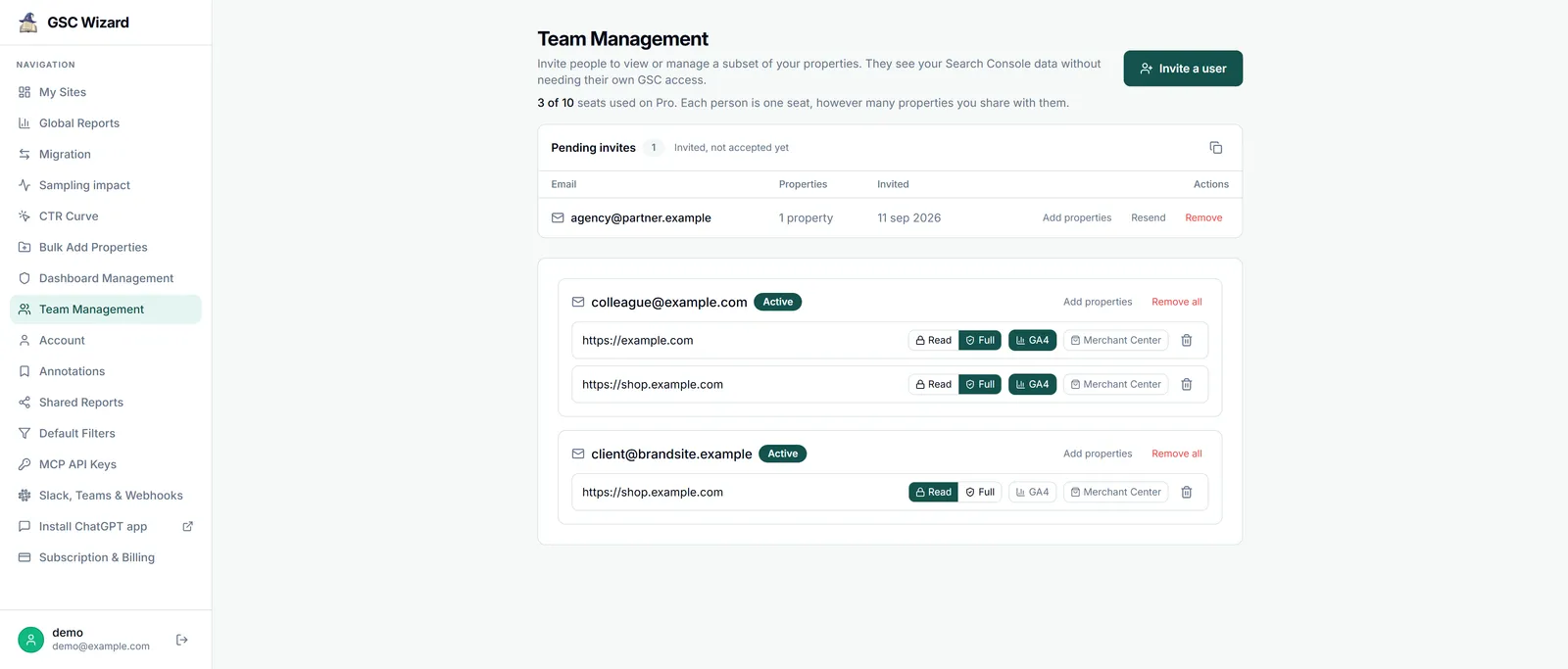
| Seats | Invite a teammate or client by email to chosen properties with Read or Full access, with optional GA4 access. They see live data without needing their own Search Console access. The plan table is below. | One seat per person, however many properties. A pending invite already counts. Neither access level can touch integrations or billing, or invite others. |
| Annotations | Dated markers on time-series charts, with an "Agency / team" category, per property or across all your properties, next to a read-only feed of confirmed Google updates. This is section 9 of the template. | A person invited with Read access sees the annotations on that property, not your account-wide ones, and creating them needs Full access. |
| AI referrals and outcomes | The GA4 LLM Traffic report shows AI assistant sessions and key events by source and landing page, Key Events splits one event by channel and page, and Blended puts Search Console and GA4 side by side per landing page. | LLM Traffic combines referrer domains with GA4's AI Assistant channel, so it can differ from that channel's own row. Visits from Google's AI Overviews are not in it. |
| Bing reports | Bing queries, pages and crawl issues next to the Google data, for section 4. | Not the AI Performance report, so no citations. |
| Slack and Teams alerts | Traffic alerts go to Slack, Microsoft Teams and signed webhooks. Slack can also receive a daily, weekly or monthly report for one property. | Traffic alerts do not go to email, and Teams receives alerts rather than scheduled reports. |
| MCP | Through the MCP server, an AI client can call generate_seo_report for a full property report in HTML, get_cross_site_summary across all properties or one tag, and get_ga4_llm_traffic, get_ga4_key_events and the Bing tools for the rest. It can also log work with create_annotation and deliver a table with create_shared_report, create_report_client and manage_report_access. |
A recipient never shared with before has to be confirmed by the account owner from an email. The AI client writes the commentary, so check it against the numbers before it goes out. |
So a client can see the data in two ways, and they suit different clients. A report client receives saved tables in the portal and costs no seat, which fits someone who wants the monthly numbers and nothing else. A seat with Read access gives live dashboards on their own property, which fits a client who wants to check your work, and that is the option I would offer first.
| Plan | Price | People | Properties |
|---|---|---|---|
| Starter | €17 a month | Owner + 1 seat | 10 API + 5 full storage |
| Pro | €39 a month | Owner + 3 seats | 50 API + 25 full storage |
| Business | €249 a month | Owner + 10 seats | 500 API + 150 full storage |
Extra seats are €9 a month each on those plans, every plan has every feature on this page, and the pricing page has the details. You can try it for 7 days free with no credit card, with one invited seat during the trial. There is no free plan for the web app, so it is paid from €17 a month after that.
Where GSC Wizard falls short for agencies
- No white label. There is no custom domain or agency branding: shared reports open on GSC Wizard's own domain, and exports are CSV files or HTML reports that carry its name, not a branded PDF. If a client expects your logo on every report, AgencyAnalytics, DashThis, Swydo and Whatagraph all include white-label branding, and the reporting tools comparison shows how each one prices it.
- No import of the Generative AI report or Bing AI Performance. GSC Wizard reads neither, so sections 3 and 5 of the template come from your exports out of Search Console and Bing Webmaster Tools, and you will be adding those to the report by hand.
- Not a prompt tracker. It reports what the search engines and GA4 measured on the site, not what an AI assistant said in a test prompt. If a client wants section 8, you need a separate tool, and ChatGPT rank tracking tools compares twelve.
- SEO only. There are no Google Ads, Meta or social sources, so it will not produce one report across all of a client's channels.
Frequently asked questions
What are the best agencies for AEO and SEO reporting?
The best agency for AEO and SEO reporting is one whose client report you can check yourself: every number names its source and date range, measured data is kept apart from sampled prompt data, changes are logged with dates, and the report ends with conversions. I cannot rank agencies on that, because I have not seen their client reports, so ask each one for a real report with the client's name removed. My separate list of AI SEO agencies is alphabetical and not ranked.
What should an AEO and SEO client report include?
A summary with the date range and comparison period, Search Console clicks and impressions, AI Overviews and AI Mode impressions from the Generative AI performance report, Bing search data and Bing AI Performance citations, GA4 AI Assistant sessions, key events or revenue by channel and landing page, a dated log of the work done, and the plan for next month. Prompt tracker numbers can be added if they are labelled as sampled.
Can Search Console show clicks from AI Overviews and AI Mode?
No. Clicks from AI Overviews and AI Mode are counted inside the Performance report under the Web search type, and that report has no filter to separate them. The Generative AI performance report shows impressions only, by page, country, device and date, with no clicks and no queries. So an AI click-through rate cannot be calculated from Search Console.
Why do Search Console, Bing and GA4 numbers not match?
They count different events on different products. Search Console counts links shown and clicks on them, Bing AI Performance counts citations shown in AI answers, and GA4 counts sessions on your site. Google also lists privacy filtering, data processing, a lag of 2 to 3 days, Pacific Time reporting and JavaScript tracking as reasons Search Console differs from Analytics. Report them side by side and do not add them into one score.
How often should an agency report AEO and SEO results?
Send a full report once a month, compare it with the previous period and the same period last year, and review strategy once a quarter. Use alerts rather than extra reports for anything urgent between those dates. Search Console data usually arrives in 2 to 3 days and citation counts move with demand and model updates, so daily or weekly AI numbers mostly show noise.
Can an agency report on a client's data without their password?
Yes, and it should. The client stays the owner and adds the agency as a restricted user in Search Console, with the Read only role in Bing Webmaster Tools and the Viewer role in GA4. Each person signs in with their own account, access can be removed at any time, and nobody needs the client's login.
Does GSC Wizard offer white-label client reports?
No. There is no white label or custom domain, shared reports open on GSC Wizard's own domain, and exports are CSV files or HTML reports that carry its name, not a branded PDF. An agency that needs its own branding on every report will be better served by a dedicated reporting tool such as AgencyAnalytics, DashThis, Swydo or Whatagraph.
Does GSC Wizard import the Generative AI performance report or Bing AI Performance?
No. GSC Wizard imports neither report, so AI Overviews and AI Mode impressions and Copilot citations have to be read and exported from Search Console and Bing Webmaster Tools. It does report Search Console data, Bing queries, pages and crawl issues, and GA4 traffic from AI assistants. GSC Wizard is also not a prompt tracker.
Next playbook
Before the first report goes out, check what the engines actually show for your client, using only their own data: check if a website shows up in AI search →
Build the measured half of the report in GSC Wizard
Search Console, Bing and GA4 AI referrals in one place, dated annotations, and a client portal for saved reports. 7-day free trial, no credit card needed, then paid from €17 a month.
Written by Jan-Willem Bobbink · Published November 4, 2026 · Updated November 5, 2026