How to choose an AI SEO agency, and check their work with your own data
A good AI SEO agency does ordinary SEO well and proves it with first-party data: Google Search Console, Bing Webmaster Tools and Google Analytics 4. Google says so itself, writing that "AEO" and "GEO" work is "still SEO" from Google Search's perspective. So choose an agency on named deliverables, honest reporting and the access it asks for, not on the word AI in the package, and keep ownership of your accounts so you can check every result yourself. I build a Search Console tool, not an agency, so this page names no agencies and ranks none; my separate list of AI SEO agencies is alphabetical and not ranked either. This page covers what the work should include, the red flags, the questions to ask before you sign, what belongs in a package, the reporting to demand, and how to check it all with read-only access.
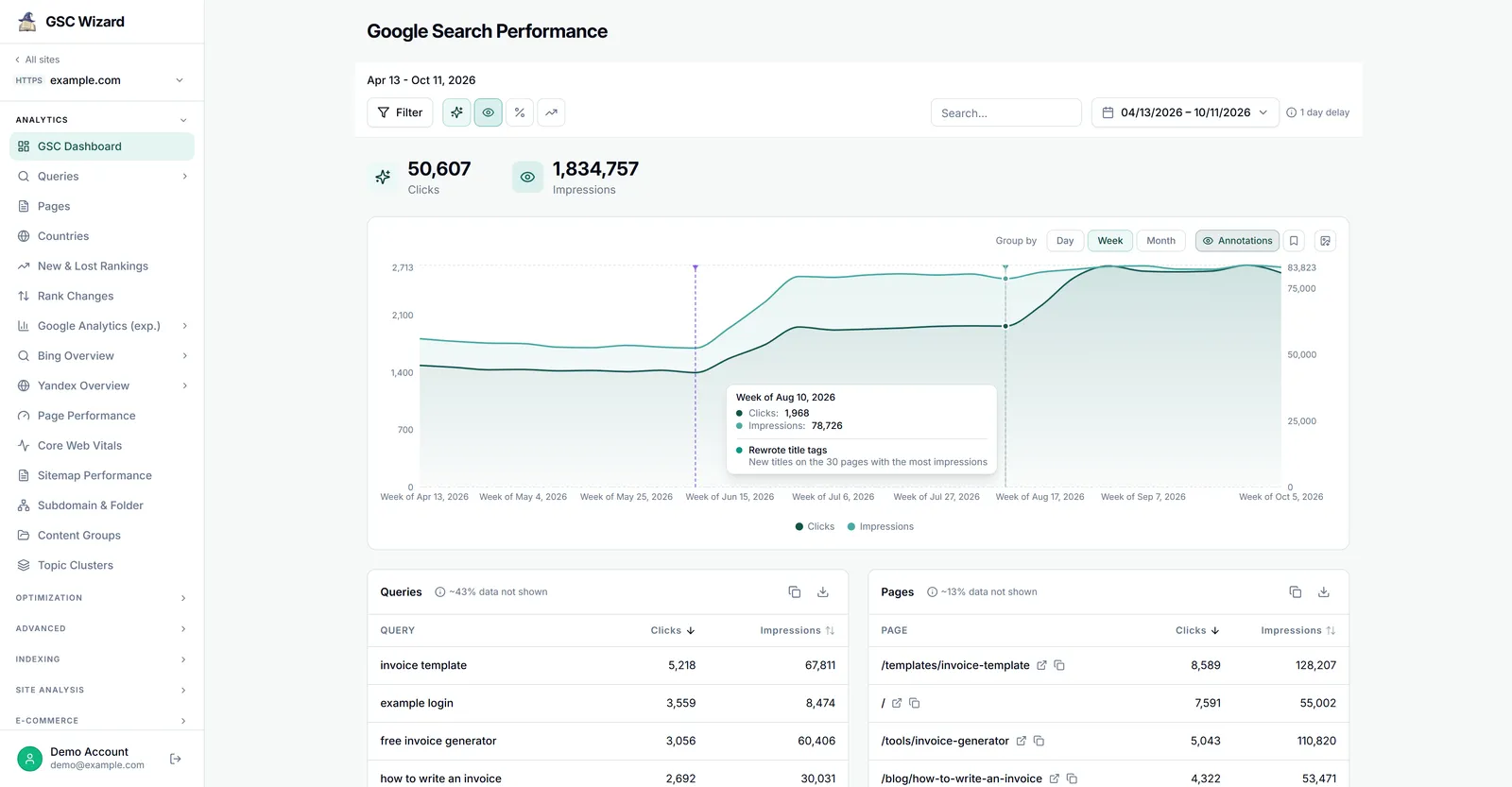
Hire an agency whose work you can verify, and verify it every month.
An hour to vet an agency, then 20 minutes a month to check its report.
Owner access to your Search Console property, plus Bing Webmaster Tools and GA4 if you use them.
What AI SEO and AEO services should include
Strip the labels off and the work an AI SEO agency should do for a small business is the work Google lists in its own guide to optimizing for generative AI features: make sure the pages can be crawled and indexed, write content that adds something only you can say, keep the site structure clear, and keep product and local business details current. On top of that comes the genuinely new part, which is measuring how the site does in AI answers using the reports the search engines now provide. Each line in the table below is something you can ask for by name and check without trusting the agency's word.
| Deliverable | What it means in practice | How you check it |
|---|---|---|
| Technical audit and fixes | Crawling allowed in robots.txt and by your CDN or host, pages indexed, important content in text, no duplicate URL sprawl. | Search Console's Pages report and URL Inspection; Bing Webmaster Tools crawl issues. |
| Content that is not a commodity | Pages built on your own experience, data or prices, rather than a rewrite of what already ranks. | Read it. Then watch clicks and impressions for those URLs in Search Console. |
| Site structure and internal links | Important pages reachable in a few clicks and linked from related pages. | A crawl of your own site; Search Console's Links report. |
| Structured data that matches the page | Markup for rich results, kept in line with the visible text. Not sold as an AI ranking switch. | Search Console's rich result reports. |
| Merchant Center and Business Profile | Product feeds and local details kept accurate, since Google's AI answers can show both. | Merchant Center diagnostics; your Business Profile. |
| Bing Webmaster Tools and IndexNow | The site verified in Bing, where Microsoft reports Copilot citations, and changed URLs announced through IndexNow. | Bing Webmaster Tools, including its AI Performance report. |
| Measurement setup | Search Console, Bing Webmaster Tools and GA4 owned by you, with key events (conversions) defined. | You are the owner or administrator in each account. |
| A dated change log and a monthly report | Every change written down with its date, and results shown against those dates. | Compare the dates with your own Search Console chart. |
Google's page Do you need an SEO? gives a similar list of useful services from agencies and consultants, and that list now includes "Optimizing for generative AI". So AI work is a legitimate thing to pay for. What you are paying for is the list above, done carefully, rather than a separate discipline with its own secret techniques.
Is AEO or GEO different from SEO? What is real and what is hype
For Google Search the answer is written down. Google's guide on AI features and your website says that "the best practices for SEO remain relevant for AI features in Google Search (such as AI Overviews and AI Mode). There are no additional requirements to appear in AI Overviews or AI Mode, nor other special optimizations necessary." Its newer optimization guide addresses the acronyms head on: "From Google Search's perspective, optimizing for generative AI search is optimizing for the search experience, and thus still SEO." The reason it gives is technical rather than diplomatic, because these features are "rooted in our core Search ranking and quality systems" and retrieve pages from the normal search index.
The same guide then lists things you can ignore for Google Search, and several of them are exactly what some AEO packages sell. Google says you do not need llms.txt files or other AI text files, because "Google Search itself doesn't use them"; you do not need to "chunk" content into tiny pieces; you do not need to rewrite pages in a special way for AI; seeking inauthentic "mentions" around the web "isn't as helpful as it might seem"; and there is "no special schema.org markup you need to add". It also warns that creating separate pages for every variation of a question, including the fan-out queries AI features generate, "primarily to manipulate rankings or generative AI responses" violates its scaled content abuse policy.
I want to be careful not to overstate this, because Google only speaks for Google. ChatGPT, Microsoft Copilot and Perplexity run their own retrieval, and Microsoft's own advice in its AI Performance announcement stresses clarity, structure, accurate and up-to-date content, and IndexNow to keep Bing informed of changes. That is still recognisably SEO. A small llms.txt file does no harm either: Google says it will "neither harm nor help" in Google Search, and I publish one on gscwizard.com for AI agents that read it, not because I expect it to move anything in Google. What is genuinely new is the measurement, since Search Console and Bing Webmaster Tools now report AI visibility directly, and an agency that has learned to read those reports properly is offering something real.
Google itself tells you to check AEO and GEO advice
In its hiring guide, Google suggests asking of any agency: "If they have advice on optimizing for AI experiences (also known as "AEO" "GEO" services), is their advice aligned with Google Search's official guidance on optimizing for generative AI features?" Its guidance on third-party SEO advice adds that good advice "either qualifies their claims as opinion based on data or experience, or backs up their claims by citing official Google Search guidance."
Red flags when hiring an AI SEO agency
- Guaranteed rankings or guaranteed AI citations. Google is blunt: "No one can guarantee a #1 ranking on Google. Beware of SEOs that claim to guarantee rankings, allege a "special relationship" with Google, or advertise a "priority submit" to Google." A guaranteed number of ChatGPT or Copilot citations is the same promise in new clothes, and Google adds that even a page meeting every requirement is not guaranteed to be indexed or served.
- Prompt-tracking screenshots as the only proof. A screenshot of an AI answer naming your brand shows one run of one prompt. Google notes that AI Mode and AI Overviews "may use different models and techniques, so the set of responses and links they show will vary." Prompt trackers can be a useful extra signal (I compare them in ChatGPT rank tracking tools), but their visibility scores are samples of prompts the agency chose. They belong next to first-party data, not instead of it.
- "AI-native" packages without deliverables. If the proposal says "AI visibility optimization" or "LLM authority building" and you cannot find what will actually be done, how much of it, and by when, there is nothing to hold the agency to.
- Hundreds of near-identical pages, one per AI query. Writing a page for every fan-out variation is the pattern Google names under scaled content abuse. The risk lands on your domain, not on the agency.
- Paid or fake "mentions". Planting your brand in forums and listicles is the AI-era version of a link scheme, and Google says it is less helpful than it looks.
- Claims of inside data. Google writes that "no third-party tool has access to our internal ranking or AI systems". An agency claiming otherwise is either confused or selling.
- The agency wants to own your accounts. If the agency becomes the only verified owner of your Search Console property, or holds your GA4 and Bing accounts in its name, leaving it becomes painful. You should own them and grant access.
- Secrecy about changes. Google advises being careful "if a company is secretive or won't clearly explain what they intend to do", and reminds you that "you are responsible for the actions of any companies you hire".
- Cold outreach about your "AI visibility". Google's advice about unsolicited SEO emails applies unchanged.
A note from my own data, because it explains why the screenshot point matters. Bing Webmaster Tools lists "Top Opportunity Queries" for gscwizard.com on the Topic Portfolio tab of its AI Performance report, and when I exported them on 4 November 2026 about two thirds of the 50 were searches for SEO agencies or SEO services. Many were near-identical, keyword-stuffed strings such as "best seo agencies ai-native aeo optimization blog okr pages" and "top ai seo agencies ai-driven seo services", repeated with small variations. Real people rarely type like that. Templated prompts run daily by tracking tools do, which suggests that some of the AI "demand" an agency shows you is other tools measuring each other, and is one more reason to judge results on clicks, conversions and engine-reported citations to your own pages.
Questions to ask an AI SEO agency before signing
The first five come from Google's own interview list in its hiring guide; the rest are the ones I would add for AI work.
- "Can you show me examples of your previous work and share some success stories?" Ask for the Search Console chart behind each story, with the dates of the work marked on it.
- "Do you follow the Google Search Essentials (previously known as Webmaster Guidelines)?" The answer should be a plain yes, with an explanation of how.
- "What kind of results do you expect to see, and in what timeframe? How do you measure your success?" Look for a range and a named data source, not a promise.
- "Will you share with me all the changes you make to my site, and provide detailed information about your recommendations and the reasoning behind them?" Ask for a dated change log as part of the contract.
- "What's your experience in my industry?" And in your country and language, if that matters for you.
- Which first-party numbers will you report every month? You want Search Console, Bing Webmaster Tools and GA4 by name, with date ranges and comparison periods.
- How will you report AI Overviews and AI Mode? A good answer mentions that Search Console counts their clicks inside the normal Performance report under Web, with no filter to separate them, and shows AI impressions (no clicks, no queries) in its separate Generative AI performance report.
- What access do you need, and why? Read access for an audit, more only when a task needs it.
- Which tactics will you not use? An agency that can name what it refuses to do (mass pages, bought mentions, guaranteed citations) has thought about the risk to your domain.
- What happens when we stop working together? You keep the accounts, the content and the reports; they hand back access and remove their verification tokens.
What reporting to demand from an AEO and SEO agency
Every number in an agency report should come with its source and its date range, and the sources that matter most are the ones the search engines publish about your own site. The table shows what each one can and cannot tell you, so you can spot a report that stretches a metric past what it measures.
| Source | What it shows | What it cannot tell you |
|---|---|---|
| Search Console Performance report (Web) | Clicks, impressions, CTR and position by query and page. AI Overviews and AI Mode are counted here under the Web search type: a click on a link in either counts as a click, and all links in an AI Overview share one position. | It has no AI filter, so AI clicks cannot be separated from classic ones. |
| Search Console Generative AI performance report | Impressions only, for AI Overviews and AI Mode together, by page, country, device and date. Google rolled it out to all sites by 31 August 2026. | Clicks, queries, a split between AI Overviews and AI Mode, and anything outside Google. |
| Bing Webmaster Tools AI Performance | How often your pages are cited as sources in Microsoft Copilot, Bing's AI summaries and select partners, which pages, and a sample of grounding queries. | Visits. Microsoft says a citation count does not indicate "placement or presentation" in the answer. |
| Bing Webmaster Tools search performance | Clicks and impressions from Bing search by query and page. | Anything about Google. |
| GA4 AI referrals | Sessions from AI assistants by landing page. GA4's default "AI Assistant" channel covers sources "like ChatGPT, Gemini, Deepseek, Copilot, or Grok", and Google says it excludes AI Overviews and AI Mode. | Mentions without a click, and apps that send no referrer. |
| GA4 key events and revenue | Leads, sign-ups and sales by channel and landing page. This is what the work is for. | Which search query started the visit. |
| Prompt-tracking tools (optional) | How often chosen prompts name or link your brand across AI assistants. | Real demand. The prompt set is chosen by whoever runs the tool, so it should be labelled as an estimate. |
Each source has its own playbook here. The Bing AI Performance report explained covers citations and grounding queries, how to check if your website shows up in AI search puts the Google and Bing reports together, and AI referral traffic in GA4 shows ChatGPT, Perplexity, Gemini and Copilot visits by page. If the agency also reports rankings, free rank tracking with Search Console and Bing shows how to read position data from the engines themselves.
What's in an AI SEO package
An AI SEO package normally bundles an audit, a set of fixes, a stated amount of content work, the Bing and Google account setup, and a monthly report, and the best SEO packages for AI search optimization are simply the ones where you can check each of those lines in your own accounts. The first table on this page lists the work itself. This one reads a package the way you would read a quote, line by line, with what you should actually receive for each line and how to check that you got it.
| Typical package line | What you should receive | How to check it |
|---|---|---|
| Starting audit | A written list of issues ordered by impact, each with the affected URLs and a proposed fix, covering crawling by both Googlebot and Bingbot. | Spot-check a few URLs in Search Console's URL Inspection and the Pages report. |
| Monthly technical fixes | Named tasks with dates, and who implements them: the agency, or your developer working from their notes. | Compare the change log with the live pages. |
| Content work | A stated number of pages improved or written, with the source of the expertise named, such as an interview, your data or your prices. | Read them, then watch those URLs in Search Console. |
| Structured data | Markup for rich results on named templates, matching the visible text. | Search Console's rich result reports. |
| Local and product details | Google Business Profile, Bing Places or Merchant Center kept current, where each applies to you. | Open your listing or Merchant Center diagnostics yourself. |
| Bing setup and IndexNow | The site verified in Bing Webmaster Tools under your account, and changed URLs announced through IndexNow. | Your Bing Webmaster Tools account, including its AI Performance report. |
| Video (if you have video) | Watch pages, video structured data or a video sitemap, and a check of what got indexed. | Search Console's Video indexing report. |
| Reporting | A monthly report that names each source and date range. This client report template shows what a good one holds. | Open the same date range in your own accounts and compare. |
| Prompt tracking (optional) | The list of prompts, the engines and how often they run, with results labelled as sampled. | Ask for the prompt list. If it is mostly branded prompts, the score says little. |
Best SEO packages for AI search optimization: what is reasonable to bundle
I cannot name a best package, because what agencies publish about a package is mostly promises rather than deliverables, and I have no fair way to compare what they do. What is reasonable to bundle is everything that shares one goal and one report: the audit, the fixes, the content work on pages you already have, the Bing and Google setup, and the monthly reporting. Those belong together because each one affects how you read the others. The things worth pricing as separate lines are the ones whose cost grows on its own, namely writing a stated number of new pages, producing video, digital PR, and any tool subscription passed on to you, because you should be able to drop one without renegotiating the rest.
Some lines should not be in a package at all, or should not cost much. Google's optimization guide says you do not need llms.txt files for Google Search, do not need to "chunk" content, and do not need special schema.org markup, and that seeking inauthentic "mentions" "isn't as helpful as it might seem", so a package that charges for those as AI work is charging for things Google has told you to skip. The section on what is real and what is hype above has the quotes. A separate AEO or GEO audit on top of an SEO audit deserves the same question, which is what it covers that the first audit did not.
AI search and video search in one package
Video belongs in a package when video is part of how your customers decide, and it is not worth adding for its own sake. Google says in its video SEO best practices that videos can appear "in several different places on Google, including the main search results page, Video mode, Google Images, and Discover", and its generative AI guide says these features "can bring in relevant images and video" and that if you already follow its image and video documentation, "you're already optimizing for generative AI search". So the AI part of video search is ordinary video SEO. Microsoft's AI Performance announcement points the same way, advising you to "align text, images, and video so they consistently represent the same entities, products, or concepts."
What an agency can actually deliver here is the technical side, which is separate from filming. Google asks for a dedicated watch page for each video "if it makes sense for your business", and its examples make the limits clear: a blog post that reviews an embedded video and a product page with a 360 video are not watch pages. The watch page must be indexed, and Google warns that "just because the watch page is indexed doesn't mean that the video will also be indexed". The video needs a valid thumbnail at a stable URL, and metadata through video structured data, a video sitemap or the Open Graph protocol. If your videos sit on YouTube or Vimeo, Google may index them on your page and on the platform, and it still recommends structured data on your own watch page. To check the work, use the Video indexing report, the Video rich result report, and the Videos search appearance filter in the Performance report. One thing no agency can show you is a measured AI video number from Search Console, because the Generative AI performance report has no video breakdown.
Top AI SEO services for small businesses, and what to skip
The top AI SEO services for a small business are the cheap, durable ones at the start of this table, and most of the rest can wait until search is a large channel for you. Google's own view is that "if you run a small local business, you can probably do much of the work yourself", so anything below that you can do yourself is one less line to pay for.
| Service | For a small business | Why |
|---|---|---|
| Technical check and fixes | Keep | Pages that cannot be crawled or indexed cannot appear anywhere, and this is often a short, one-off job. |
| Business Profile and Bing Places details | Keep, if you serve an area | Google lists Business Profile information in its guidance on AI features, and Microsoft says Bing Places helps keep address, hours and contact details current for AI answers. |
| Merchant Center feed | Keep, if you sell products | Google names it alongside Business Profile. A service business can skip it. |
| Pages about your own services and prices | Keep, or write them yourself | Nobody knows the business better, and this is the content an outside writer cannot invent. |
| A short monthly report | Keep | Search Console, Bing Webmaster Tools and GA4 are free to read, and one page is enough. |
| Prompt tracking subscription | Skip at first | It samples prompts someone chose, and a small site may produce too little data to read. ChatGPT rank tracking tools compares them if you want one later. |
| Video watch pages | Skip without video | There is nothing to optimize until you have videos worth watching on their own page. |
| llms.txt and other "AI files" as a paid item | Skip | Google says they are not needed for Google Search. If you want one, it is a small file you can add yourself. |
| A monthly quota of AI-written articles | Skip | Volume for its own sake risks the scaled content abuse policy, and the risk lands on your domain. |
| Multi-market or multi-engine dashboards | Skip | They are built for teams with several markets and a person to read them. |
As for what any of this costs, I do not quote market prices, for the reason given in the next section. Ask for each line above to be priced separately, which also shows you what you are paying for reporting and what you are paying for work.
AI SEO packages and pricing models
I am not going to quote market prices for SEO packages, because I have not found a primary source for them that I would trust, and the roundups that circulate rarely say where their numbers come from. The pricing models themselves are easier to describe, and each has a question that tells you whether it suits you.
| Model | Fits when | Ask before you sign |
|---|---|---|
| Monthly retainer | You want steady work on content, fixes and reporting. | What exactly is delivered each month, and what is the notice period? |
| Fixed-price project | An audit, a migration or a redesign with a clear end. | Is implementation included, or only the recommendations? |
| Hourly consulting or training | Your own team does the work and needs a second opinion. | Who writes the plan down, and who checks the result? |
| Performance-based | Both sides agree on a metric neither can fake. | Is the metric read from your Search Console or GA4, or from the agency's own tool? |
Whatever the model, a package worth signing names its deliverables, the access it needs, the reporting cadence and sources, the change log, the notice period, and that you own the accounts and the content. Payment tied to "AI citations" measured only by a tool the agency controls fails that test, because you cannot audit the number you are paying for.
Outsourcing vs in-house vs DIY for a small business
Google's guidance is more encouraging to small businesses than most agency sales pages: "If you run a small local business, you can probably do much of the work yourself." It recommends starting with the SEO starter guide, partly so that if you do hire someone later, you will recognise a technique that is "not recommended or, worse, strongly discouraged". It also names the moment when hiring is most useful, which is a redesign or a new site, because "the earlier, the better".
| Option | Good fit | Main risk |
|---|---|---|
| Do it yourself | A local business or small site where the owner knows the customers best. | Time, and technical problems you do not know to look for. |
| Freelancer or agency | A redesign, a migration, technical work, or a site past what one person can handle alongside running the business. | Paying for activity rather than results, unless you check the data yourself. |
| In-house hire | Search is a large, steady channel and changes ship every week. | One person cannot cover every specialism, so you may still buy help for audits. |
Many small businesses end up with a mix: they write the content themselves, because nobody knows the product better, and pay for a technical audit and an occasional review. Any of the three works as long as the business, not the contractor, owns the accounts.
How to check an agency's work yourself, read-only
You do not need to be an SEO to check an SEO. You need to own the data, give the agency only the access each task requires, and read the same numbers they report on, with their changes marked on the timeline.
- Stay the owner of Search Console. Verify the property yourself and add the agency as a user under Settings → Users and permissions; the steps are in how to add a user in Google Search Console. Google's hiring guide says that for an audit you should "only grant read access to Search Console (at this stage, don't grant them write access)", which means a restricted user. Upgrade them to full user when they need to submit sitemaps or request indexing; Search Console permissions explained lists what each level can do. When you part ways, remove the user and, if they were a verified owner, their verification tokens too, because Google warns a removed owner can otherwise re-verify.
- Give GA4 the Viewer role. In Google Analytics, a Viewer "can see settings and data" without changing the setup, which is enough for reporting. Keep the Administrator role yourself.
- Own Bing Webmaster Tools as well. Copilot's citations are reported there, so the account should be yours. Bing Webmaster Tools vs Google Search Console explains what each one reports.
- Read the same numbers yourself. Open the agency's report next to your own Search Console with the same date range, and check that the clicks and impressions match. If you would rather not work in Search Console's interface, you can connect it to GSC Wizard with the read-only option, which asks Google only for the
webmasters.readonlyscope, so GSC Wizard cannot change anything in your Search Console account. - Ask for every change to be logged with a date. A traffic change means little until you know what happened just before it. In GSC Wizard, annotations put dated markers on every chart, with an "Agency / team" category, next to a feed of confirmed Google updates so a core update is not mistaken for the agency's work.
- Compare before and after, page by page. Four to eight weeks after a logged change, compare the pages it touched with the same period before. Split branded from non-branded queries, because brand searches move with marketing and seasons rather than with SEO work.
GSC Wizard's sharing features work in both directions, which makes this easier whoever pays for the tool:
- You own the GSC Wizard account. Invite the agency by email to the properties it works on, with Read access (dashboards, reports and exports) or Full access (also annotations, tags, content groups and saved filters). The agency never sees your Google login, cannot touch your integrations or billing, and you can revoke a property or the whole person at once. Each invited person uses a seat: Starter includes the owner plus one, Pro the owner plus three and Business the owner plus ten.
- The agency owns the GSC Wizard account. Ask them to invite you with Read access to your own property, so you see the live data rather than a PDF of it. For one-off reports they can use Save & share, which sends saved reports to a client portal where each viewer signs in by email and access can be revoked; it is not a public link.
For the AI-specific checks, GSC Wizard's GA4 LLM Traffic report shows sessions from ChatGPT, Perplexity, Copilot, Gemini, Claude and other assistants by landing page, its Query Analysis report picks out long, conversational queries in your Search Console data, which is where AI Mode follow-up questions end up (Google counts each follow-up as a new query), and its Bing reports show Bing queries, pages and crawl issues. Two limits are worth stating plainly. GSC Wizard does not read Search Console's Generative AI performance report or Bing's AI Performance report, so check AI impressions and Copilot citations in Google's and Microsoft's own interfaces. And GSC Wizard is not a prompt tracker: it reports what the engines measured on your site, not what an AI assistant said in a test prompt.
For agencies: what good AEO and SEO reporting looks like
If you run an agency and want clients who stay, the reporting that earns trust is the reporting a client can check. Name the source of every number, and keep measured data (Search Console, Bing Webmaster Tools, GA4) visibly apart from estimates such as search volume or prompt-tracking scores. Always state the date range, the comparison period and the date the data is settled through, since Search Console's last few days are still being filled in. Put your changes on the same timeline as the traffic, report AI visibility with the engines' own reports rather than screenshots, and end each report with the conversions the client actually cares about. Give the client their own read access to the data, so the report is a summary of numbers they can see rather than the only window onto them. The section-by-section version, with what each number can and cannot prove, is in AEO and SEO reporting for agencies.
For tools, the best SEO reporting tools compares ten options on data source, Search Console depth, white-label delivery and price, and the best Google Search Console tools for agencies narrows that to multi-client Search Console work. GSC Wizard is in both with its limits stated, including that it has no white-label reports, so an agency that needs its own branding on every PDF will be better served by one of the dedicated reporting tools there.
Frequently asked questions
What should AI SEO services for small businesses include?
The same work as good SEO, plus measurement of the AI surfaces: a technical check that your pages can be crawled and indexed, content that adds something only your business can say, sensible internal links, up-to-date Merchant Center and Business Profile details where they apply, and a monthly report built on Search Console, Bing Webmaster Tools and GA4. Every deliverable should have a name, a date and a way for you to check it.
How do I find the best agency for AEO and SEO reporting?
Ask to see a real report they send a client today, with the client's name removed. A good one names its data source for every number, states the date range and the comparison period, separates measured data (Search Console, Bing Webmaster Tools, GA4) from estimates (prompt trackers, search volume), lists the changes made that month with dates, and ends with conversions rather than rankings alone. I build a reporting tool, not an agency, so I do not rank agencies.
Are AI-powered SEO agencies better than traditional SEO agencies?
Not by label. Google says optimizing for its AI features is still SEO, so an "AI-native" agency has to do the same groundwork as any other. AI tools can make an agency faster at research and drafting, which is fine, but the output still has to meet Google's spam policies and be worth reading. Judge the deliverables, the access they ask for and the reporting, not the word AI on the package.
Is AEO or GEO different from SEO?
For Google Search, no. Google's own guide says: "From Google Search's perspective, optimizing for generative AI search is optimizing for the search experience, and thus still SEO." Other engines such as ChatGPT, Copilot and Perplexity run their own retrieval, so the details can differ, but the foundations (crawlable, indexed, useful pages that answer the question clearly) are the same everywhere.
Can an agency guarantee citations in ChatGPT, Copilot or Google AI Overviews?
No. Google writes that "No one can guarantee a #1 ranking on Google" and that indexing and serving are not guaranteed even for pages that meet every requirement. AI answers also vary between runs and users, so a promised citation count is not something an agency controls. Treat a guarantee as a reason to keep looking.
What should an AI SEO package include?
Named deliverables with a quantity or a due date (an audit, a set of fixes, a number of pages improved or written), the access the agency needs and why, a reporting cadence with the first-party sources listed, a written change log, a notice period, and a clear statement that you own the accounts and the content. A package that only says "AI visibility optimization" without saying what gets done is not a package.
What are the best SEO packages for AI search optimization?
I cannot name a best package, because what agencies publish is mostly promises rather than deliverables, so compare them line by line. A good one bundles an audit, named fixes, a stated amount of content work, Bing and Google account setup under your ownership, a dated change log and a monthly report from Search Console, Bing Webmaster Tools and GA4, with each line something you can check yourself. New page writing, video production, digital PR and tool subscriptions are worth pricing as separate lines.
Should an SEO package for AI search include video search?
Only if video is part of how your customers decide. Google says its generative AI features can bring in relevant images and video, and that following its video SEO documentation already optimizes for them, so Google asks for no separate AI video work. The package line should cover dedicated watch pages, video structured data or a video sitemap, and a check in Search Console's Video indexing report. Filming is a separate cost.
What can a small business skip in an AI SEO package?
Most small businesses can skip prompt tracking subscriptions at first, paid llms.txt files, monthly quotas of AI-written articles, multi-market dashboards, and video work if they have no video. Keep the technical check and fixes, Business Profile and Bing Places details if you serve an area, Merchant Center if you sell products, pages about your own services and prices, and a short monthly report from Search Console, Bing Webmaster Tools and GA4.
Should a small business outsource SEO, hire in-house or do it yourself?
Google's own advice is that a small local business "can probably do much of the work yourself", starting with its SEO starter guide. Outsourcing makes sense for a site redesign, a migration or technical work you cannot do, and an in-house hire makes sense once search is a large, steady channel. Whichever you choose, keep ownership of Search Console, Bing Webmaster Tools and GA4 yourself.
How can I check my SEO agency's work without sharing my Google login?
Stay the verified owner of your Search Console property and add the agency as a user: restricted while they audit, full user once they need to submit sitemaps or request indexing. Give them the Viewer role in GA4 if they only report. Then read the same data yourself, for example by connecting Search Console read-only to a tool such as GSC Wizard, and ask the agency to log every change with a date so you can see what followed it.
Does GSC Wizard recommend or rank SEO agencies?
No. GSC Wizard is a Search Console reporting tool built by one person, not an agency, and this page names no agencies. My separate list of AI SEO agencies is alphabetical and not ranked. GSC Wizard can show you, or the agency you hire, the first-party data to judge their work on.
Next playbook
Once the agency is working, check whether the site actually appears in AI answers, using only data the engines publish: check if your website shows up in AI search →
Check your agency's work in your own data
Connect Search Console read-only, mark each change on the timeline, and share live reports with the people who need them. 7-day free trial, no credit card needed.
Written by Jan-Willem Bobbink · Published November 4, 2026 · Updated November 5, 2026