Free rank tracking with Search Console and Bing Webmaster Tools
The free way to track keyword rankings is the data Google and Bing already collect about your own site. Google Search Console's Performance report shows the average position of every query your site appeared for, day by day, for the last 16 months, and Bing Webmaster Tools' Search Performance report does the same for Bing, also with 16 months of data. Both cost nothing. Neither is a rank tracker in the usual sense, because they report an average over everyone who saw your site rather than one position checked from one place, and they only know about queries where you already appear. This playbook shows how to use both as a free rank tracker, when that is better than a paid SERP-scraping tool and when it is worse, and how to keep your ranking history past 16 months.
A daily position history for the keywords that matter to you, from first-party data, without paying per keyword.
About 15 minutes to set up, then a few minutes a week.
A site verified in Google Search Console, and ideally in Bing Webmaster Tools too.
Why Search Console average position is not a rank tracker position
A SERP-scraping rank tracker types your keyword into Google from one location, on one device, at one moment, and writes down where your page appeared. Search Console does something different. Google's help page on impressions, position and clicks defines the number as "the topmost position occupied by a link to your property or page in search results, averaged across all queries in which your property appeared", and it averages that over every impression, because "the position of the link will be different each time it is seen". Every searcher counts, wherever they were and whatever device they used.
That makes the number impression-weighted. Say "trail running shoes" earned 900 impressions at position 3 on mobile in the United States and 100 impressions at position 15 on desktop in Germany. Search Console reports (900 × 3 + 100 × 15) / 1,000 = 4.2, while a tracker set to US mobile would report 3 and one set to German desktop would report 15. Neither is wrong; they answer different questions. The same help page says it plainly when someone sees position 5 in the report but 8 in their own search: "For your specific search your position might be different than the average because of many variables, such as your search history, location, and so on." I go deeper into how the average moves when new queries arrive in average position in Google Search Console.
Two more details matter for tracking. A position is only recorded when there is an impression: "if the result is on page 3 of search results, but the user only views page 1", Google records nothing for that query. And Google counts positions by search result element, not by blue link, so a carousel or a knowledge panel occupies one position on its own and every link inside it shares that number.
When that is better than a rank tracker: the average reflects what real searchers were shown, it covers every query you appear for (including the long tail nobody would think to add to a tracker), it sits next to the clicks and CTR those positions earned, and it costs nothing. When it is worse: you cannot pick the city, you cannot see competitors, a query with no impressions has no position at all, and a shift in where your audience searches from can move the average without any ranking changing.
How to check keyword rankings on Google for free with Search Console
- Open the Performance report. In Search Console, open Performance → Search results. Google's documentation for the report says the default view covers the past three months.
- Switch on Average position. Click the Average position heading above the chart. The chart then draws your position next to clicks and impressions, and the table gets a Position column.
- Narrow it to one keyword. Click the query in the Queries table, which filters the whole report to that query, or click + Add filter at the top of the report and choose Queries. To follow a group of keywords together, choose Custom (regex) in the same filter; my regex filter guide has patterns you can copy.
- Get closer to a tracker-style number. Add a Country filter and a Device filter for the market you care about. That removes most of the mixing described above, so the line is far easier to read as "my position for this keyword in this market".
- Choose the time scale. Set the date range (up to 16 months back) and pick Daily in the granularity menu above the chart to see the position day by day. Weekly or Monthly smooths out the weekday wobble once you look at longer trends.
- Compare two periods. Open the date filter and choose Compare. Google's filtering and comparison guide notes that the table then shows a Difference column for each row, and recommends weekly or monthly granularity when you compare date ranges so you are not lining up a Monday against a Saturday.
- Save the numbers before they expire. Search Console keeps 16 months of performance data, the window Google introduced in 2018. Anything older is gone, so export the rows you care about every month (see how to export Search Console data) or store them automatically, as described further down.
Three limits are worth knowing before you trust a free Search Console tracker. The table shows at most 1,000 rows, which hides most of the long tail on a bigger site (see the 1,000-row limit). Google's troubleshooting page says "anonymized (rare) results are omitted from the table", so a very low-volume keyword may never appear. And the newest days are not final yet: Google says collected data is "usually available in 2–3 days", so the last few days fill in later and a dip at the end of the chart is usually data delay rather than a ranking drop.
How to track keyword rankings in Bing Webmaster Tools
Bing's equivalent is just as free. Microsoft's own getting-started post calls it "Free and full of powerful features" and lists Search Performance reporting to "track impressions, clicks, and average position across pages and keywords using up to 16 months of data". The 16 months are fairly new: Bing extended Search Performance from 6 to 16 months in October 2024, so older guides that say six months are out of date.
- Add your site. Sign in at bing.com/webmasters with a Microsoft, Google or Facebook account. If the site is already verified in Google Search Console, Microsoft lets you import it instead of verifying it again.
- Open Search Performance. It shows clicks, impressions, CTR and average position for your keywords and pages over the period you choose.
- Find your keyword and read its average position. Search the keyword list for the term you want to follow, then widen or narrow the date range to see how its position moved.
- Compare periods. Since the March 2025 update, Microsoft says you can "compare data across different time periods for clicks, impressions, CTR, keywords, and pages".
Bing's average position has the same nature as Google's: an average over the searches where your site was shown, not one checked ranking. It is worth tracking anyway, because Microsoft says what Bing indexes is used across its search ecosystem, including Copilot, and a keyword can rank very differently on Bing than on Google. For a side-by-side of the two consoles, see Bing Webmaster Tools vs Google Search Console.
Free rank tracker options compared
| Google Search Console | Bing Webmaster Tools | GSC Wizard | SERP-scraping rank tracker | |
|---|---|---|---|---|
| Cost | Free | Free | From €17/month after a 7-day free trial | Paid, usually by the number of keywords tracked |
| Which keywords | Every query you got impressions for, minus anonymized rare ones | The keywords Bing reports for your site | Every query Search Console reports, plus Bing with an API key | Only the list you enter, including keywords you do not rank for |
| What "position" means | Average topmost position over all impressions | Average position over the searches where you were shown | Search Console's average, plus daily position bands | One check from one location and device |
| History | 16 months | 16 months | 16 months on API properties; up to 10 years on full storage properties | From the day you start tracking |
| Clicks and CTR per keyword | Yes, measured | Yes, measured | Yes, from Search Console and Bing | No, estimates at best |
| Competitors | No | No | No | Yes |
Daily rank tracking and history beyond 16 months
The free consoles are fine for checking a handful of keywords, but they get tedious once you want to see every day which queries moved, and they forget everything after 16 months. That is the gap I built GSC Wizard for. To be clear about what it is: the web app is not free (plans start at €17 a month after a 7-day trial that needs no credit card, see pricing), and it is not a SERP scraper. It reads the same first-party data Search Console holds, so every position in it is Search Console's average position, and it does not ask you to pick keywords in advance: it covers every query Search Console reports for your properties. What it adds on top:
- A daily position line for any keyword or keyword group. Filter the property dashboard to one query, or to a regex or topic cluster, and the chart shows that selection's position next to clicks and impressions.
- Position bands per day. The dashboard's Impressions by Position card splits impressions into positions 1-3, 4-10, 11-20 and 21+, and the Query Counting card and Query Count per Day table count how many distinct queries ranked in each band on each day. The Pages Ranking card does the same for pages. A ranking shift shows up as queries moving between bands, which is easier to read than one average.
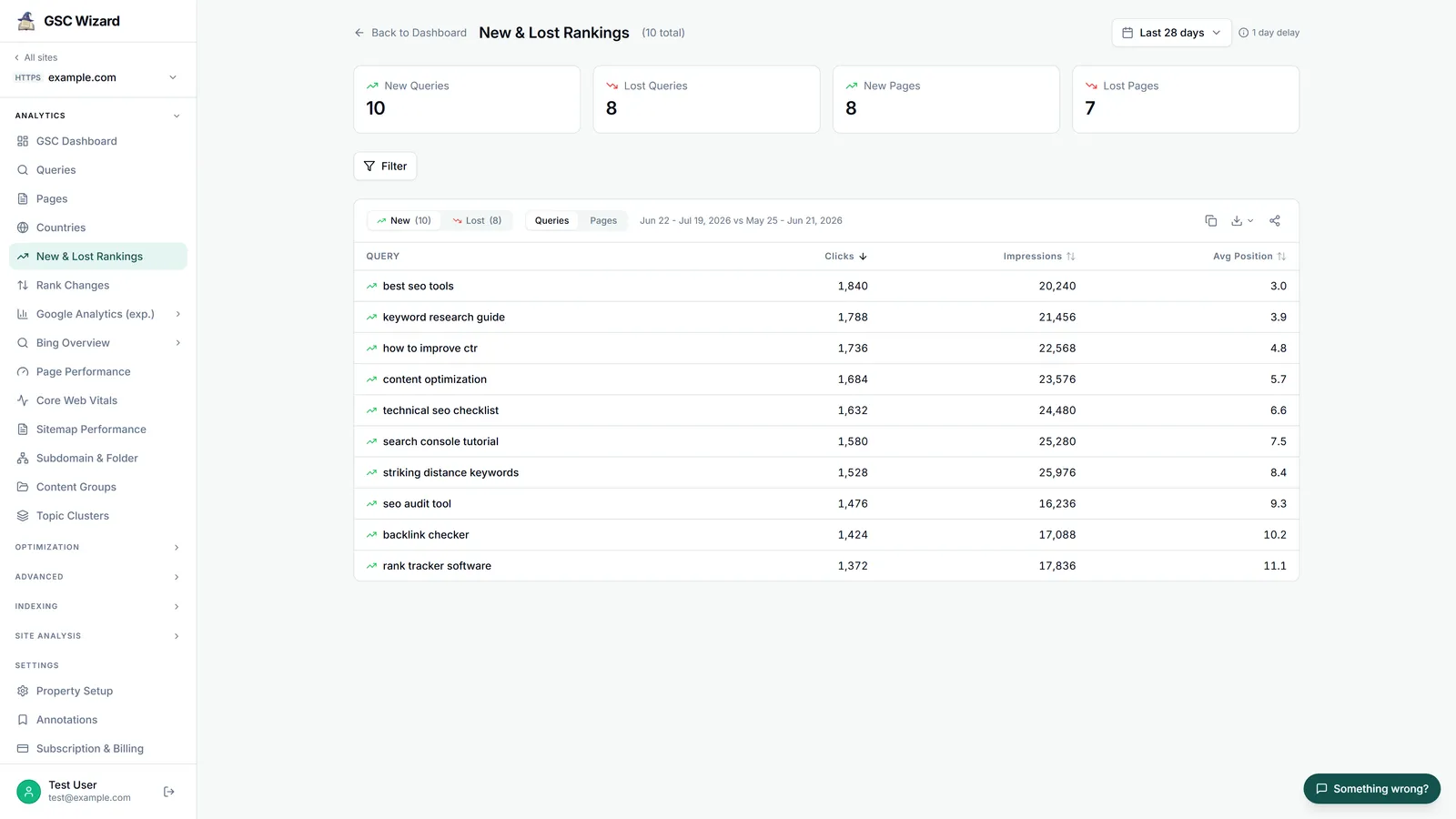
- New & Lost Rankings. The queries and pages that started or stopped ranking between two periods, with per-topic-cluster and per-content-group totals.
- Rank Changes. For every keyword present in both periods, whether it improved, worsened or stayed within half a position, on a before-and-after scatter plot, with minimum click and impression thresholds to cut noise. Both reports need a comparison period switched on.
- Bing in the same place. With a Bing Webmaster Tools API key in Account settings, the Bing Queries report lists each query's clicks, impressions and average ranking, with the previous ranking when a comparison is on, and Bing Overview shows Bing's new rankings. GSC Wizard reads Bing live through its API and does not store it, so it has the history that API returns: about 16 months of clicks, impressions, queries and pages, with query and page rows dated by week, and about six months of crawl data.
History depends on the property type. An API property reads Search Console live, so it has the same 16 months Google keeps. A full storage property is copied into GSC Wizard's own database: when you add it, the 16 months Google still has are backfilled, and from then on new data is collected every day, so the history keeps growing past Google's limit, up to 10 years. Starter includes 10 API properties plus 5 full storage properties. The same data is available to AI assistants through the GSC Wizard MCP server, whose ranking tools return the position bands and the new, lost, improved and declined queries for any two periods.
If you only want to see what the band view looks like first, the Ranking Distribution Analyzer page shows an example split for a typical site across positions 1-3, 4-10, 11-20, 21-50 and 50+, with query counts, clicks, impressions and CTR per band (illustrative numbers, not your data).
When a paid rank tracker is still the better tool
First-party data has blind spots that no amount of filtering fixes, and in these four cases a paid SERP-scraping tracker earns its price.
Exact local positions. Search Console breaks data down by country, not by city or postcode. A restaurant, a dentist or a plumber cares about what someone sees two streets away, and only a tool that checks the results from that location can tell you.
SERP features. Search Console's Search appearance dimension tells you about your own rich results, and a carousel or knowledge panel you appear in gets a position, but it does not tell you what else is on the page: which features showed up for a keyword, and who holds them.
Competitors' rankings. Search Console and Bing Webmaster Tools only show sites you have verified. If you need to know where three rivals rank for your money keywords, a tracker is the only way.
Keywords you do not rank for yet. No impression means no row, so a target keyword where you sit on page five is invisible in Search Console until you climb into view. A tracker reports position 48 from day one, which is useful when you launch a page and want to watch it move up.
A sensible split for most sites is to use Search Console and Bing as the free tracker for everything you already rank for, and pay for a tracker only for the short list of local, competitive or not-yet-ranking keywords where those four gaps matter.
Free keyword research tools: Search Console queries and Bing Keyword Research
The same two consoles double as free keyword research tools. In Search Console, the Queries table is a list of searches Google already associates with your pages: sort by impressions, look at the queries in positions 4 to 20, and pull out question queries with a regex filter. How to use Google Search Console for keyword research walks through those techniques, the striking distance playbook turns the 4 to 20 list into edits, and clustering Search Console queries groups thousands of them into topics you can track together.
Search Console only knows queries you already appear for. For ideas beyond that, Bing Webmaster Tools includes a Keyword Research tool at no extra cost, which Microsoft describes as a way to "discover trending keywords, related search queries, and long-tail opportunities in real time". Because it draws on Bing's searches rather than your own impressions, it can suggest terms you have never ranked for, and those are exactly the keywords to give a paid tracker if you want to watch a new page climb.
Frequently asked questions
Is there a free rank tracker?
Yes, for your own site. Google Search Console and Bing Webmaster Tools are both free, and both show the average position of every query your site appeared for, with 16 months of history. What they cannot do is check a fixed keyword list from a chosen city, show competitors' rankings, or show a position for a keyword you do not rank for yet. Those still need a paid rank tracker that checks the search results itself.
How do I check my keyword ranking on Google for free?
Open Google Search Console, go to Performance, switch on Average position above the chart and click the query in the table, or add a Query filter. Set the date range, pick Daily in the granularity menu, and add a Country and a Device filter if you want a number closer to what one searcher sees. The figure is the average of your topmost position over every impression in that range, not one live ranking.
Why is my position in Search Console different from what I see when I search?
Search Console averages the topmost position of your site over every impression, across all locations, devices and searchers. Google's help says your position for one specific search can differ from that average because of many variables, such as your search history and location. A manual search or a rank tracker is one check from one place; Search Console reports what everyone who saw your site was shown.
How far back can I see keyword rankings in Search Console?
16 months. Anything older drops out of the Performance report and the API, so a longer history has to be exported regularly or stored elsewhere. A GSC Wizard full storage property does that: it backfills the 16 months Google still holds and then collects every day, keeping up to 10 years.
Does Bing Webmaster Tools show keyword rankings?
Yes. Its Search Performance report shows clicks, impressions, CTR and average position for your keywords and pages, and since October 2024 it holds 16 months of data. Bing Webmaster Tools is free; you only need a verified site, and sites already verified in Google Search Console can be imported.
Is GSC Wizard a free rank tracker?
No. GSC Wizard is paid, from €17 a month, with a 7-day free trial that needs no credit card. It does not track a keyword list you type in: it works over every query Search Console reports for your properties, adds daily position bands, new and lost rankings and rank changes, and on full storage properties keeps the history beyond Google's 16 months.
Can I track competitor rankings for free?
Not with first-party data. Search Console and Bing Webmaster Tools only show sites you have verified, so they never show where a competitor ranks. For that you need a tool that checks the search results itself, which is what paid rank trackers do.
Next playbook
Once you can see where every query ranks, push the ones that are nearly there. Find your striking distance keywords →
Keep every ranking, not just the last 16 months
Daily position bands, new and lost rankings and rank changes from your own Search Console and Bing data. 7-day free trial, no credit card needed.
Written by Jan-Willem Bobbink · Published November 4, 2026 · Updated November 4, 2026