Google Merchant Center
Feed Audit
Twenty-one checks over the synced Merchant Center catalog and the product pages behind it, scored out of 100.
Requires Merchant Center Run on demand Monthly schedule
Opening the page never starts a run: it shows the latest stored run, or No feed audit yet. A run reads every offer from the synced catalog, crawls each distinct product page on the property (plus any extra hosts you allow), checks the feed images, and scores the lot. The audit reads the catalog that the Merchant Center link on Organic Shopping syncs, so link an account there first.
What you get
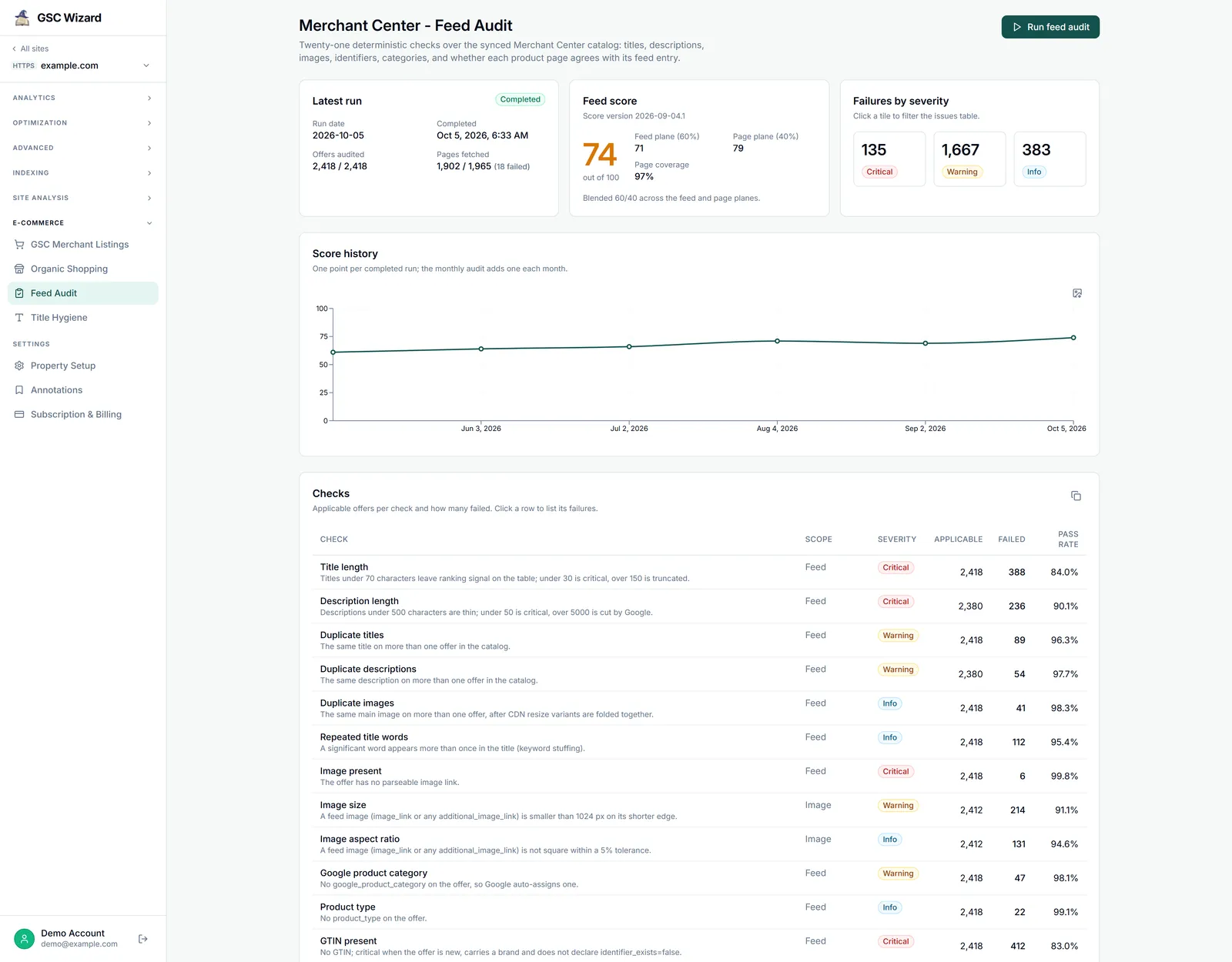
- Latest run: its status (Queued, Crawling pages, Scoring, Completed, Failed or Cancelled), run date, offers audited and pages fetched. It refreshes every 15 seconds while a run is in progress.
- Feed score out of 100, with the Feed plane (60%), the Page plane (40%) and the page coverage.
- Failures by severity (Critical, Warning, Info). Click a tile to filter the issues table.
- Score history: one point per completed run.
- Checks: applicable offers per check, how many failed, and the pass rate. Click a row to list its failures.
- Issues: failed checks per offer, with CSV and HTML export. Passes are not stored, so every row is something to fix.
- Recent runs: newest first. Click a completed run to inspect its checks and issues.
The 21 checks
Grouped by where they look. Each check has a usual severity, and some raise or lower it per offer.
- Feed: Title length, Description length, Duplicate titles, Duplicate descriptions, Duplicate images, Repeated title words, Image present, Google product category, Product type, GTIN present, Recommended attributes, Duplicate URLs.
- Image: Image size (a feed image under 1024 px on its shorter edge) and Image aspect ratio (not square within a 5% tolerance).
- Page: Page HTTP status, Product schema (a JSON-LD Product node with name, image, price and currency), H1 count, Title element count.
- Feed vs page: Price matches page, Title matches page, Page images missing from feed.
How to run it
- Open the property, expand E-COMMERCE in the left sidebar, and click Feed Audit.
- Click Run feed audit. The worker picks the run up within a few minutes.
- While it runs, the button reads Run in progress and Stop and reset appears. Stop and reset discards the run and its crawled pages, so you can start a new one the same day.
- When it completes, start with Failures by severity, then click a check to list the offers that failed it.
Schedule and run limits
- A scheduled audit runs once a month, in the first seven days of the month. It skips a property with a run in progress or one completed in the last 21 days.
- You can start up to 3 runs per 24 hours yourself. The monthly run does not count, and a click refused because a run is already going does not use one up.
- If the property was audited in the last 28 days, a new run asks first: click Run anyway to skip that guard. There is still at most one run per property per day.
- A collaborator with read access can view the results but cannot start or stop a run.
Which pages are crawled
- The page checks always fetch product pages on the property’s own host and its subdomains.
- Under Extra hosts the audit may crawl, the owner can add other hosts (such as
shop.example.com) with Add host. They must be the owner’s own Search Console properties, up to 200 per property. Offers whose link points anywhere else get N/A on every page check. - The crawler identifies itself as GSCWizard-Bot and follows the Crawl rate set in the property’s Property Setup.
- If your robots.txt or a firewall blocks GSCWizard-Bot, the run says so, skips the page checks and scores the feed checks only. To include them, add
User-agent: GSCWizard-BotwithAllow: /to robots.txt, or allow the bot in your firewall or bot settings, then run the audit again.
How the score works
- The score blends the feed plane (60%) and the page plane (40%). A run with fewer than 25 audited offers is not scored.
- The page plane only counts once at least half of the distinct product pages, and at least 100, were fetched. Until then, the score is the feed plane only.
- Throttled responses (429, 503) and network errors on page fetches are retried and left unverified, never failed.
Limits
- The Issues CSV export stops at 5,000 rows. Narrow the check or severity filter to export the rest.
- The Feed Score drops alert fires when the score falls 5 points or more against the previous run. See Alerts.
Part of Google Merchant Center. Related: Title Hygiene, Organic Shopping.