GSC Merchant Listings
How your product results perform in web Search: visibility per search appearance, your most important products over time, and the queries behind them.
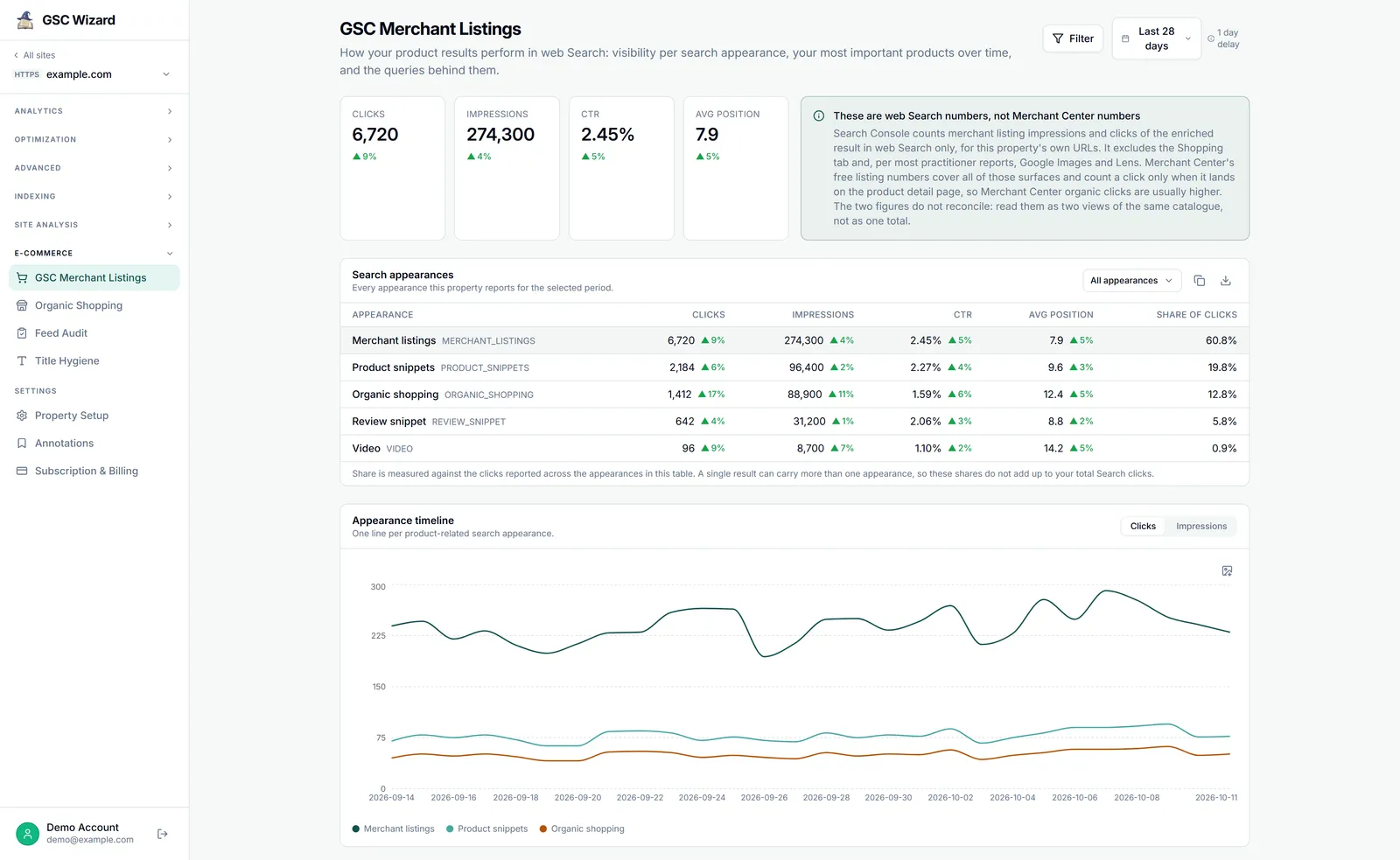
This report reads Search Console, not Merchant Center, so it works for any property with product pages, with or without a Merchant Center connection. It sits first under E-COMMERCE in a property’s left sidebar, and everyone the property is shared with can see it.
What you get
- Four totals for the merchant listings appearance: Clicks, Impressions, CTR and Avg position, with change badges when a comparison period is on.
- Search appearances: every search appearance the property reports, with clicks, impressions, CTR, average position and share of clicks. A filter hides the ones you do not need, and remembers that per property in your browser.
- Appearance timeline: one line per product-related appearance (merchant listings, product snippets, and organic shopping where the property reports it).
- Top products over time: your best merchant-listing pages, plotted day by day, for the top 3, 5 or 10.
- Top products: a table of product pages. A product here is a page URL, which for most shops maps one to one to a product detail page.
- Queries behind merchant listings: what people searched when your product tile showed.
How to use it
- Open a property, expand E-COMMERCE in the left sidebar (it starts collapsed), and click GSC Merchant Listings.
- Pick a date range, and a comparison period if you want change badges. The report loads straight away and reloads when either changes.
- Narrow it with the filter panel, the same one the dashboard uses.
- Switch the timelines between metrics, and change how many products the product timeline plots.
Controls
- Date range and comparison period, plus the shared filter panel with saved filters.
- An appearance filter for the appearance table and timeline.
- A metric toggle on each timeline, and a Products picker (Top 3, Top 5, Top 10) on the product timeline.
- Copy any table to the clipboard or download it as CSV, and export a chart as PNG.
When it says there are no merchant listings
No merchant listings for this property means Search Console reports no merchant listings search appearance for the property in that period. That normally means no product pages are showing as enriched product results in web Search, not that data is missing. The panel lists the appearances the property does report; if it reports none at all, try a longer date range.
Data source and freshness
- Search Console search analytics, filtered by search appearance, for the property’s own URLs. It follows Search Console’s own reporting delay.
- Results are cached for up to an hour.
Limits
- These are web Search numbers, not Merchant Center numbers. Search Console counts the enriched result in web Search only and excludes the Shopping tab. Merchant Center free listing numbers cover more surfaces and are usually higher. The two do not reconcile: read them as two views of the same catalogue, not as one total.
- When a view hits the row limit, the report says so, and the tables below are a top slice rather than the full set.
- The product results appearance stopped reporting in January 2024 and is not charted.
Part of Google Merchant Center. Related: Organic Shopping, Queries.