Redirect maps and verification
Upload the map of old URLs to new URLs, check every redirect on the live server, and see what Google has made of the move.
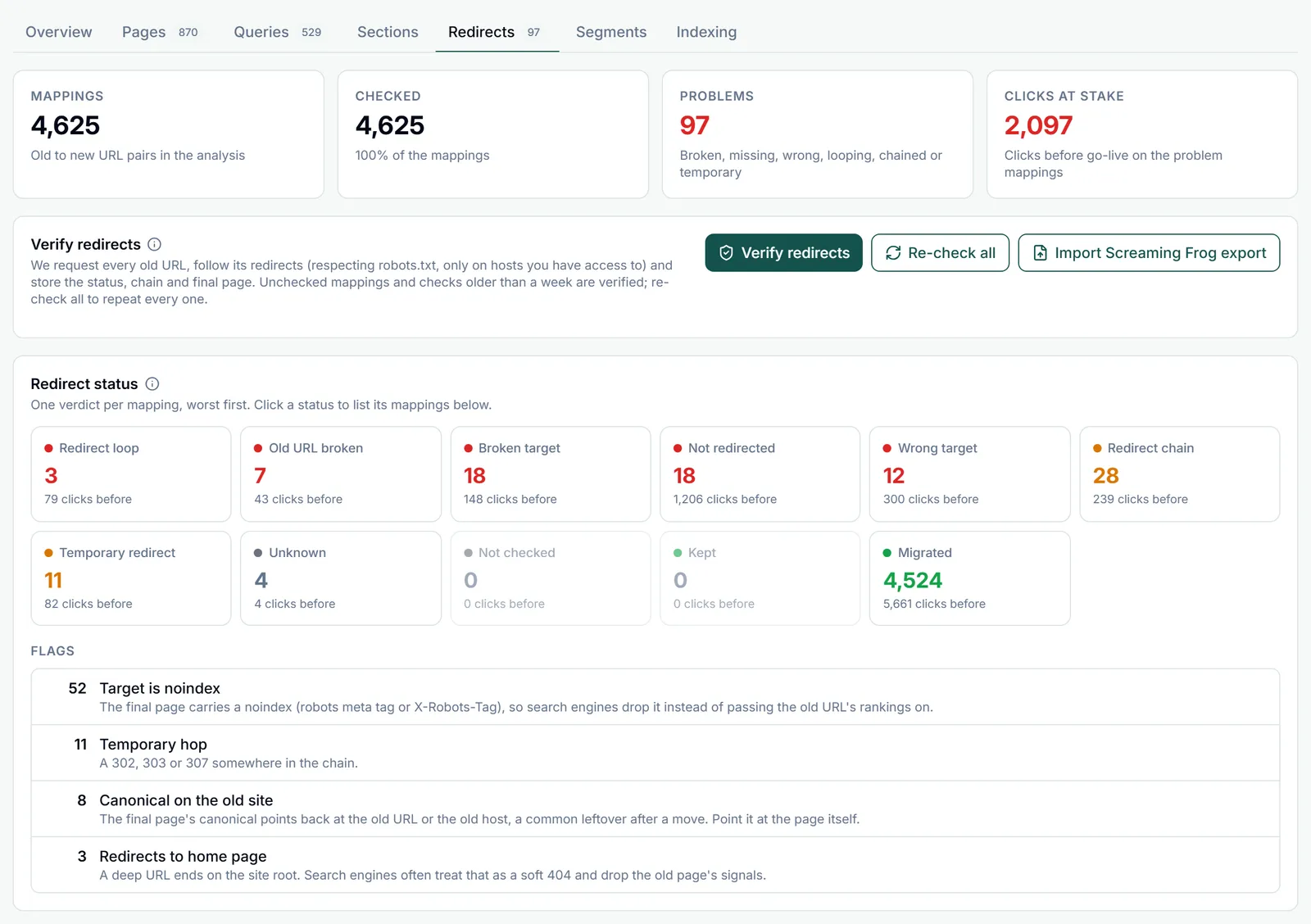
A redirect map is a list of old URL and new URL pairs. Migration Compare works without one, joining old and new pages that share a path, but a map is what makes the analysis page by page: each old URL is compared with its own new URL, merged and split pages are judged as one move, unmapped pages with traffic stand out, and every redirect can be checked.
File format
Two columns: the old URL, then the new URL. Comma, tab and semicolon separated files are all read; the separator is detected.
old_url,new_url
https://www.example.net/blog/seo-tips/,https://www.example.com/articles/seo-tips/
https://www.example.net/shop/blue-widget.html,https://www.example.com/products/blue-widget/
https://www.example.net/about-us/,https://www.example.com/about/
- A header row is optional. Column names are recognised in any letter case, with underscores and hyphens read as spaces, so
from_url,From URLandfrom-urlare one name. Old URL: from, from url, url from, redirect from, old, old url, original url, source, source url. New URL: to, to url, url to, redirect to, redirect url, new, new url, target, target url, destination, destination url. - Without a recognised header the first two columns are used. A first row that does not look like URLs is taken as an unknown header and skipped.
- Screaming Frog exports work as they are:
Addressis the old URL, andFinal Address(redirect reports) orRedirect URL(the Internal and Response Codes tabs) the new one. Rows without a redirect target are left out. - Each URL is an absolute
httporhttpsURL, or a path starting with a single/, of at most 2,048 characters. An old path is resolved against the old property when redirects are verified. - A rejected row is reported with its line in the file (Row 14: ...). A row that repeats an earlier pair is dropped.
Uploading and labels
Open Redirect mappings under the setup.
- Pick the properties in the setup first. Maps are stored per property pair; with URL prefixes or regex patterns, the pair is the one property on both sides.
- Type an optional label, for example Blog move, then drop a
.csv,.tsvor.txtfile on the box or click it to browse. A file can hold up to 10,000 rows and 5 MB; upload as many files as you need. - Pairs already stored under the same property pair and label are skipped, so uploading a corrected file again only adds the new rows.
- Each label becomes a chip under Labels for this pair, with its mapping and checked counts. The analysis uses the label picked in the setup’s Mapping label field: All labels, one label, or Unlabelled. Changing it needs a new run.
- One analysis reads up to 50,000 mappings. A larger set is cut at 50,000 with a warning; split it into labels to analyse it in parts.
- Uploading needs access to both properties. The list under the upload box shows every mapping of the selected label with its status. Filter it by URL or status, copy it, or click Download mappings for a CSV with each check’s status, reason, flags, final URL and hop count. Delete label and Delete all for this pair remove mappings after a confirmation.
- Only mapped URLs, under Filters and matching, restricts pages, queries and totals to the URLs in the map. It needs a map for the pair.
Strict and normalized matching
URLs in a map rarely match Search Console’s spelling exactly. The Strict URL matching box under Filters and matching sets how strict both the page matching and the redirect verdicts are. It applies instantly, without a new run.
- Normalized (the default): http vs https, a leading
www., a trailing slash and letter case are tolerated. A mapped URL picks up the traffic of the Search Console pages that differ from it only in those ways, and a redirect whose final URL differs from the mapped target only in those ways still counts as reaching it, with a flag saying what differs. - Strict: those differences count, because an old URL that still answers on one of them is a finding. Only exact matches are used, and a redirect must land on the mapped target exactly.
- In both modes, a mapped URL that matched its Search Console page only loosely lands in the URL mismatch bucket on the Pages tab, so spelling problems in the map stay visible.
Verify redirects
Click Verify redirects in the panel or on the Redirects tab. For each mapping, GSC Wizard requests the old URL on the live server and records what happens.
- Redirects are followed one hop at a time, up to five hops. A chain that needs more counts as a loop.
- robots.txt is respected: it is checked before the first request and again before every hop. A blocked URL gets the status Unknown, with the reason.
- Only old URLs on a host of a property you can access, as owner or through a share, are requested. Others are skipped with the reason Not on a property you have access to.
- A redirect is followed only while it stays on those hosts. A hop to any other host is recorded as the final URL but not requested, so that mapping reads Unknown. For a domain move, add both the old and the new site to GSC Wizard so every redirect can be followed to the end.
- When the final page answers 2xx with HTML, its title, canonical, noindex (robots meta tag or X-Robots-Tag) and hreflang count are read too, so a target that is noindexed or canonicalised back to the old site is flagged.
- Each request has a 12-second time limit. Requests come from GSCWizard-Bot, the same crawler as the on-page checks. If a firewall or bot protection blocks it, old URLs can read as broken (a 403) or Unknown, so allow it before you verify.
- The page works through the set in batches of up to 100 mappings, unchecked ones first, and counts checked, remaining and skipped as it goes. Keep the page open until it finishes, or click Cancel. Old URLs shared by several mappings are requested once.
- A check stays current for 7 days: running it again only checks mappings that are new or were last checked more than a week ago. Re-check all checks every mapping again.
- Results are stored with each mapping, so they come back in later runs, in saved migrations and in shared reports.
Redirect statuses
Every mapping gets one status, decided in a fixed order. The table lists them worst first, as the Redirects tab does. Statuses marked as a problem count towards the badge on the Redirects tab and, weighted by the traffic they carry, the risk score.
| Status | What it means | Problem |
|---|---|---|
| Redirect loop | The redirects lead back to an earlier URL, or need more hops than the checker follows. | Yes |
| Old URL broken | The old URL answers 4xx or 5xx without redirecting, so the links and rankings it had are lost. | Yes |
| Broken target | The old URL redirects, but the final URL answers 4xx or 5xx. | Yes |
| Not redirected | The old URL still answers 2xx itself instead of redirecting to the new URL. | Yes |
| Wrong target | Redirects to a working page that is not the mapped target. | Yes |
| Redirect chain | Reaches the mapped target, but through two or more hops. Every hop slows users and crawlers down; point the old URL straight at the target. | Yes |
| Temporary redirect | Reaches the mapped target in one hop, but with a 302, 303 or 307. Use a permanent 301 or 308 so search engines treat the new URL as the replacement. | Yes |
| Unknown | Checked, but without a usable answer: a network error, a robots.txt block, a refused address or an unusual status code. | No |
| Not checked | This mapping has not been verified yet. | No |
| Kept | The mapping points the URL at itself (an unchanged URL) and it answers 2xx without redirecting. | No |
| Migrated | One permanent redirect (301 or 308) to the mapped target, which answers 2xx. | No |
Redirect flags
Flags never change the status. They add what else the check noticed: how the chain got there, how the final URL differs from the mapped target, and what the final page says about itself.
| Flag | What it means |
|---|---|
| Redirects to home page | A deep URL ends on the site root. Search engines often treat that as a soft 404 and drop the old page’s signals. |
| Temporary hop | A 302, 303 or 307 somewhere in the chain. |
| JavaScript or meta refresh | A hop in the chain is a JavaScript or meta refresh redirect, not an HTTP 301 or 308. Search engines may not follow it or treat it as permanent; use a server-side 301. |
| Hop through http | After the first request the chain passes through an http:// URL: an extra, unencrypted hop. |
| Hop through another host | The chain passes through a host that is neither the old host nor the final host. |
| http vs https | The final URL and the mapped target differ in http vs https. |
| www vs bare host | The final URL and the mapped target differ in a leading “www.”. |
| Trailing slash | The final URL and the mapped target differ in a trailing slash. |
| Letter case | The final URL and the mapped target differ in letter case. |
| Query string | The final URL and the mapped target differ in the query string. |
| Target is noindex | The final page carries a noindex (robots meta tag or X-Robots-Tag), so search engines drop it instead of passing the old URL’s rankings on. |
| Canonical on the old site | The final page’s canonical points back at the old URL or the old host, a common leftover after a move. Point it at the page itself. |
| Target canonical elsewhere | The final page declares another URL as its canonical, so search engines may index that URL instead. |
The JavaScript or meta refresh flag comes from Screaming Frog imports, which record that kind of hop. A single hop of that kind to the mapped target counts as Temporary redirect, not Migrated. The built-in check follows HTTP redirects only, so there an old URL that moves with a meta refresh or JavaScript reads as Not redirected.
Import a Screaming Frog crawl
Already crawled the old URLs, or need to check URLs our crawler cannot reach? Click Import Screaming Frog export and pick a CSV from the SEO Spider.
- Accepted: the Redirect Chains and All Redirects reports, and the Internal: All and Response Codes exports. In the last two, chains are followed inside the export for up to 10 hops; a redirect whose target is not in the export gets an unknown final status.
- Each row is matched to a mapping by its old URL: an exact match first, then one that ignores http vs https, www and a trailing slash. A mapping written as a path matches on the path.
- The Indexability columns, and on the Internal tab the title, meta robots, X-Robots-Tag and canonical columns, fill in the target page signals, so the noindex and canonical flags work as with the built-in check.
- A row with status 0 (no response: a robots.txt block, a DNS failure, a timeout) becomes Unknown, with Screaming Frog’s reason.
- Imported checks show Screaming Frog as their source and count as verified in the risk score, like the built-in check.
Google’s view with URL Inspection
The redirect check shows what your server answers. The Google’s view card on the Redirects tab shows what Google has made of it: whether it recrawled the old URL and saw the redirect, indexed the new URL, and moved the canonical to it.
- Pick how many pairs to check in Pairs to inspect: Top 20, 50, 100 or 200. Pairs with a redirect problem come first, then the pairs with the most clicks before go-live.
- Click Inspect in Google. This queues a background run that inspects the old URLs on the old property and the new URLs on the new property. Each URL uses one URL Inspection call; Google allows 2,000 per property per day, and a run that reaches the limit pauses and resumes the next day. The run keeps going after you close the page.
- When the run has finished, click Load Google’s view. Loading stored results is free, and uses the newest stored inspection of each URL, including ones you ran earlier from the URL Inspection report. Each pair is placed on a handover stage, and the funnel sums the pairs and their clicks per stage.
Only the owner of a property can start an inspection run on it. Someone with shared access can load the stored results once the owner has run it.
| Stage | What it means |
|---|---|
| Not inspected | Neither URL of the pair has a stored URL Inspection result yet. |
| Redirect not seen yet | Google’s last crawl of the old URL is from before go-live, or it has not reported a redirect for it yet, so the move has not registered. |
| Redirect seen | Google reports the old URL as a page with a redirect. Inspect the new URL to see whether it took over. |
| New URL not indexed | Google inspected the new URL and it is not indexed (yet). |
| Other canonical chosen | Google picked a canonical other than the new URL (often the old URL or a duplicate), so the new URL does not rank in its own right. |
| New URL indexed | The new URL is indexed; Google did not report which canonical it chose. |
| Canonical moved | The new URL is indexed and Google chose it as the canonical: the handover is complete. |
Part of Migration analysis. Related: Health, recovery and risk, URL Inspection.