Windows and baselines
Every number in Migration Compare is side A before go-live against side B after it. This page explains where those two windows sit, and what each warning means.
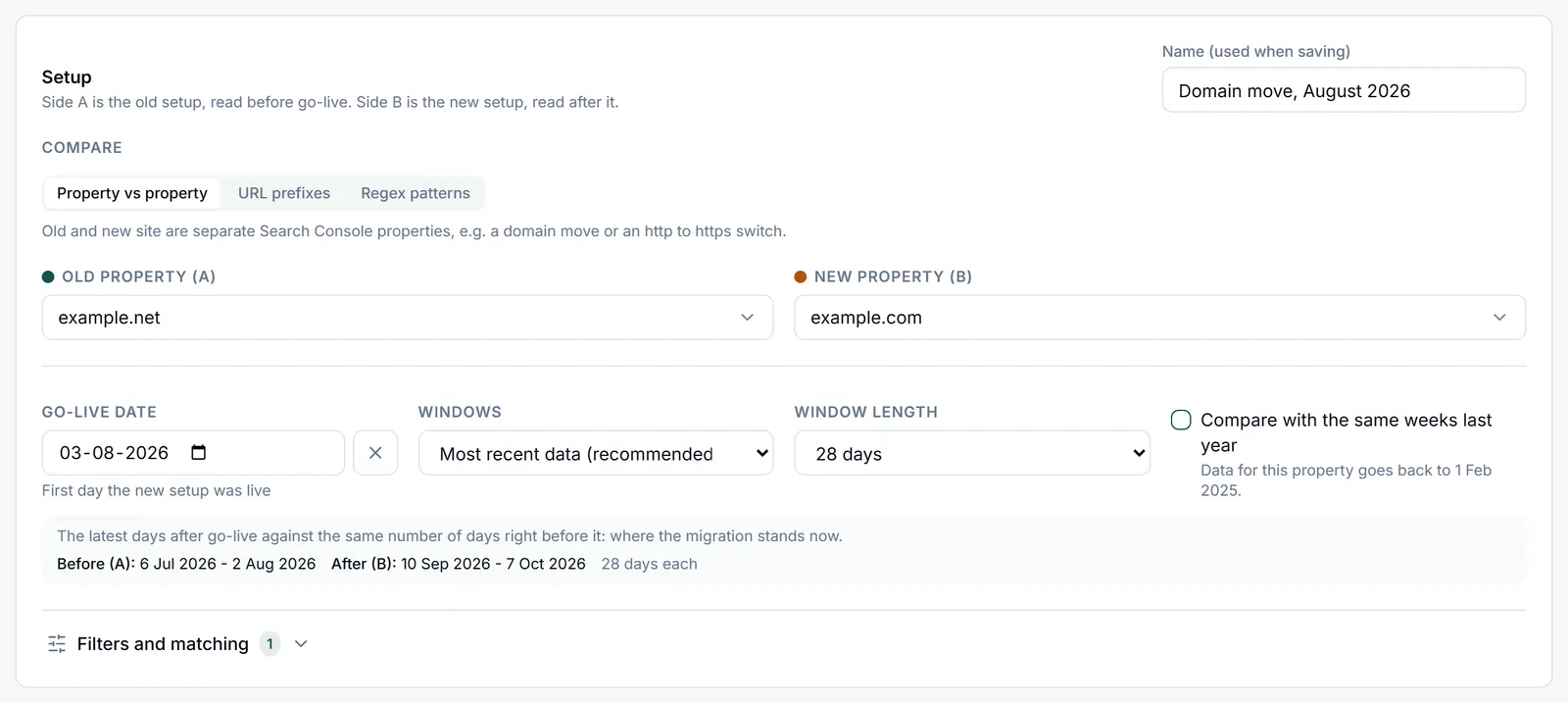
Side A, the old setup, is always read over the before window, and side B, the new setup, over the after window. Both are set in the timing row of the setup, and the line under it previews the exact dates before anything is fetched, for example Before (A): 6 Jul 2026 - 2 Aug 2026, After (B): 10 Sep 2026 - 7 Oct 2026, 28 days each.
The go-live date
The first day the new setup was live: the day the new site launched or the redirects went on.
- The go-live day counts as day 1 of the new setup. If the switch happened late in the day, the next day is often the better pick.
- The earliest date you can pick is the first day of data for the old property. A date up to a year ahead is allowed too, so you can set up a migration before it happens: until the first post-launch day has final data, only the baseline is shown.
- Clear the date with the x next to it to compare both sides over one date range instead. Health, recovery and risk need a go-live date.
The latest final day
Search Console needs about three days to finalise a day. The latest day any window uses is therefore today (UTC) minus three days, shown above the results as Latest complete day. Later days are left out rather than read as a drop.
The three window strategies
Pick one in Windows. N is the Window length.
| Strategy | Before window (side A) | After window (side B) | Answers |
|---|---|---|---|
| Most recent data (recommended) | The N days right before go-live | The last N days up to the latest final day | Where does the migration stand now? |
| From go-live | The N days right before go-live | The first N days from go-live | How did the launch itself go, dip included? |
| Full period | From the Full period start (default: 90 days before go-live) to the day before go-live | Go-live to the latest final day | Everything before against everything since |
- Window length offers 7, 14, 28 (the default), 56 and 90 days, or Custom for any whole number of days from 1 to 365. Full period ignores it.
- Most recent data and From go-live keep both windows the same length, so their totals compare like for like.
- Full period windows usually differ in length. The setup then warns that totals are skewed and that the per-day figures and the recovery percentage are the numbers to compare. Recovery, pace and the risk score always work per day, so they stay valid.
Young migrations: shorter windows, whole weeks
A window cannot be longer than the post-launch days that exist.
- With Most recent data or From go-live, N is shortened to the days available since go-live, and both windows shrink with it.
- A shortened window of 14 days or more is rounded down to whole weeks, so both windows hold each weekday equally. Asking for 28 days on day 20 gives two 14-day windows; on day 10 it gives two 10-day windows.
- An after window under 7 days gets a note that weekday effects can dominate, so treat the comparison as provisional.
Same weeks last year
Tick Compare with the same weeks last year to take seasonality out. The before window becomes the after window moved back 364 days: exactly 52 weeks, so every day lines up with the same weekday a year earlier.
- Use it when the migration landed in a seasonal swing, such as a shop that moved in November, or when the weeks before go-live were not normal.
- The after window is placed as usual by the strategy and length you picked. The Full period start is ignored.
- It needs data from a year back. Search Console keeps 16 months. A property synced to the warehouse in Dashboard Management keeps every day from then on, so its history keeps growing past Google’s window. For a synced old property, the note under the checkbox shows how far back its data goes.
- If go-live is more than a year before the end of the after window, last year’s weeks are already partly or fully after the migration. The setup warns and suggests turning the option off.
- It takes effect once the first post-launch day has data. It is not available with the Bing data source, which keeps about six months.
Filters that apply to both sides
Under Filters and matching:
- Country and Device (Desktop, Mobile or Tablet) narrow both sides to the same segment.
- Search type: Web (the default), Image, Video or News. To see every search type side by side instead, load the search-type split on the Segments tab.
- The same panel holds Mapping label, Section depth, Only mapped URLs, Strict URL matching and Alerts, covered in Redirect maps, Reading the results and Saving, sharing and alerts.
Warnings and what they mean
Window warnings show under the dates in the setup. After a run, every warning is listed under Analysis warnings above the results, in a full sentence with the dates and counts involved.
| Situation | What it means |
|---|---|
| Go-live in the future | The go-live date is still ahead, so there is no post-launch data yet. Only the baseline is shown. |
| No final data since go-live | Go-live was in the last three days, so Search Console has not finalised a post-launch day yet. |
| Windows shortened | There are fewer post-launch days than the window length asks for, so both windows were shortened (and rounded to whole weeks from 14 days). They grow as days pass. |
| Unequal windows | The before and after windows differ in length, as with Full period, so their totals are not comparable. Read the per-day figures and recovery. |
| Last year already after go-live | With the same weeks last year, part or all of the baseline falls after go-live. Turn the option off to compare with the weeks before go-live. |
| Baseline beyond the data | The old property’s data starts inside the before window, so the baseline is partial. Days before the data starts are left out of the per-day baseline rather than counted as days without clicks. |
| Short after window | The after window holds under 7 days, so weekday effects can dominate. |
| Low baseline | Side A had fewer than 10 clicks in the before window: too few for reliable recovery and trend figures, so health reads Insufficient data. |
| Missing days | A side has no data for more than two days of its window, so its totals there may be too low. |
| Row limit reached | One of the reads hit its row limit, so the figures built from it are incomplete. |
| Loose URL matches | Mapped URLs match their Search Console page only loosely (http vs https, www, trailing slash or letter case). |
| Mapped URLs without data | Some mapped old URLs had no Search Console data in the before window. Normal for pages without impressions. |
| New URLs before launch | New URLs already had impressions or clicks before go-live, from a staging host or early indexing. |
| More than 50,000 mappings | Only the first 50,000 mappings of the set are part of the analysis. Split the map into labels to analyse the rest. |
| Only mapped URLs not pre-filtered | The mapped URLs could not be turned into a Search Console page filter (too many of them, or one too short), so that side’s daily trend chart and its country and device splits cover the whole property. Totals, recovery and the tables still count mapped URLs only. |
Part of Migration analysis. Related: Health, recovery and risk, Annotations.