Saving, sharing and alerts
Keep a migration, hand the report to a client, hear about it when redirects break or recovery stalls, and ask an AI assistant about it.
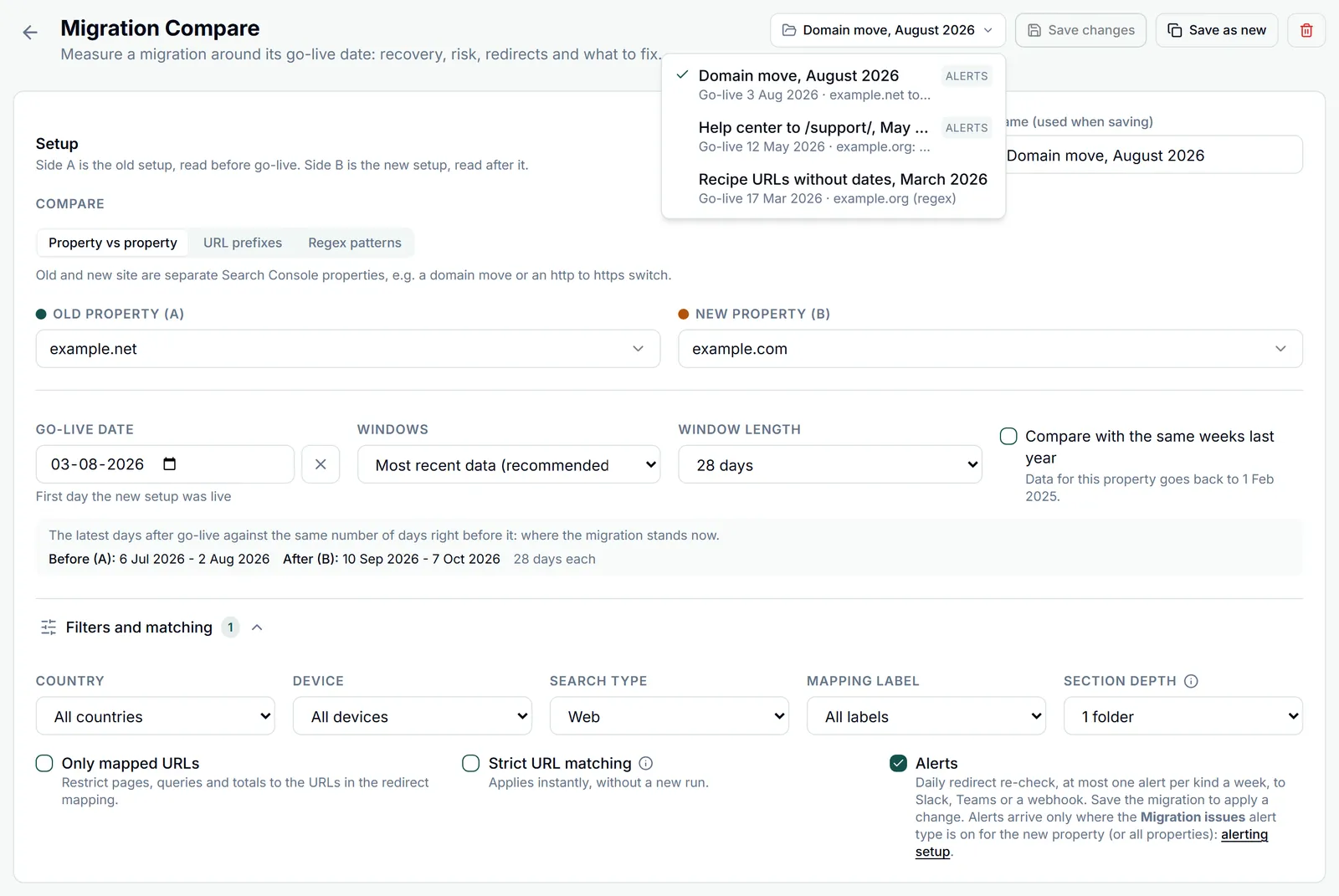
Saved migrations
The Saved migrations menu at the top right of the page lists them; the buttons next to it save.
- Save stores the whole setup: the properties, prefixes or patterns, the go-live date and windows, the filters, the mapping label, the matching and section depth, and the alerts switch. The name comes from Name (used when saving), up to 120 characters.
- With a saved migration open, Save changes updates it, Save as new stores a copy, and the bin icon deletes it.
- Picking a saved migration fills the setup but does not run it: click Run analysis when you want the data. The page address carries the migration, so a bookmark or a link reopens it.
- You can keep up to 50 saved migrations.
- Saving with a go-live date adds an annotation named Migration go-live: <name> to each property you can edit (as owner, or with full access through a share), so the date shows on every chart of those properties. Changing or clearing the date moves or removes it, and deleting the migration removes it. See Annotations.
- Redirect maps are stored per property pair and label, separately from the migration, so several saved migrations can share one map.
Exports and client reports
The Export menu in the results header.
- Download HTML report: one standalone file with the verdict, charts and tables, styled for light and dark mode and readable without GSC Wizard.
- Save and share: stores the report and opens the client picker, so you can send it through the client portal. Clients sign in by email; nothing is published on an open URL.
- The HTML report and the shared report keep the summary, charts, health and totals whole, and trim the long lists to keep the file small: at most the 300 busiest pages plus 300 pages with a redirect problem, the top 300 queries, and 50 each of topics, sections, flows and rules.
- Pages CSV and Queries CSV hold every row of the analysis. Their file names include both windows, like every export.
Daily re-check and alerts
Turn on Alerts under Filters and matching and save the migration; the switch needs a saved migration, and a change takes effect when you save.
- About once a day, GSC Wizard re-checks each saved migration with alerts on. Each time it verifies the mappings that were never checked or were last checked more than six days ago, never-checked ones first, then the oldest, up to 400 per migration, so a map of a few thousand redirects is re-checked about once a week.
- It recounts the redirect problems over the whole map and compares them with the previous check.
- When the go-live date is set and both properties are synced to the warehouse, it also reads recovery the same way the report does. A setup filtered on a country and a device together has no recovery reading.
- It skips accounts without an active subscription or trial.
| Alert | Raised when | Severity |
|---|---|---|
| New redirect issues | More mappings than at the previous check are now Old URL broken, Broken target, Redirect loop, Not redirected or Wrong target, or more redirect targets now carry a noindex or a canonical that points elsewhere or back at the old site. Chains and temporary redirects do not raise it. | High when a loop, a broken old URL or a broken target is among them, when the grown statuses cover 5% or more of the map, or when noindexed targets do. Medium otherwise. |
| Recovery dropped | Recovery fell 10 points or more against the previous reading, or against the reference reading from about a week before. | High |
| Recovery stalled | 14 or more days after go-live, recovery is under 90% and gained less than 2 points in about a week. | Medium |
- Alerts go out through your alert subscriptions in Slack, Microsoft Teams or outbound webhooks. Tick Migration issues in one of your alert subscriptions or webhooks. Migration alerts go only to the account that saved the migration, not to people the properties are shared with.
- Each kind of alert is sent at most once per migration per week, and links back to the saved migration.
- The Migration checklist shows Alerts on for a saved migration once the switch is on.
Bing data
In Property vs property mode, the Data source switch in the results header reads the same windows and the same redirect map from Bing Webmaster Tools instead of Google.
- It needs a Bing Webmaster Tools API key on the Account page, next to the Google account that owns each property, and both sites in Bing Webmaster Tools.
- Bing keeps about six months of data, so older migrations and the same weeks last year baseline are not available with Bing.
- Bing samples its page and query reports to the top rows it keeps, so page and query totals are a lower bound. It has no country or device breakdown.
- Bing data cannot be filtered by country, device or search type, so the switch is unavailable while any of those filters is set.
- URL prefixes and Regex patterns cannot be split in Bing’s reports, so those modes always read Google.
The MCP tools
With GSC Wizard connected to Claude, ChatGPT or another MCP client, an assistant can run the same analysis.
- compare_migration: before and after comparison in any of the three modes. With a go-live date it adds the windows, recovery and the trend buckets of pages and queries; the window strategy, window length and same-weeks-last-year baseline work as in the app.
- get_migration_health: the app’s health check for a go-live date or a saved migration: recovery, pace, momentum, projection milestones, URL success, the risk score and its factors, recommendations, redirect status counts from the stored checks, top lost pages and queries, losing sections, the impression handover, the click change split and the checklist. It leaves out the branded split, the search-type split and a saved migration’s country and device filters, and analyses up to 10,000 redirect mappings per call.
- list_migrations: your saved migrations, with the last health snapshot from the daily re-check. Pass an id to get_migration_health to analyse one.
- add_migration_redirects, list_migration_redirects and delete_migration_redirects manage the redirect maps the app reads.
Try: “List my saved migrations, then run a health check on the shop replatform and tell me which three fixes matter most.”
Part of Migration analysis. Related: Sharing & team access, Alerts.