Shopping tools for AI assistants
What every assistant can ask of your Merchant Center account, how to read the answers, and what to do when a tool says Merchant Center is not set up.
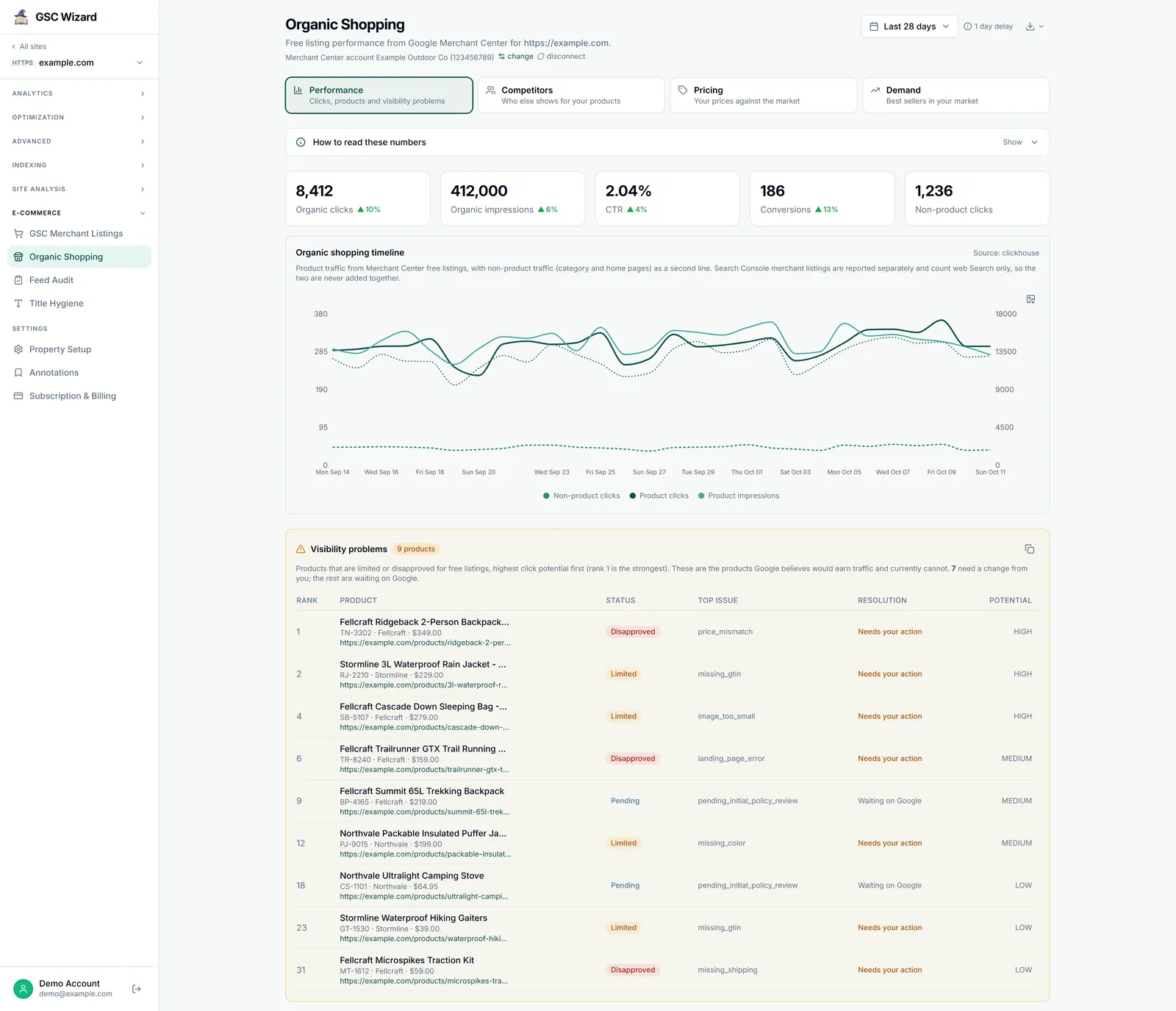
Claude, ChatGPT, Codex and Grok all reach Merchant Center through the same GSC Wizard MCP server at https://mcp.gscwizard.com/mcp, so they get the same tools and the same answers. This page is the part the four setup guides share.
The shopping tools
You do not need the names: ask in plain language and the assistant picks a tool. Naming one helps when it picks the wrong one. Every tool finds the Merchant Center account through the link on the property, so you never paste a merchant id.
| Tool | What it answers | Needs |
|---|---|---|
Search get_merchant_listings_performance | Product results in web Search from Search Console: clicks, impressions, CTR and position per search appearance, plus the product pages behind them. | Search Console only |
Accounts list_gmc_accounts | Every Merchant Center account your connected Google logins can read, and the site each one is linked to. | Merchant Center connected |
Performance get_organic_shopping_performance | Free listing clicks, impressions and conversions per day, and the top offers, grouped by brand, Google category or your own product type. | Linked account |
Product health get_product_listing_status | Every product that is disapproved, limited or pending, with its top issue, sorted by Google’s click-potential rank, and whether the fix is yours or Google’s. | Linked account |
Product health get_gmc_account_health | Account-level issues such as suspensions and policy warnings, and checks on the settings Google reads: terms of service, the free listings program, the claimed website, shipping and returns. | Linked account |
Product health get_gmc_data_sources | Your feeds and their latest upload or scheduled fetch: whether it succeeded, how many items it created or updated, and the processing issues Google reported. | Linked account |
Feed audit run_feed_audit | Queues the 21-check feed audit. The only shopping tool that writes, and what it writes is a run inside GSC Wizard, never anything in Merchant Center. | Linked account, write access |
Feed audit get_feed_audit_results | The Feed Score from 0 to 100, split into feed and page, failures by severity, pass rates per check and the score history. | Linked account |
Feed audit get_gmc_title_hygiene | Title and description lengths, missing descriptions, duplicate titles and repeated words, over a sample of up to 5,000 offers. | Linked account |
Market get_gmc_competitors | Who you compete with in one country, category and traffic source: relative visibility, page overlap and how often they rank above you. | Linked account |
Market get_gmc_pricing_insights | Your price against the market benchmark per product, and Google’s suggested sale price with the predicted change in impressions, clicks and conversions. | Linked account |
Market get_gmc_best_sellers | Google’s best sellers by country and category, with rank movement and a flag on the ones you do not stock. | Linked account |
Anything else query_gmc_report | A read-only Merchant Center Query Language query, for fields and filters the fixed tools do not expose. | Linked account |
The full list of more than 130 tools, with arguments, is on the MCP server page, and the Merchant Center MCP page shows what the shopping tools return.
Reading the answers
A few things about shopping data are easy to get wrong. The tools warn the assistant about each one, and they are worth knowing before you pass an answer on.
- Search Console and Merchant Center never add up. Merchant listings in Search Console count the product result in web Search only. Merchant Center free listings also cover the Shopping tab, Images, Lens, YouTube and Maps, so they are usually higher. Compare the trends, never the totals. More on the two numbers.
- Units differ by tool. CTR in the performance tools is a percentage from 0 to 100. Google’s other rates, such as page overlap, predicted price effects and feed audit pass rates, are fractions from 0 to 1, so 0.12 means 12%. Competitor visibility is a ratio: 200 means that competitor is shown two hundred times as often as you.
- The last few days can still change. Merchant Center performance runs up to yesterday, and GSC Wizard re-fetches the last four days every night as Google fills them in. Compare complete weeks.
- A feed audit takes time. The feed checks finish within minutes, but the page crawl runs at a polite pace, so a large catalog can take hours. Queue it, then ask for the results later.
- Title hygiene from an assistant is a sample of up to 5,000 offers from the live product list. The Title Hygiene report in the app counts every synced offer.
What an assistant can and cannot change
Google offers no read-only Merchant Center permission, so its consent screen asks to manage your product listings. GSC Wizard only ever reads with it.
- No tool edits a product, a feed, a price or a Merchant Center setting. Every shopping tool reads, except
run_feed_audit, which queues an audit inside GSC Wizard: it checks the synced catalog and crawls your product pages, and writes nothing to Merchant Center. - GSC Wizard’s sign-in screen names the account you are signed in as, and has a box, ticked by default, that reads Also allow … to make changes. Untick it to connect read-only: the assistant can still read everything, and only write tools, such as queuing a feed audit, are refused. A read-only API key does the same for clients that use a key.
- Connected apps on your Account page lists every assistant you approved, shows whether each can make changes, and disconnects it.
Troubleshooting
A shopping tool that cannot answer returns a short notConfigured note rather than an error, and the assistant usually passes it on in its own words. The note carries a reason code, a hint, and the email of the GSC Wizard account the connection is signed in as; ask for the reason if the assistant only paraphrases.
Reason no_scope: Merchant Center is not connected
No Google login on this GSC Wizard account has granted Merchant Center access. Open Account settings and click Connect Merchant Center, with the Merchant Center box ticked on Google’s screen.
Reason no_account: nothing is linked to the site
Access is granted, but the property does not know its Merchant Center account yet. Pick it on the property’s Organic Shopping page and click Save, as in step 6 of the connect guide.
Reason credentials_revoked: the access stopped working
Google no longer accepts the Merchant Center access granted earlier, for example after GSC Wizard was removed at myaccount.google.com. Connect Merchant Center again from Account settings.
Reason gmc_on_other_account: a different Google login
Merchant Center is connected on another Google login than the one behind the property’s Search Console connection. Live tools still answer, but a tool that reads only synced data has nothing stored, and feed audits are refused. Connect Merchant Center with the Google account that owns the property in Search Console.
The note names a GSC Wizard account you did not expect
The assistant is signed in to another GSC Wizard account than the one that holds the shop, which happens most when two Google logins each created one. Sign in at tool.gscwizard.com with the right account, then disconnect GSC Wizard in the assistant and connect it again.
The property is shared with you and the shopping tools refuse
The owner has to switch on Merchant Center for your invite in Team Management, because Google limits pricing and best-seller data to the retailer. The merchant listings tool works on any shared property. Queuing a feed audit also needs full access.
A feed audit was not queued
Each property runs one audit per day, and each user can start three per day. When an audit finished less than 28 days ago, a new one is skipped unless you ask for it anyway: say “run it even though the last one is recent”. On a read-only connection the tool is refused.
Quota or rate limit errors
The Merchant API quota belongs to your Merchant Center account. The daily quota resets at midnight Pacific time; for a rate limit, try again in a few minutes.
Part of Google Merchant Center. Related: Connecting Merchant Center, Claude, ChatGPT, Codex, Grok.