Connecting Merchant Center to Codex
Most Merchant Center problems are fixed in code: a price the page renders differently from the feed, a missing GTIN in the feed generator, a title template that repeats the brand. Give Codex the issues, and it can find and fix the line that causes them.
Codex reaches Merchant Center through the GSC Wizard MCP server at https://mcp.gscwizard.com/mcp. The Codex CLI, the IDE extension and the desktop app read the same ~/.codex/config.toml, so you add the server once and it works in all three.
Before you start
- A GSC Wizard subscription or trial. MCP access is part of every plan.
- Merchant Center linked to the property in the GSC Wizard app, not in Codex: see Connecting Merchant Center. If the property’s Organic Shopping report shows numbers, Codex can read them.
Already using GSC Wizard in Codex for Search Console? There is nothing to add: the shopping tools are on the same server.
Add the server
From any terminal:
codex mcp add gsc-wizard --url https://mcp.gscwizard.com/mcpThis writes an [mcp_servers.gsc-wizard] table into ~/.codex/config.toml. Already added GSC Wizard for Search Console? Then skip this step: the shopping tools are on the same server.
Sign in
codex mcp login gsc-wizardYour browser opens GSC Wizard’s sign-in screen. Check the account it says you are signed in as, and untick the box that allows changes if Codex should only read. Then start codex and type /mcp to see the tools.
Check that it works
Ask something you can compare with the app, so you know Codex reads the right account:
“List my Merchant Center accounts and their sites, then show free listing clicks for example.com over the last 28 days, with the dates.”
The clicks should match the Organic Shopping report for those dates. A notConfigured note instead names a reason, explained in the reference.
Keep Codex to the shopping tools
Every tool definition costs context on every turn, and the server has more than 130. For work on a shop, list only the tools the task needs. The block below is the read-only shopping set, with a key from an environment variable for runs without a browser, such as codex exec and CI.
[mcp_servers.gsc-wizard]
url = "https://mcp.gscwizard.com/mcp"
bearer_token_env_var = "GSCW_API_KEY"
enabled_tools = [
  "list_sites",
  "get_merchant_listings_performance",
  "list_gmc_accounts",
  "get_organic_shopping_performance",
  "get_product_listing_status",
  "get_gmc_account_health",
  "get_gmc_data_sources",
  "get_feed_audit_results",
  "get_gmc_title_hygiene",
  "get_gmc_competitors",
  "get_gmc_pricing_insights",
  "get_gmc_best_sellers",
  "query_gmc_report"
]
tool_timeout_sec = 120
Codex sends the variable’s value as the bearer token, so the key never sits in the file. Create it under Account → API keys, read-only. Drop the bearer_token_env_var line to keep using the browser sign-in. Product status and pricing on a large catalog can take longer than a plain lookup, which is what the timeout is for.
Codex reads AGENTS.md at the start of a session. A few lines there save repeating the shop in every prompt:
## Merchant Center
- Shop property: sc-domain:example.com (use the gsc-wizard MCP tools).
- Before changing how a product page renders price, availability or
  structured data, check get_product_listing_status for that product.
- Never call run_feed_audit without asking first.
What to ask Codex
The useful prompts join the Merchant Center data to the repository Codex has open.
“Read the top 20 problem products from get_product_listing_status. For every price mismatch, find where this repo renders the price on the product page and in the Product JSON-LD, and check whether sale prices are handled the same way in both.”
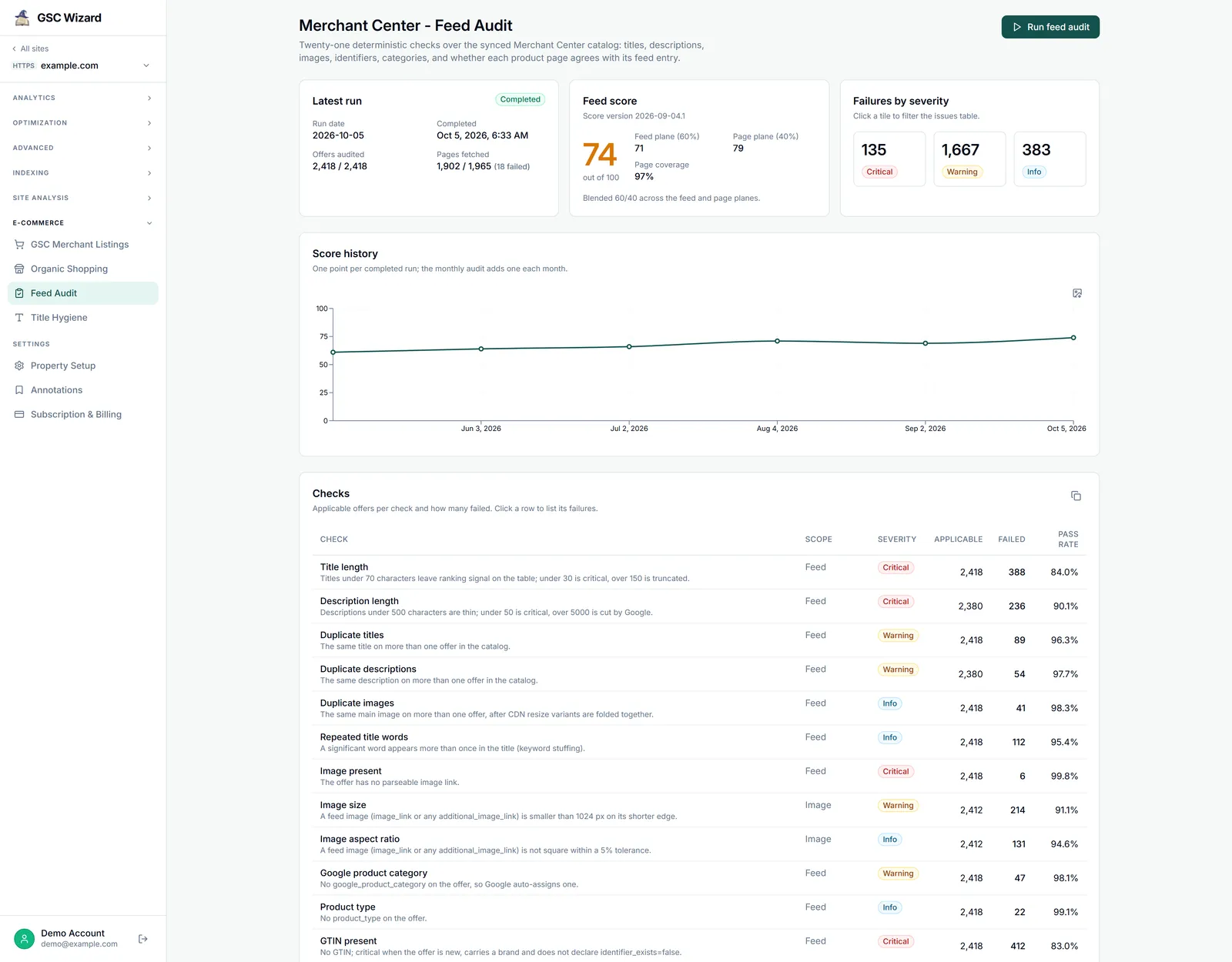
“Get the latest feed audit results for example.com. For the three checks that fail most, find the code that generates the product feed and propose a fix for each.”
“Run title hygiene for example.com, then find the template that builds product titles and change it so the brand is not repeated.”
“Check get_gmc_data_sources. If the scheduled fetch of the primary feed is failing, find the route that serves the feed file and tell me why it might return an error.”
“Which products are limited for a missing GTIN? Find where GTINs come from in our catalog import and list the products that have one in the database but not in the feed.”
All thirteen shopping tools, how to read their numbers and what Codex can change are in the shopping tools reference.
Troubleshooting
/mcp does not list gsc-wizard
Run codex mcp list to confirm the entry exists, and check that it is a url entry rather than a command entry. Codex reads the config at startup, so restart it after editing the file.
Every call returns 401
With a key, the variable named in bearer_token_env_var has to be exported in the shell that started Codex and hold the full gscw_live_ key. With the browser sign-in, run codex mcp login gsc-wizard again.
Codex answers for the wrong GSC Wizard account
A GSC Wizard connection added through ChatGPT’s apps, rather than in config.toml, shares ChatGPT’s sign-in. Signing out of the browser does not change it: remove the connection and add it again while you are signed in at tool.gscwizard.com as the right account.
Calls time out on a large catalog
Raise tool_timeout_sec, and narrow the question: one brand, one category or a shorter date range answers faster than the whole catalog over months.
Codex answers with a notConfigured note
The note names a reason, and the reference explains each one. Most mean the Merchant Center link on the property is missing or broken, which is fixed in the app, not in Codex.
Part of Google Merchant Center. Related: Connecting Merchant Center, Shopping tools reference, Claude, ChatGPT, Grok.