Full On-Page Check
A technical and on-page audit of the pages Search Console already shows for your site, with the On-Page SEO keyword checks run in the same crawl.
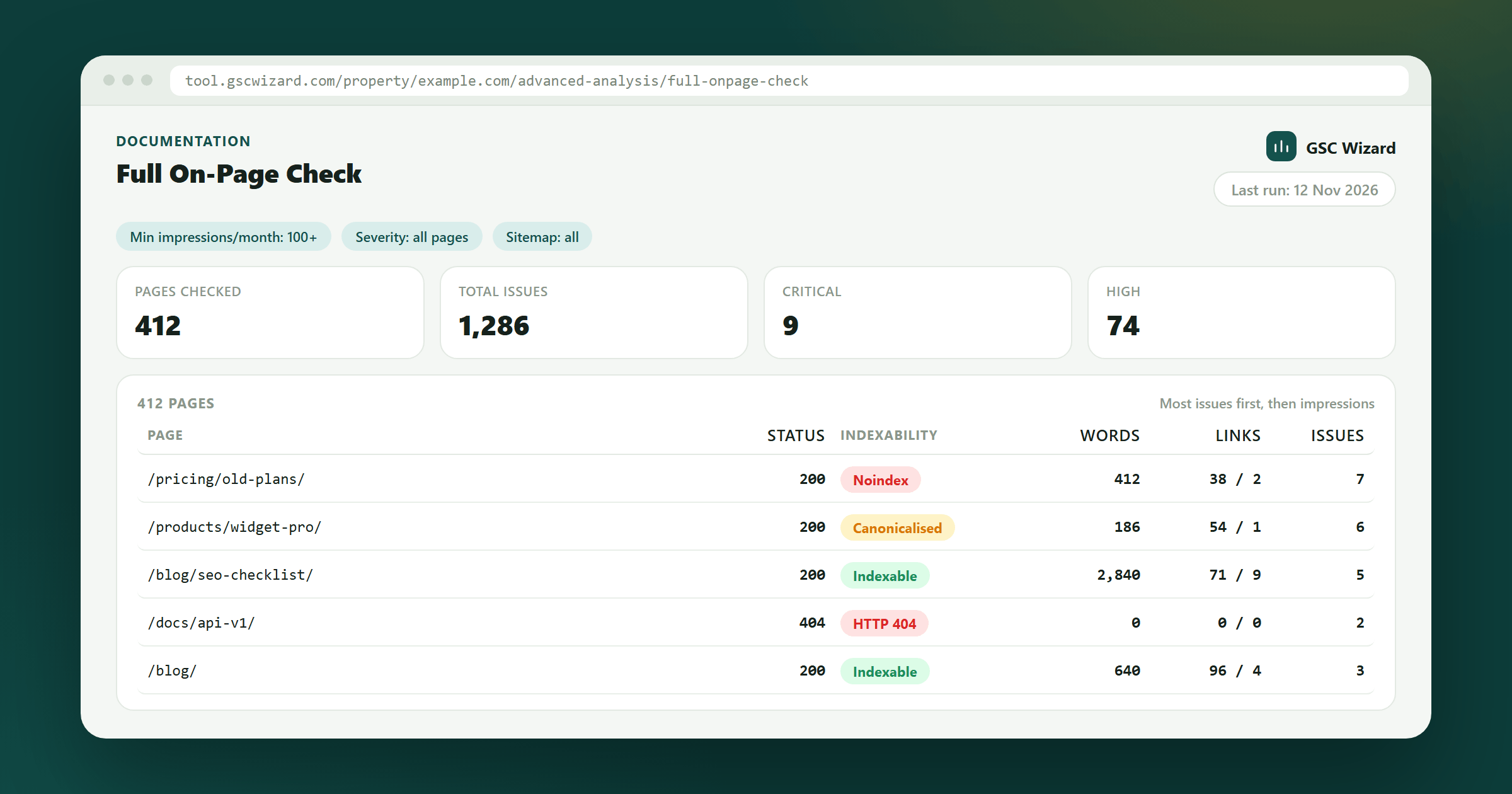
The check reads the last 28 days of query and page data from Search Console, ranks your pages by impressions and crawls the top ones, up to 1,000, with GSCWizard-Bot. Each page is fetched once, and that one response is checked for its HTTP status and redirects, indexability (meta robots and the X-Robots-Tag header), the canonical tag, title and meta description, headings, word count, internal and external links, image alt text, structured data, the viewport tag, hreflang, and whether the URL is listed in your XML sitemap. The same crawl runs the On-Page SEO keyword checks: up to three of each page’s top queries are matched against its title, meta description and H1, so a page’s technical problems and its keyword gaps sit in one row.
How to run it
- Open the property, expand ADVANCED in the left sidebar and click Full On-Page Check.
- Pick a Min impressions/month threshold: 50+, 100+ (the default), 500+ or 1,000+. It is the number of impressions a query needs in the 28-day window to count as a page’s target keyword. It does not change which pages are crawled.
- Click Run check (Re-run check once a report exists). A progress bar counts the pages processed against the total, and results fill the table as each page finishes.
- Keep the tab open while it runs: the crawl lives in that request, so Stop or closing the tab ends it, and the pages already crawled are saved as the report.
- Once two or more runs exist, Previous runs reopens any of the last five, each labelled with its date and issue count.
Limits and crawl behaviour
- A run stops after 14 minutes. If that happens before every page is crawled, a notice says so and the pages that finished are kept.
- You can start two runs an hour, and only one can run on a property at a time.
- Pages are fetched five at a time unless the property’s crawl rate in Property Setup says otherwise (one to ten at a time, with an optional delay of up to 60 seconds between waves). A robots.txt Crawl-delay is honoured as well, and the slower of the two wins. A site that answers 429 or 503 gets a pause that respects Retry-After, fewer pages at a time, and a retry of the throttled page.
- Each page has 12 seconds to answer, and a response is read up to 5 MB. Redirects are followed for up to five hops, and never to a host outside the properties you have access to.
- robots.txt is read before every page and every redirect hop. A disallowed URL is not fetched: it is reported as Blocked by robots.txt, and a banner above the table counts the pages skipped that way.
Summary cards and the pages table
- Summary cards: pages checked, total issues, and the critical, high, medium and low counts. Below them, Keyword coverage shows the keywords checked (with the impressions at stake on the ones missing from at least one element) and how many are missing from the title, the meta description and the H1.
- Filters: search by URL or title, a severity row (All pages, critical, high, medium, low, info), category and issue dropdowns (each issue with its page count), a content-group picker, the HTTP status bucket (2xx, 3xx, 4xx, 5xx or Error), a minimum word count, and In sitemap / Not in sitemap.
- The table lists the worst pages first (most issues, then most impressions), 25 to a page: Page, Status, Indexability, Keyword (the top target keyword, with T, D and H markers that flag a title, description or H1 missing one of the page’s keywords), Words, Links (internal / external), Time (response time), Sitemap (a tick, a cross, or a dash when no sitemap could be read) and Issues. Status, Words, Links and Time sort on click.
- Click a row to expand it: every issue with its severity, a keyword coverage table (impressions, clicks, position, and whether the keyword is in the title, meta description and H1), and the raw signals, from the title and its length to meta robots, X-Robots-Tag, nofollow links, structured data types, Open Graph, Twitter card, lang, hreflang count and the page’s impressions over 28 days.
What each issue means
Severity is fixed per issue, except where a page that earns impressions in Search gets the higher one.
| Issue | Raised when | Severity |
|---|---|---|
| Blocked by robots.txt | robots.txt disallows GSCWizard-Bot for the page or a redirect target. On-page checks are skipped. | Critical |
| Could not fetch page / HTTP error | The request failed, or the page answered 400 or above. On-page checks are skipped. | Critical |
| Redirect loop | The redirect chain runs past five hops. | High |
| Page redirects | The URL redirects (the message names the target and the hop count). | Low |
| Slow server response | The page took more than 3 seconds to answer. | Low |
| Non-HTML response | A 2xx answer that is not HTML, such as a PDF. On-page checks are skipped. | Info |
| Noindex directive | meta robots or X-Robots-Tag says noindex. | Critical with impressions, high without |
| Nofollow directive | A page-level nofollow. | Medium |
| Missing canonical tag / Canonical points elsewhere | No canonical, or one that names another URL (the page then counts as Canonicalised, not indexable). | Medium; elsewhere is low without impressions |
| Title and meta description | Missing title (high), missing meta description (medium), a title over 60 or under 30 characters, or a description over 160 or under 70 (low). | High to low |
| Missing H1 / Multiple H1s | No H1 on the page, or more than one. | High / low |
| Thin content | Fewer than 300 words of visible text. | Medium under 100 words, low otherwise |
| No internal links | No links to the page’s own host were found on it. | Medium |
| Images missing alt text | One or more images on the page have no alt text. | Low |
| Structured data | No JSON-LD or microdata at all (low), or a Product, FAQPage, BreadcrumbList, Organization, LocalBusiness, Review, AggregateRating, Recipe or Article block missing a required field (medium) or a recommended one (low). | Medium or low |
| Missing viewport tag / Large page | No viewport meta tag, or an HTML response over 1.5 MB. | Low |
| Sitemap mismatch | A non-indexable page listed in the XML sitemap (medium), or an indexable page missing from it (low). | Medium or low |
| Keyword potential: title, H1, meta description | One or more of the page’s target keywords is missing from that element. One issue per element, not per keyword. | Title high with impressions (medium without), H1 medium, meta low |
Checks across the whole crawl
Three checks run once every page is in, and only see links between pages that are part of this crawl.
- Orphan page: an indexable page that answers 2xx and earns impressions or sits in the sitemap, yet no other crawled page links to it (high with impressions, medium without).
- Broken link target: a page that failed or answered 400 or above, listed with the crawled pages that link to it (medium).
- hreflang: alternates that do not include the page itself, two or more alternates with no x-default, or an alternate that does not link back (medium each).
The sitemap is found through the Sitemap: lines in robots.txt, or at /sitemap.xml and /sitemap.txt when there are none, following sitemap index files one level deep. When no sitemap can be read, the two sitemap checks are skipped rather than reported as missing.
Exports
The Export menu above the table works on the rows that match your current filters.
- CSV, one row per page: every signal the crawl collected, with the issue counts by severity and the issue list.
- CSV, one row per issue and CSV, one row per keyword (with the current title, meta description and H1 next to each keyword).
- HTML report: a standalone file of the pages table.
- The file names carry the crawl date, as every export does, and the table copy button copies the visible table.
Access and requirements
- The property must be verified for you in Search Console, and a Google account must be connected, because the page list and keywords come from Search Analytics.
- Collaborators with read-only access can open past reports but not start a check. A collaborator with full access runs it on the owner’s Google connection, which counts toward the owner’s shared live-data allowance. See Sharing & team access.
If the report comes back empty or full of blocked pages, allow the bot in robots.txt with User-agent: GSCWizard-Bot and Allow: /. This check sends GSCWizard-Bot/1.0 (Full On-Page Checker); the GSCWizard-Bot page covers firewall rules and how to verify the requests.
From an AI assistant: with GSC Wizard connected, the audit_onpage_seo tool runs the same per-page audit for up to 25 URLs a call, either the ones you name or the top pages by impressions. It stops after about 50 seconds and lists the pages it did not reach, so the assistant can call it again for the rest.
Part of Advanced analysis. Related: Link Crawl, On-Page SEO Check, URL Inspection.