Sync, history and data
What is copied from Google Ads, how far back, how often it is refreshed, and how to tell how fresh a report is.
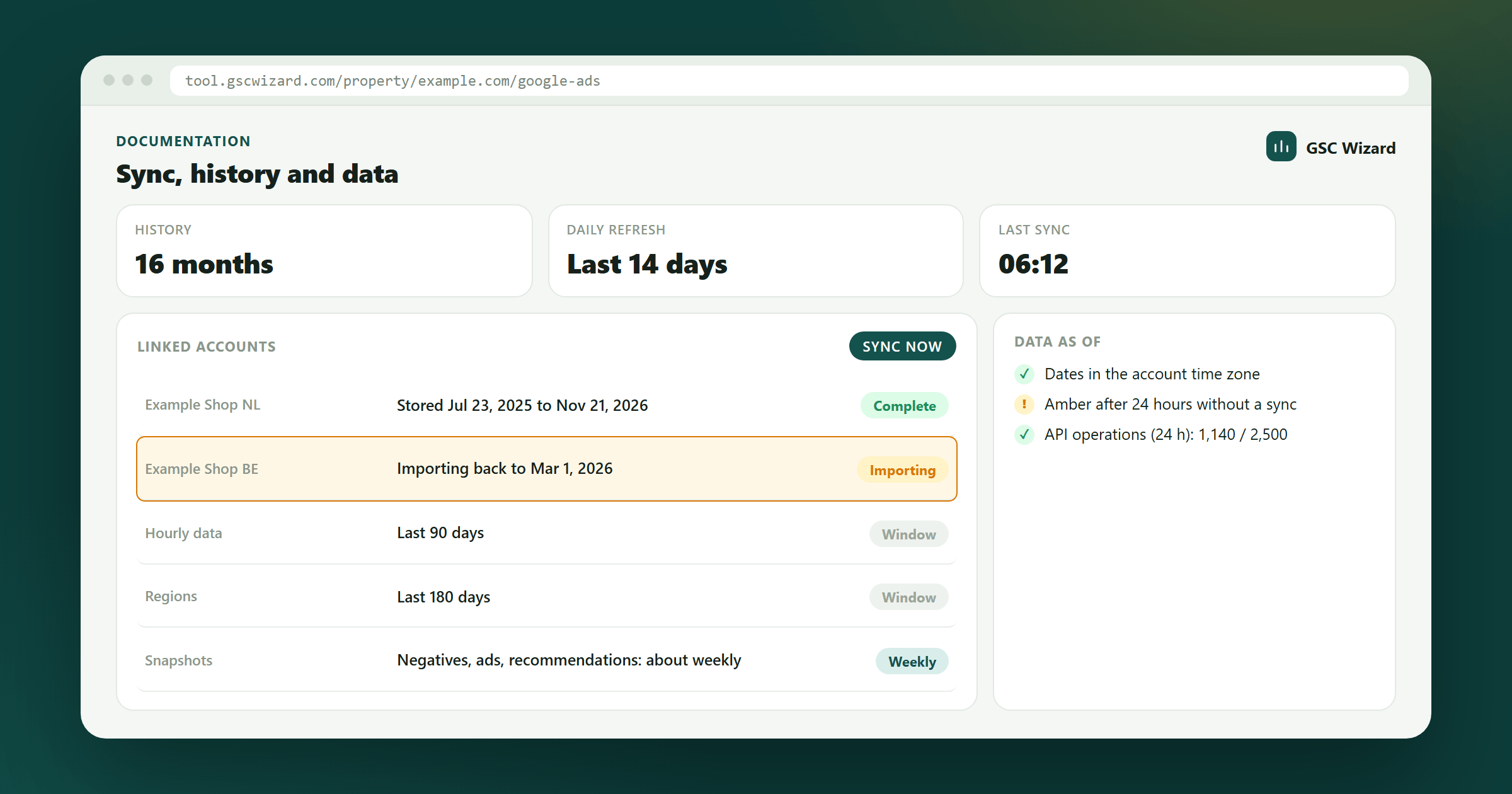
GSC Wizard copies your Google Ads reporting data into its own warehouse and every report reads from there. This page explains what is copied, how far back, how often it is refreshed, how to tell how fresh a report is, and what happens to the data when you unlink.
What is imported, and how far back
Reporting data comes in by day, in the account’s time zone. Each kind has its own window, set by what Google keeps and what the reports need.
| Data | How far back |
|---|---|
| Campaigns, search terms, keywords and Quality Score, landing pages, Shopping products, campaign settings and budgets, Performance Max asset groups | 16 months |
| Conversions by conversion action | The whole stored history |
| Hours of the day | The last 90 days |
| Regions | The last 180 days |
| Change history | Google keeps 30 days. GSC Wizard keeps every change from about 30 days before your first sync on, so the history grows longer than Google’s. |
| Weekly snapshots: negatives, ads and asset stats, search terms per ad group, conversion action settings, new and returning customers, budget and target simulations, Google’s recommendations, account settings, invalid clicks, the linked Merchant Center account, region names, Performance Max placements and search categories | Refreshed about once a week; each snapshot is kept for about six months |
Google Ads itself keeps up to 37 months of performance data; GSC Wizard imports the most recent 16.
The history import
- Linking an account starts the import of 16 months of history, one calendar month per run, newest month first, so the recent past is there first.
- A background sync runs every 10 minutes. Each pass picks up several accounts and keeps going while it has time, so a new link usually fills in within the hour. Large accounts take longer.
- The History column of the linked accounts table shows importing back to a date while it works, then complete. While history is still importing, the data-as-of line on every report says so.
- When Google keeps refusing one month of an account’s history, the import skips that month after repeated failures and goes on with the older ones, so one bad month never stops the rest. The month is recorded as missing: every report whose date range (or comparison range) covers it says “Google Ads data for <account> is missing from <start> to <end>”, and the data-as-of line names the missing dates. GSC Wizard tries the month again about once a week and fills it in when Google returns it, and the note goes away by itself.
The daily refresh
Google Ads data is not final the day after. Conversions arrive late, invalid-click credits are applied after the fact, and impression share settles about three days later.
- Once a day per account, GSC Wizard reads the last 14 days again, ending yesterday in the account’s time zone, and replaces the stored rows for those days. Nothing is counted twice.
- The refresh waits until three hours after midnight in the account’s time zone, so yesterday is complete when it is read.
- After a gap, such as an expired permission that was restored, it catches up up to 31 days per run until it is current again.
- The weekly snapshots run about every six and a half days, attached to a daily run. A pass that settles late conversions over the last 90 days runs at the same time.
The data-as-of line
Every Google Ads report shows when its data was last synced, because a reporting delay over 24 hours has to be disclosed under the Google Ads Developer Policies. It reads like this:
Google Ads data: Example Shop: synced 06:12 (Europe/Amsterdam). Stored daily from the Google Ads API; dates are in the account time zone, and impression share settles about 3 days after the fact.
- One entry per linked account, with “history still importing” added while the import runs.
- The line turns amber when an account’s last sync is more than 24 hours old, and shows the last sync error, which usually says what to fix.
Sync now
You never need to press it for the daily refresh: Google Ads data runs through yesterday in the account’s time zone and is refreshed every night by itself. Sync now is for the first import, and for picking up yesterday’s late figures sooner.
- Sync now on the Overview’s Setup card runs for up to four minutes with a live ticker, newest month first. Stop ends it at the next Google Ads call and keeps the finished months.
- It imports history that is still pending and reads the daily window when that is due. The same days are read again only a few times a day, and one person’s re-reads stay within about 100 Google Ads operations a day; otherwise the card says the data is already up to date and nothing is spent.
- It needs write access to the property: the owner, or a collaborator with full access and Google Ads turned on.
- An account that was paused because Google reported lost access is reactivated by a manual sync once the access is back.
- The
sync_google_adstool in AI assistants does the same in steps of about 40 seconds per call. See Google Ads in AI assistants.
Time zones and currency
- Google Ads days are in each account’s own time zone. Search Console days are in Pacific Time. Reports that put the two side by side say so, and a day-level comparison can differ at the edges for that reason.
- Money is shown in the account’s currency. When the linked accounts of a property use different currencies, the Report currency setting on the Overview picks one (or Automatic), and the other accounts are converted at the ECB reference rate of each day. Reports that converted anything say which accounts and at which rates. A currency without an ECB reference rate cannot be converted and is marked no exchange rate.
- With more than one account linked, each report has an account filter to show a subset of them.
Search term coverage
Google hides low-volume search terms from advertisers, so the visible terms explain only part of the spend (on one test account they explained 42% of campaign cost). Reports built on search terms therefore show a coverage line, and money totals always come from campaign or product rows, never from adding up terms. Search Console anonymises rare queries in the same way, which matters wherever the two are joined.
The shared daily operations budget
Google meters the Google Ads API in operations per day for the whole Google Cloud project, and every GSC Wizard user shares that one project. GSC Wizard therefore keeps a budget of its own under Google’s limit.
- Reports never spend operations: they read the warehouse. Only the sync, listing accounts, the check before a link and the domain check do.
- One sync query is one operation however many rows it returns, and an account needs about 12 to 14 operations a day.
- When operations run short, weekly snapshots wait first, then the history import, and the daily refresh comes last, so the recent days of linked accounts stay current.
- When the budget for the last 24 hours is spent, listing accounts is refused until it frees up.
- Each user also has a daily allowance of 400 Google Ads lookups per 24 hours for listing accounts, checking an account before it is linked, and domain checks. When it is used up, the message says when it works again.
Storage, privacy and deletion
The full text is in the privacy policy (section 2.2c); in short:
- The data is stored in GSC Wizard’s own data warehouse in Falkenstein, Germany (EU), keyed to the property and under the same per-customer access rules as your Search Console data. Link and sync state, and a 30-day log of API calls, are kept in the application database, also in the EU.
- It is used only to show your own reports, including the ones that combine it with the same property’s Search Console, GA4 and Merchant Center data. It is not sold, not shared with other customers, not used for advertising and not used to train AI models. It leaves GSC Wizard only where you send it: an AI assistant over MCP, Slack, Teams, Linear or a webhook.
- The change history includes the email address of the Google Ads user who made each change, as Google reports it.
- Google refresh tokens are encrypted at rest. The Google Ads permission is only requested when you start the Google Ads connect.
- Daily performance data is kept while the account stays linked. Large weekly snapshots, such as ad texts, negatives and recommendations, are kept for about six months.
- The stored Google Ads data, the change history with its email addresses included, is deleted when you unlink the account from the property, disconnect the Google account, delete the property or your GSC Wizard account, or when a collaborator’s access that the link depends on is revoked. A weekly clean-up catches anything left behind.
- The savings ledger in Brand Savings is kept after an unlink, because its entries are your own notes for the property. It is deleted when you delete its entries, the property or the GSC Wizard account that owns the property.
Part of Google Ads. Related: Connecting Google Ads, Report settings, Exporting data.