Google Ads
See your Google Ads accounts next to the same property’s Search Console, GA4 and Merchant Center data: where paid and organic search overlap, where they disagree, and what to change in Google Ads.
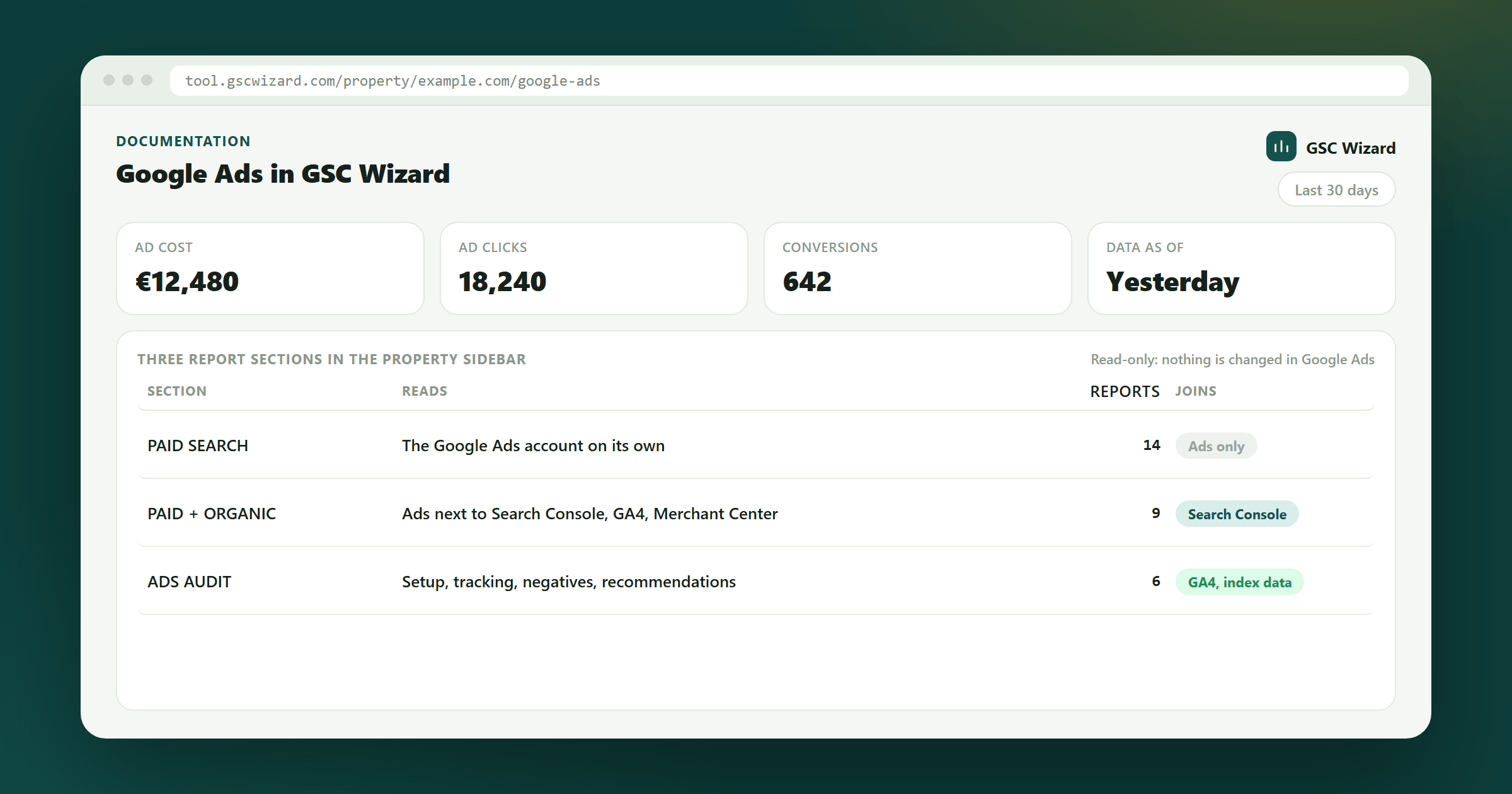
GSC Wizard reads your Google Ads accounts through the Google Ads API and keeps a copy of their reporting data in its own data warehouse, next to the Search Console history of the property the account advertises. Every report reads that copy, never Google live, so opening a page costs no Google Ads API quota and the reports can join paid data with organic data at any date range you pick. What sets it apart from the Google Ads interface is the cross-check with organic search: paid search terms joined to the same Search Console queries, paid landing pages next to their organic clicks, position and indexing state, product ads next to Merchant Center free listings and feed issues, and GA4 outcomes for paid and organic search side by side.
Read-only, always. GSC Wizard never changes anything in a Google Ads account: no bids, budgets, negative keywords, ads, pauses or applied recommendations. Where a report suggests a change, its CSV export is your work list (Brand Savings also writes a file you can import in Google Ads Editor), and you make the change in Google Ads yourself.
Three groups of reports
The 29 reports sit on each property, in three sections of the left sidebar that start collapsed: PAID SEARCH, PAID + ORGANIC and ADS AUDIT. The report search (Ctrl+K or Cmd+K) finds them as well, also under words like PPC or AdWords.
Paid search reports
The Google Ads account on its own: overview, search terms, keywords, landing pages, assets, Shopping, Performance Max, budgets, time, geo and changes.
Paid + organic reports
Google Ads joined with Search Console, GA4 and Merchant Center: brand savings, paid vs organic, total search, scorecards, content P&L and experiments.
Ads audit reports
Checks on the account setup: health check, conversion tracking, Ads vs GA4, new vs returning users, negative keywords and recommendations.
- PAID SEARCH is the Google Ads account on its own: Google Ads Overview, search terms and n-grams, keywords and Quality Score, landing pages, ads and assets, Shopping, Product Matrix, Performance Max, budgets and targets, hours and devices, regions, and the change history Google deletes after 30 days.
- PAID + ORGANIC joins Google Ads with Search Console, GA4 and Merchant Center: Brand Savings, Paid vs Organic, total search, a landing-page scorecard, the ad page against the ranking page, a content P&L, the Product Triangle and Ads Natural Experiments.
- ADS AUDIT checks the account setup: a 13-check Ads Health Check, conversion tracking, Ads against GA4, new and returning users, negative keywords, and Google’s own recommendations.
Every report loads from the warehouse when you open it, except the parts that read GA4 live, which wait for a Run analysis button. Every table exports to CSV with the date range in the filename, and terms, URLs and money amounts are blurred in privacy mode like the rest of GSC Wizard.
Getting started
Setup happens on the property, on the Google Ads Overview page, and takes a few minutes. The connection guide shows every screen.
- Open a property, expand PAID SEARCH in the left sidebar and click Google Ads Overview. A Setup card with three numbered steps sits at the top.
- Click Connect Google Ads and approve with a Google login that can see your Google Ads accounts. It does not have to be the login behind Search Console.
- Click Choose account and link the Google Ads account that advertises this site. Several accounts per property are fine, and one account can serve several properties.
- Click Sync now to import the newest months straight away. The background sync fills in 16 months of history and then refreshes every day.
Setup and reference
How the connection, the data and the settings work, and what to do with the reports.
Connecting Google Ads
Grant Ads access once per Google account, then link one or more Ads accounts to a property.
Sync, history & data
The history import, the daily refresh, the data-as-of stamp, Sync now, currency, and what happens on unlink.
Report settings (thresholds)
Tune the judgement values a property’s Ads reports use, and how statistical guards keep results honest.
Google Ads alerts
Seven daily checks on a linked account, delivered to Slack, Microsoft Teams, webhooks or Linear for the property owner.
Google Ads in AI assistants
The Google Ads MCP tools in ChatGPT, Claude, Copilot, Gemini and other clients, with example prompts.
Workflows
Step-by-step recipes: cut brand spend, find SEO priorities in paid data, audit an account, and check conversion tracking.
What it is good for
A few of the jobs the reports were built for. The workflows page walks through each one step by step.
- Find brand spend you could cut: brand terms where you already rank first organically and nobody bids against you, with a strict before and after once you pause.
- Turn paid search terms into SEO priorities: terms you pay for where the site ranks on page two, priced at your own cost per click.
- Fix landing page mismatches: queries where the ad sends people to one page and Google ranks another.
- Audit a new or inherited account: the health check, conversion tracking, negatives and recommendations in one pass.
- Reconcile Google Ads with GA4, sort the shopping catalog and explain a performance change.
How fresh the data is
- Linking an account imports 16 months of history, newest month first. A new link usually fills in within the hour.
- After that, the last 14 days are read again once a day for every account, a few hours after midnight in the account’s time zone, because conversions, invalid-click credits and impression share keep changing for days.
- Every report shows a data as of line with the last sync of each account. It turns amber when a sync is more than 24 hours old. Sync, history & data has the details.
In AI assistants
The GSC Wizard MCP server has 16 Google Ads tools, so Claude, ChatGPT, Gemini, Copilot and other MCP clients can answer questions about your accounts from the same warehouse copy. The server never calls the Google Ads API itself and cannot change an account. Google Ads in AI assistants lists the tools and the clients that show them.
Who can use it
- Every GSC Wizard account with a subscription or the 7-day trial. Google Ads is part of every plan, with no extra fee. One user can hold up to 25 account links over all properties, where one Ads account on one property is one link; if you need more, email support@gscwizard.com.
- People the property is shared with see the Google Ads reports only when the property owner turns on Google Ads for them in Team Management, as for GA4 and Merchant Center. The parts that read GA4 or Merchant Center also need those opt-ins (see Sharing & team access).
- The property owner, or a collaborator with full access and Google Ads turned on, can link and sync accounts. Google Ads alerts go to the property owner only.
What it does not do
Knowing the edges saves a search through the reports.
- It never writes to Google Ads: no bids, budgets, negatives, ads, pauses, or applying recommendations.
- No Keyword Planner data (search volumes and keyword ideas), and no auction insights (competitor domains), which Google does not grant at the API access level GSC Wizard has.
- No demographics or audiences report, and no Microsoft Advertising.
- History goes back 16 months. Hourly data covers the last 90 days, regions the last 180 days, and the change history starts about 30 days before your first sync.
- No email alerts: Google Ads alerts go to Slack, Microsoft Teams, Linear and webhooks.
Related: Google Analytics 4, Google Merchant Center, Connecting AI assistants.