Paid vs Organic
Every paid search term next to the same query in Search Console: where you pay for clicks you already win, where paid proves a query is worth ranking for, and what organic traffic is worth at your own CPC.
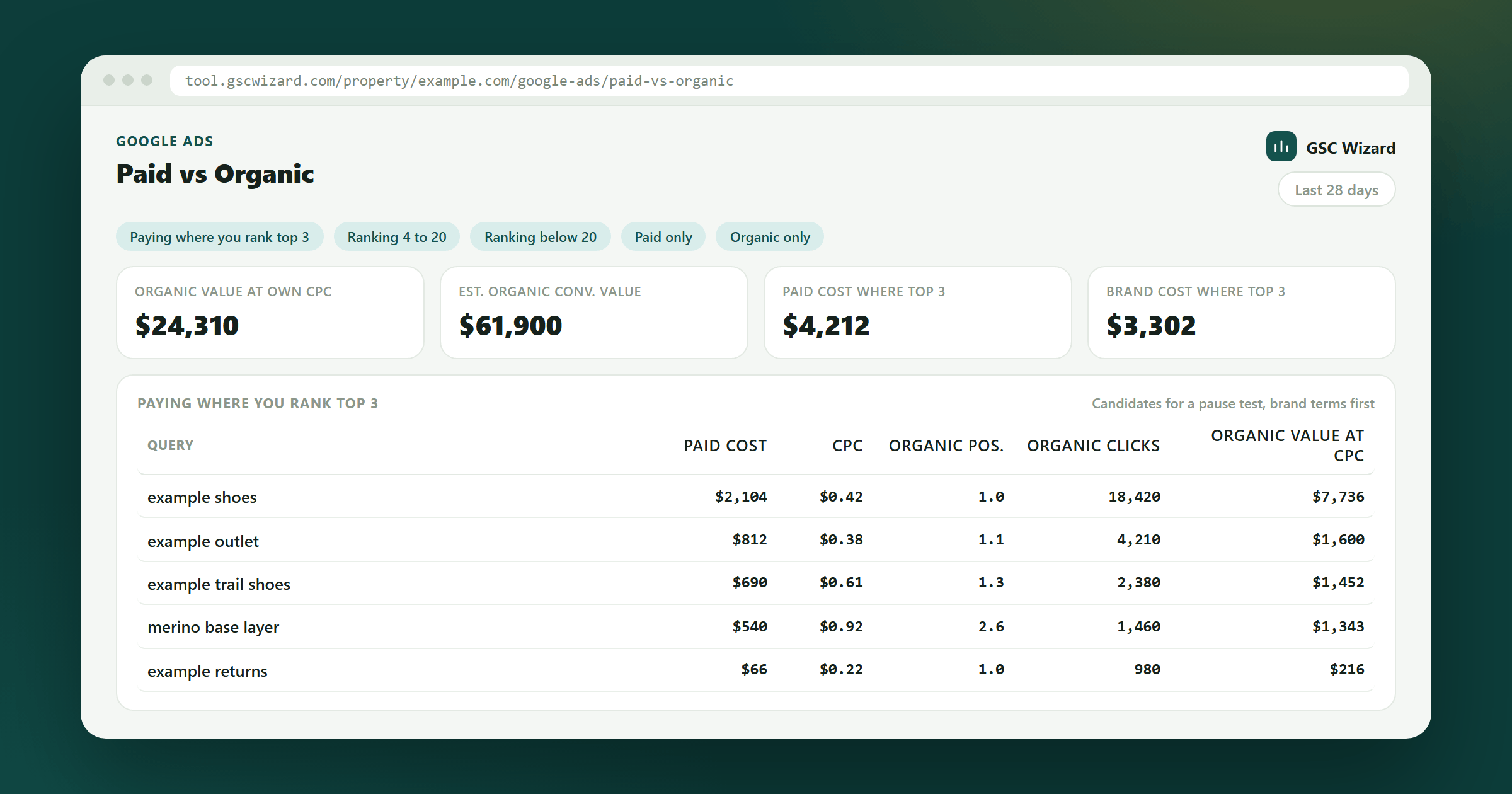
The report reads up to 100,000 paid search terms and the property’s Search Console queries for the same dates, and sorts the matches into five segments. Brand is decided by the branded keywords in the property’s setup.
Open a property and click Paid vs Organic under PAID + ORGANIC in the left sidebar (/property/<site>/google-ads/paid-vs-organic). It reads GSC Wizard’s stored copy of your Ads data, never Google live, and the stamp under the title says when each account last synced (Sync, history & data).
What you see
Tiles
Organic value at own CPC (organic clicks on queries that also had paid clicks, times that query’s paid CPC), Est. organic conv. value, Paid cost where top 3, and Brand cost where top 3, which needs branded keywords.
Segment cards
Click a card to filter the table: Paying where you rank top 3 (candidates for a pause test, brand terms first), Ranking 4 to 20 (paid proves the query converts while organic sits on page 1 or 2: the SEO priority list), Ranking below 20, Paid only (content gaps, unless paid-only is the plan) and Organic only.
Query table
Query with a brand badge, paid cost, paid clicks, CPC, paid conversions, organic position, organic clicks, organic CTR, organic value at CPC, and estimated organic conversions. Up to 5,000 paid terms by cost plus 500 organic-only queries by clicks.
Controls and exports
- Date range and a Brand only checkbox.
- The Accounts chips and the report currency work as on every Google Ads report (shared controls).
- CSV of the table, named after the segment. Tables sort, hide columns and export CSV (shared controls).
How to act on it
- Start with Paying where you rank top 3, brand terms first, and take the candidates to Brand Savings for a test plan.
- Hand Ranking 4 to 20 to whoever writes content: paid data proves these queries convert, and organic is close to the top.
- Read Paid only as a list of content gaps.
Caveats
- Overlap is a list of candidates, not a verdict: whether a paused ad loses clicks needs a test.
- Google Ads hides low-volume terms and Search Console anonymizes rare queries. The coverage line says what share of term cost joins to a Search Console query and what share of organic clicks sits on a query that also had paid traffic, so a missing match is not proof of no overlap.
- Ads days follow the account time zone and Search Console days Pacific Time; over a range of weeks the offset is noise.
In AI assistants: the get_paid_vs_organic tool of the GSC Wizard MCP server returns the same join in the segments both_top3, both_4_20, both_below_20, paid_only and organic_only, with brandOnly for brand terms. See Google Ads in AI assistants.
Part of Paid + organic reports. Related: Brand Savings, Total Search, Queries.