Ads Natural Experiments
Incrementality read off changes that already happened in your Google Ads account: how many of the paid clicks that changed did organic search pick up?
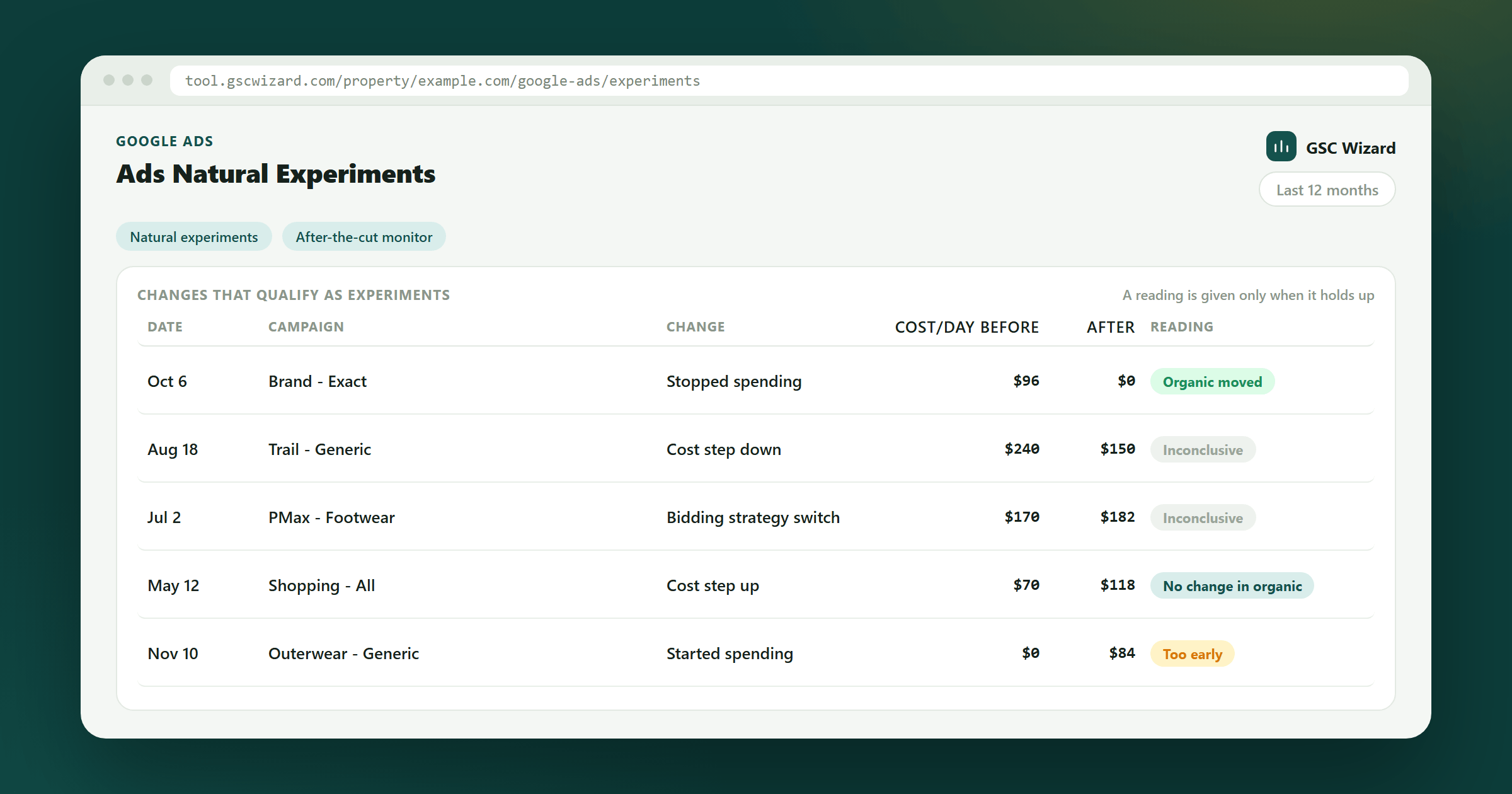
A reading is given only when it holds up; most changes are too small or too noisy and are reported as inconclusive. The verdict rules are deliberately strict. Nothing is changed in Google Ads. The active tab is kept in the page address.
Open a property and click Ads Natural Experiments under PAID + ORGANIC in the left sidebar (/property/<site>/google-ads/experiments). It reads GSC Wizard’s stored copy of your Ads data, never Google live, and the stamp under the title says when each account last synced (Sync, history & data).
What you see
Natural experiments
The list of Changes that qualify as experiments loads on arrival: a campaign that stopped or started spending, a cost step of 30% or more, or a bidding strategy switch, with cost and clicks per day before and after, and whether the window is Ready to read. Run analysis reads the four most recent ready events, and Analyse reads one. Each reading card says Organic moved, No change in organic, Inconclusive or Too early, with paid clicks a week, organic clicks a week after, the clicks picked up by organic, the measured incrementality, a chart of actual organic clicks against the expected line and its 95% band, and what limits the reading. Brand and non-brand queries can be read apart.
After-the-cut monitor
Pick a pullback from the savings ledger, from the cuts found in the range, or by date. The monitor follows brand impressions and clicks (Search Console), total search key events and revenue (GA4) and direct sessions (GA4) for up to 52 weeks, against last year scaled or the pre-pullback level, and calls each series Eroding, Below expectation, Holding, Not clear, Too early or No data. A series not read is shown as not read, not as one that held.
Using a reading in Brand Savings
A conclusive reading of a full stop or full start can be saved from its card with Save for Brand Savings. The server computes it again and stores its own result, so the saved figure can differ slightly; if it does not hold, nothing is saved and you are told why. Brand Savings then uses it in place of the research prior for exactly the queries it measured, and for no other term. A marginal reading (from a partial cut or a cost increase) and an exploratory reading cannot be saved, and saving needs write access to the property.
Controls and exports
- Date range for the event list. The monitor ignores it.
- The Accounts chips and the report currency work as on every Google Ads report (shared controls).
- CSV of the event list, of each reading card’s weeks, and of the monitor’s Google Ads weeks. Tables sort, hide columns and export CSV (shared controls).
- Settings this report uses, changeable per property in its thresholds panel (see Report settings): Smallest cost change that counts as an event (30%), a judgement call; weekly clicks, the change in paid clicks, paid clicks changed, the widest uncertainty (25 points), and the weeks of history before (6) and after (2) an event, plus the monitor’s shortfall (10%), standard errors (3.5) and weeks before judging (12), all safeguards. A safeguard set looser than suggested makes the result exploratory: it is labelled so, cannot be saved, and never drives an alert.
Caveats
- An event needs complete weeks on both sides; a recent one says Too early with the date it can be read.
- Campaigns with too few clicks a week and campaign types without search terms are left out.
- Holding counts as a finding only when a 10% decline is ruled out. The monitor shows where to look, not why.
Part of Paid + organic reports. Related: Brand Savings, Total Search Outcome, Report settings.