Brand Savings
Where your Google Ads budget buys clicks your organic results would likely bring in anyway, as an estimate, with the terms worth testing and a ledger to check what a cut did.
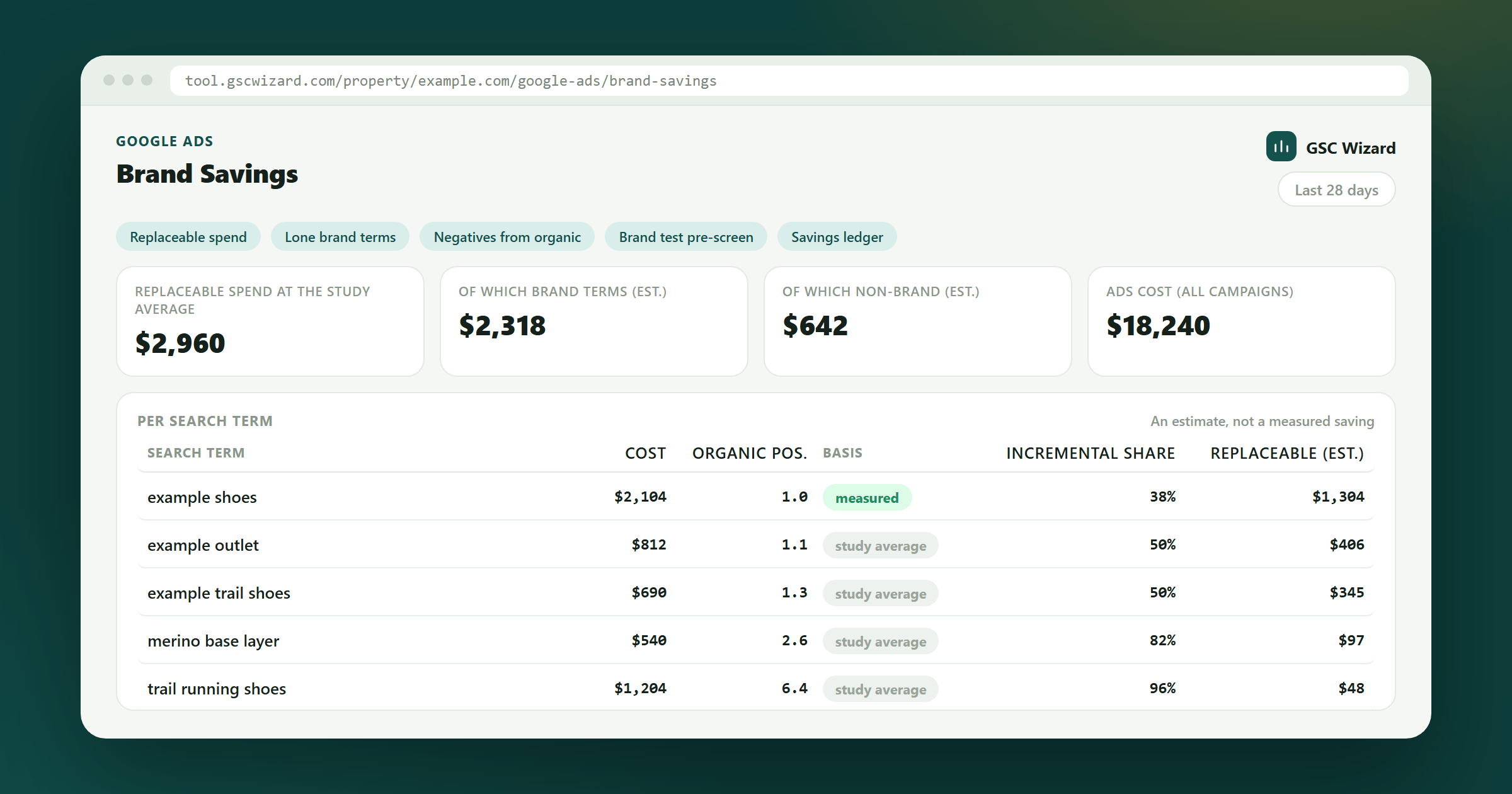
Each paid search term is joined to the same Search Console query, so the report knows where the site already ranks for what you pay for. Everything is read-only: changes go through a Google Ads Editor CSV that you import yourself. Brand terms are decided by the branded keywords in the property’s setup. The active tab is kept in the page address.
Open a property and click Brand Savings under PAID + ORGANIC in the left sidebar (/property/<site>/google-ads/brand-savings). It reads GSC Wizard’s stored copy of your Ads data, never Google live, and the stamp under the title says when each account last synced (Sync, history & data).
A research prior, not a measured saving
The estimates start from Google’s 2012 paper on the incrementality of search ads by organic rank (Chan, Kumar, Ma and Koehler; 390 Search Ads Pause studies from April to October 2011). It reports the average share of ad clicks that organic results did not pick up when the ads were paused:
- Organic position 1: about 50% of ad clicks incremental.
- Positions 2 to 4: about 82%.
- Positions 5 to 10: about 96%.
- No organic result on page 1: the study measured 99%; the report treats that spend as fully incremental.
These are averages over the advertisers studied, used as a prior, never as this account’s range. Replaceable spend is an estimate at the study average. Only a conclusive reading from Ads Natural Experiments of a full pause or start, saved for Brand Savings, replaces the prior, and only for the queries that reading measured; those rows say measured and show the reading’s own range. A reading from a partial cut or a cost increase measures the clicks at the margin and is marked * without replacing the prior.
The five tabs
Replaceable spend
Each paid term’s cost times one minus the incremental share for its organic position, summed into Replaceable spend at the study average and split into brand and non-brand, with the Ads cost of all campaigns beside it. Four cards show the terms, cost and incremental share per position bucket; the table lists every term with its basis (measured or study average).
Lone brand terms
Brand terms where the site ranks about position 1 and the paid side shows no sign of competition: campaign impression share above 90%, a low CPC compared with non-brand, a flat CPC week to week, and a high top-of-page rate. Each term gets no competition seen, check first or contested, with a suggestion and the spend at stake per 30 days.
Negatives from organic
Non-brand terms with a stable top-3 organic position (checked over sub-periods of the range, which must be at least 14 days) and a paid conversion rate below the account’s, suggested as exact negatives. Untick a term to leave it out.
Brand test pre-screen
Seer Interactive’s five signals for a brand pause or bid-down test, each Yes, No, Partly known or Not known with its evidence, and a verdict: Worth testing or Not yet.
Savings ledger
Record an action on a term (bid cut, paused, exact negative added, other change, or competitors seen) and see paid cost, paid clicks and organic clicks per week before and after it. Weeks run Monday to Sunday, the action week is left out, and a week not yet synced reads “not read” rather than 0. A before and after comparison is not a controlled test.
Controls and exports
- Date range on every tab except the ledger. An Ads figures only view shows the Google Ads columns alone.
- The Accounts chips and the report currency work as on every Google Ads report (shared controls).
- Editor CSV on the lone brand terms and negatives tabs: columns Campaign, Keyword and Criterion Type, each picked term as an exact negative ([term]) of type “Campaign negative” in every campaign that served it, one file per Google Ads account. Performance Max campaigns are left out (use a brand exclusion or an account-level negative list there). In Google Ads Editor use Account, Import, From file, check the preview and post the changes yourself. When a campaign name starts with =, +, - or @, a note next to the button warns before you download: the file imports correctly into Google Ads Editor, but do not open it in a spreadsheet program, which may read such a name as a formula. The other tables export to CSV.
- Settings this report uses, changeable per property in its thresholds panel (see Report settings): the rules of the lone-term, negatives and pre-screen tabs, such as the organic position that counts as about position 1 (1.5) and the impression share that clears a term (90%). The research prior is not a setting.
How to act on it
- For no competition seen, start with a bid cut of about 30% for 2 to 4 weeks rather than a pause, and log it in the ledger. Consider a pause only if impression share stays above 90% and total clicks (paid plus organic) hold.
- For check first, look at auction insights in Google Ads and try a smaller cut of about 15%. For contested, keep the ad.
- Judge any test on total search conversions, not paid clicks, and read the result in Ads Natural Experiments.
In AI assistants: the get_replaceable_spend tool of the GSC Wizard MCP server returns paid cost weighted by the published prior per organic position, split brand and non-brand with coverage, and says plainly that only a pause test measures it. See Google Ads in AI assistants.
Part of Paid + organic reports. Related: Paid vs Organic, Ads Natural Experiments, Total Search, Workflows.