Ads Health Check
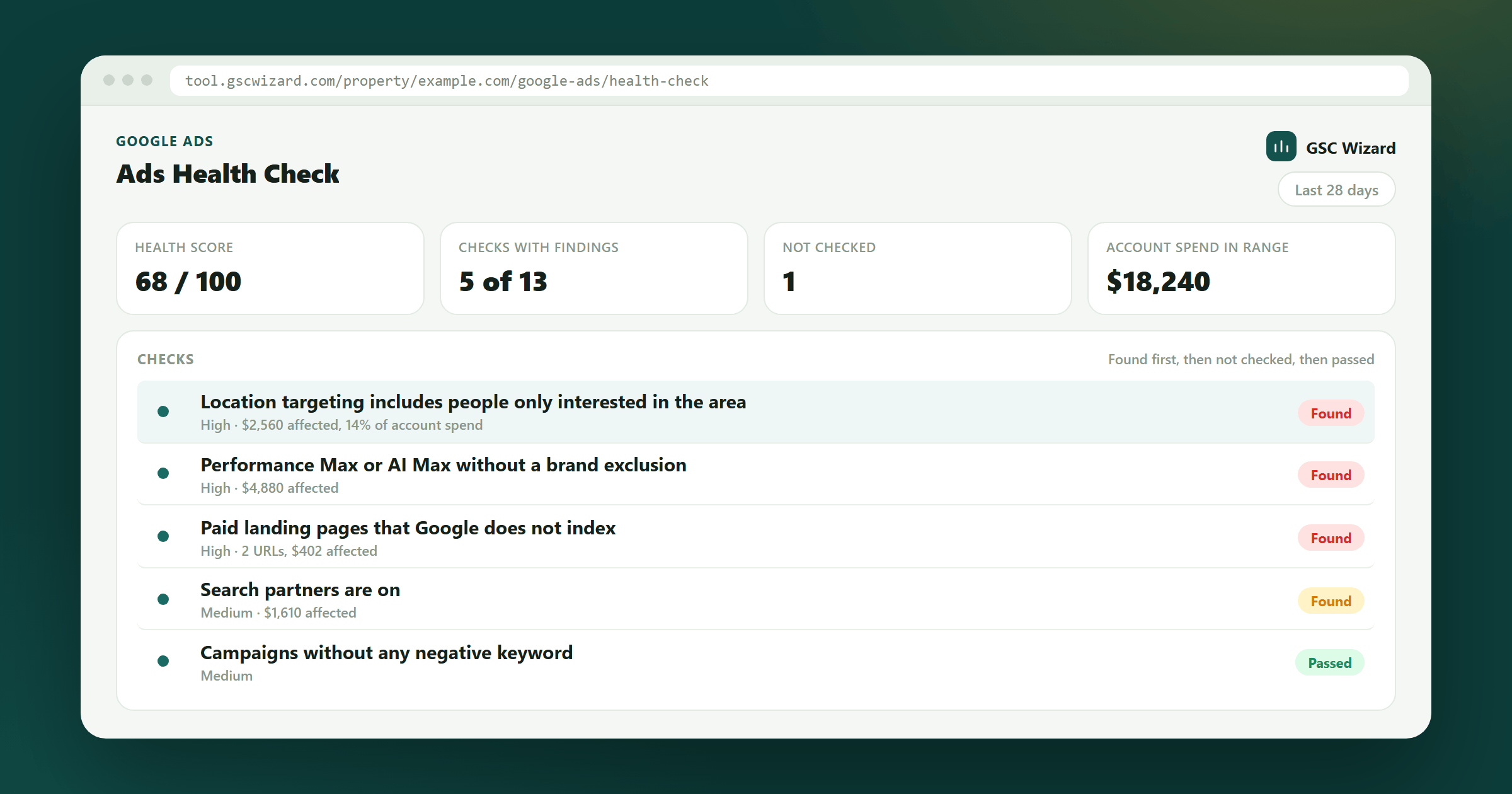
A short list of checks on how the account is set up, each with the spend it affects in the selected range and what to change in Google Ads.
The last check compares paid landing pages with stored URL Inspection and Index Tracker results; nothing is inspected from this page. Brand and non-brand campaigns are told apart by the branded keywords in the property’s setup.
Open a property and click Ads Health Check under ADS AUDIT in the left sidebar (/property/<site>/google-ads/health-check). It reads GSC Wizard’s stored copy of your Ads data, never Google live, and the stamp under the title says when each account last synced (Sync, history & data).
The 13 checks
Each card shows a severity, Found, Passed or Not checked, the spend affected in the range and its share of account spend, why it matters, what to do in Google Ads, and the affected campaigns, ad groups or URLs.
- Search partners are on.
- Location targeting includes people only interested in the area.
- Broad match campaign setting is on.
- Automatically created assets are on.
- Final URL expansion is on.
- Performance Max or AI Max without a brand exclusion.
- Campaigns without any negative keyword.
- Ad groups with too few ads: with the weekly snapshot of enabled ads stored for every account shown, ad groups with exactly one enabled ad, and ad groups with none where the keyword status of the same week shows the ad group is live (otherwise the check says ad groups without an enabled ad were not checked); enabled ads count whether or not they had impressions. Until that snapshot is stored, it counts the ads that had impressions in the last 30 days instead.
- Shared budgets across unlike campaigns.
- Targets that differ widely between similar campaigns.
- Conversion goals that differ per campaign.
- Bid strategy or budget unchanged for 90 days or more.
- Paid landing pages that Google does not index.
How the score works
Every check that ran is worth its severity: high 3, medium 2, low 1. A check with findings loses half its worth for the finding and the other half in proportion to the share of account spend it affects. Checks that could not run yet count neither way. Tiles show the Health score, Checks with findings, Not checked and Account spend in range. A score is comparable only with scores computed under the same settings.
Paid URLs and Google’s index
The 500 most expensive paid URLs, with paid cost and clicks, Google’s state (Indexed, Not indexed, Redirects, Blocked, Error or No stored result), the detail, when it was checked and whether the result came from the Index Tracker or URL Inspection. Tabs: Not indexed or broken, No stored result, All.
Controls and exports
- Date range (for spend only).
- The Accounts chips and the report currency work as on every Google Ads report (shared controls).
- CSV per check and of the paid URL table. Tables sort, hide columns and export CSV (shared controls).
- Settings this report uses, changeable per property in its thresholds panel (see Report settings): How far apart targets of similar campaigns may be (3x), Days without a bid or budget change that count as stale (90), and one Severity per check (low, medium or high), all judgement calls.
How to act on it
- Work through the Found cards from the top: they are sorted by status, and the spend figure says which matters most.
- Each card’s What to do in Google Ads names the setting, for example Campaign, Settings, Networks for search partners. GSC Wizard never changes your Google Ads account: every change described here is one you make yourself in Google Ads or Google Ads Editor.
- For paid pages Google does not index, fix the page (status code, robots.txt, noindex, redirect target) or point the ads at an indexable page, then re-inspect the URL in GSC Wizard.
Caveats
- A check that needs data not stored yet says Not checked and why: campaign settings arrive with the daily sync, negatives and ads with the weekly one, and the stale-bids check needs 90 days of change history.
- Account-level brand exclusions and URL exclusion rules are not seen.
- A check that passed on the previous daily run and fails now, or a score drop of 10 points or more, can raise an alert.
In AI assistants: the get_google_ads_health tool of the GSC Wizard MCP server returns the score and the 13 checks with findings, fixes, affected campaigns or URLs and spend, under the property’s settings; status: 'fail' lists only the checks with findings. See Google Ads in AI assistants.
Part of Ads audit reports. Related: Ads Negative Keywords, Ads Geo, Performance Max, Workflows.