Ads vs GA4
Ads clicks against GA4 sessions and Ads conversions against GA4 key events, per day and campaign. The two never match exactly; this report watches the ratio and flags when it moves.
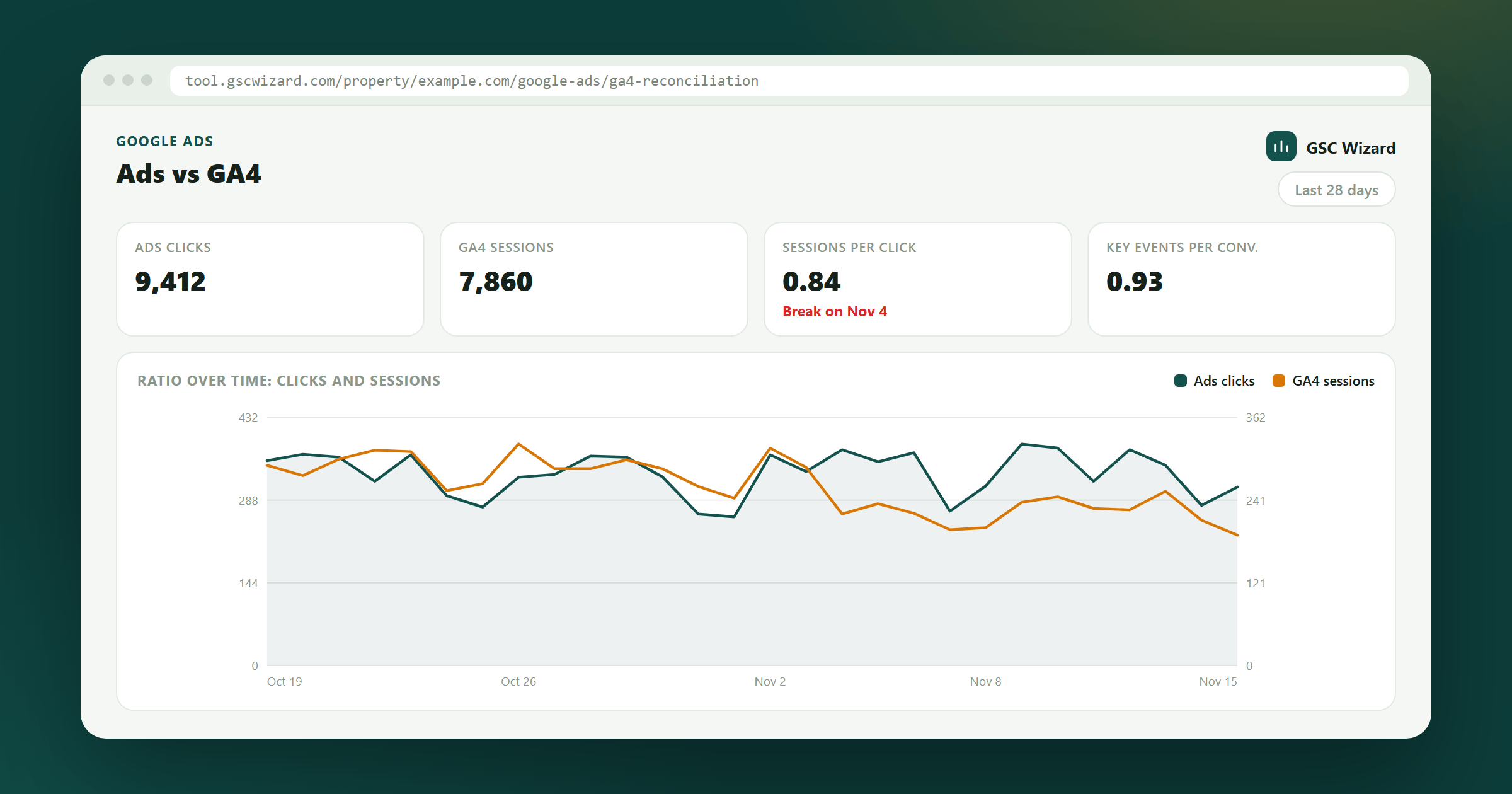
A gap between Google Ads and GA4 is normal. A gap that changes is not: it usually means a lost click id, a tag that stopped firing on some pages, a consent change, or a slow landing page. A collapsible Why Google Ads and GA4 never match section on the page explains the standing differences.
Open a property and click Ads vs GA4 under ADS AUDIT in the left sidebar (/property/<site>/google-ads/ga4-reconciliation). It reads GSC Wizard’s stored copy of your Ads data, never Google live, and the stamp under the title says when each account last synced (Sync, history & data).
What you see
Two tabs: Ads vs GA4 and Google Ads only.
Tiles
Ads clicks, GA4 sessions, Sessions per click, Ads conversions, GA4 key events and Key events per conv.
Breaks
Up to 20 campaign breaks: a shift in sessions per click or key events per conversion against the campaign’s own trailing level.
Ratio over time
Weekly or daily lines of the click gap, sessions per click, key events per conversion, or clicks and sessions, for all accounts or one campaign. The 20% line on the click gap is a reference for reading, not an alert.
Link health
Clicks from the Ads API against the clicks and cost GA4 imported from Google Ads, which shows whether the GA4 link itself works.
Tables
Campaigns with both sides and the latest break, and a Daily series.
Controls and exports
- Press Run analysis. It reads GA4 live for the range plus a 34-day lead-in; results are cached for an hour. A date change or a saved setting clears the result.
- The Accounts chips and the report currency work as on every Google Ads report (shared controls).
- CSV of the campaign and daily tables, also for the Google Ads only view. Tables sort, hide columns and export CSV (shared controls).
- Settings this report uses, changeable per property in its thresholds panel (see Report settings): Shift in sessions per click (or key events per conversion) that is a break (20%), a judgement call; Standard errors a break needs (3) and the clicks or conversions needed in the 7-day window (300) and the 28-day baseline (1,200), safeguards.
How to act on it
- A clicks-to-sessions gap that grows points at tagging (a lost click id, a tag that stopped firing on some pages), a consent change, or a landing page that got slow.
- A drop in key events per conversion points at a GA4 key event or an Ads conversion action that changed or stopped; check Conversion Tracking Health.
Caveats
- Break verdicts need volume, so small accounts see the ratios without verdicts. “No break” in the days judged does not say those weeks were steady.
- Days are calendar days in each system’s own time zone. Days the Ads data is not stored for say so, never 0.
- Without GA4 only the Google Ads figures are shown; connect it in Connecting GA4. The page notes GA4 thresholding, sampling and an “(other)” row when they apply.
- A break can also raise the Ads vs GA4 gap changed alert.
Part of Ads audit reports. Related: Conversion Tracking Health, New vs Returning, Google Analytics 4.