Content P&L
Which parts of the site are bought and which are earned: ad cost and paid clicks per content group and topic cluster, next to organic clicks and what those would cost at the group’s own CPC.
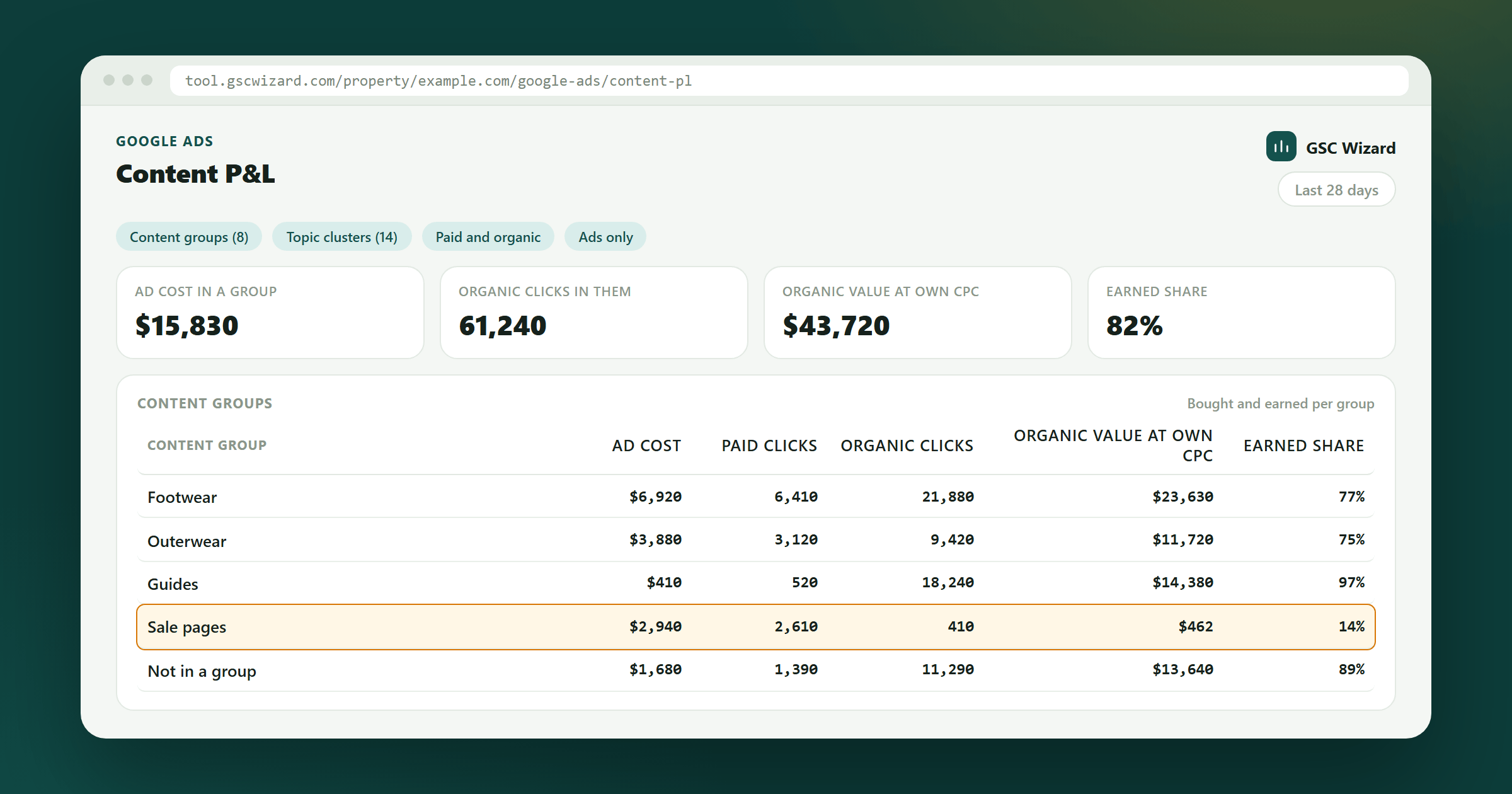
Content groups sort paid landing pages and organic pages into the same sections of the site; topic clusters do the same for paid search terms and organic queries. Both come from the reports you already set up: Content Groups and Topic Clusters.
Open a property and click Content P&L under PAID + ORGANIC in the left sidebar (/property/<site>/google-ads/content-pl). It reads GSC Wizard’s stored copy of your Ads data, never Google live, and the stamp under the title says when each account last synced (Sync, history & data).
What you see
Tiles
Ad cost in a group (or cluster), Organic clicks in them, Organic value at own CPC, and Earned share: organic clicks out of organic plus paid clicks.
Group table
Per content group or topic cluster: ad cost, paid clicks, CPC, paid conversions, organic clicks, organic position, organic value at own CPC and earned share. Rows for pages or queries outside every group are kept as their own row. Click a name to see its biggest pages or queries. The Ads only view shows the Google Ads figures alone.
GA4 revenue and key events per group
On content groups, a GA4 run adds revenue (organic and paid), key events and sessions per group.
Controls and exports
- Date range, Content groups or Topic clusters, and Paid and organic or Ads only.
- The GA4 part runs on Run analysis and belongs to its date range: change the range and it is cleared.
- The Accounts chips and the report currency work as on every Google Ads report (shared controls).
- CSV of the group table and of a group’s members. Tables sort, hide columns and export CSV (shared controls).
How to act on it
- A group with high ad cost and a low earned share is bought traffic: a content investment there can lower what you pay for it.
- A group with a high earned share and ad cost on top is where to look for spend organic may replace; take its queries to Paid vs Organic.
Caveats
- A page belongs to the first group it matches; a query can sit in several clusters, so cluster rows can overlap.
- Organic value at own CPC is an estimate for ranking groups, not what the ads would lose if paused.
- Without content groups or clusters, everything sits in one row; the page links to the report where you create them.
Part of Paid + organic reports. Related: Paid vs Organic, Ads Landing Pages, Content groups.